
MRCH1 - Air-conditioner MITSUBISHI - Free user manual and instructions
Find the device manual for free MRCH1 MITSUBISHI in PDF.



| Product Type | Reversible air conditioner (heating and cooling) with programmable remote control |
| Brand | Mitsubishi Electric |
| Model | MRCH1 (remote control) |
| Remote control power supply | 2 AA alkaline batteries (annual replacement recommended) |
| Main functions | Weekly programming, Auto / Cool / Heat / Drying / Off modes, automatic or manual fan speed, temporary or permanent override, shut-off timer, air direction control (louvers), optional outdoor sensor, optional portable central controller |
| Number of zones | Up to 16 zones with portable central controller |
| Wireless communication | RedLINK™ network, minimum separation distance 20 cm |
| Display | LCD screen with backlight, displays temperature, mode, program, battery status |
| Maintenance and cleaning | Replacement of remote control and outdoor sensor batteries (AA lithium batteries); refer to the manual for cleaning the indoor unit filters |
| Security | Function locking to prevent unauthorized changes; FCC Class B compliance; RF exposure warning |
| Spare parts and repairability | Standard batteries commercially available; replacement remote control referenced; contact Mitsubishi Electric for parts |
| General information | User manual provided, limited warranty included, made in the USA |
Frequently Asked Questions - MRCH1 MITSUBISHI
User questions about MRCH1 MITSUBISHI
0 question about this device. Answer the ones you know or ask your own.
Ask a new question about this device
Download the instructions for your Air-conditioner in PDF format for free! Find your manual MRCH1 - MITSUBISHI and take your electronic device back in hand. On this page are published all the documents necessary for the use of your device. MRCH1 by MITSUBISHI.
USER MANUAL MRCH1 MITSUBISHI
Quick Reference Card
Grasp and pull to see basic operating instructions at a glance.
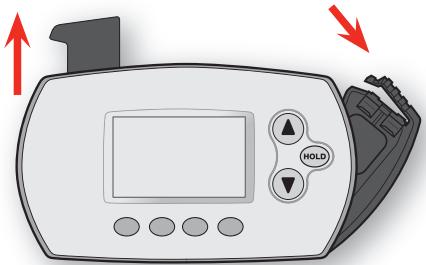
M28450A
Battery Holder
Press down and pull to remove batteries. Batteries should be replaced once a year (see page 28).

CAUTION: EQUIPMENT DAMAGE HAZARD. Please refer to the equipment Operating Manual for recommended operating temperatures.
Need Help?
For assistance with this product please visit http://controls.mehvac.com
or call Mitsubishi Electric toll-free at 888-990-7546
Read and save these instructions.
Contents
About your new remote controller
Programming at a glance. 2
Quick reference to controls 3
Quick reference to display screen.... 4
Programming & Operation
Set the time and day. 5
Select the fan setting. 6
Select the system setting. 7
Multi-zone configurations 8
Drying mode 9
Program schedules 10
Program schedule overrides. 13
System changeover. 17
Portable Central Controller 18
Outdoor air sensor 19
Additional features 20
Appendices
Advanced functions. 24
Battery replacement. 28
In case of difficulty 31
Regulatory information. 32
Limited warranty. 33
About your remote controller
Your new remote controller is pre-programmed and ready to go. All you have to do is set the time and day. Then check the settings below and change if needed:
- Set time and day (required for proper operation) See page 5
- Select fan setting.. See page 6
- Select system setting.. See page 7
- Program schedules: Preset to energy-saving levels while space is occupied (assumes arrival at 8 am and departure at 10 pm). See pages 10-11

ONE TOUCH TEMP CONTROL: You can override the program schedule at any time, and manually adjust the temperature (see pages 13-16).
Quick reference to controls
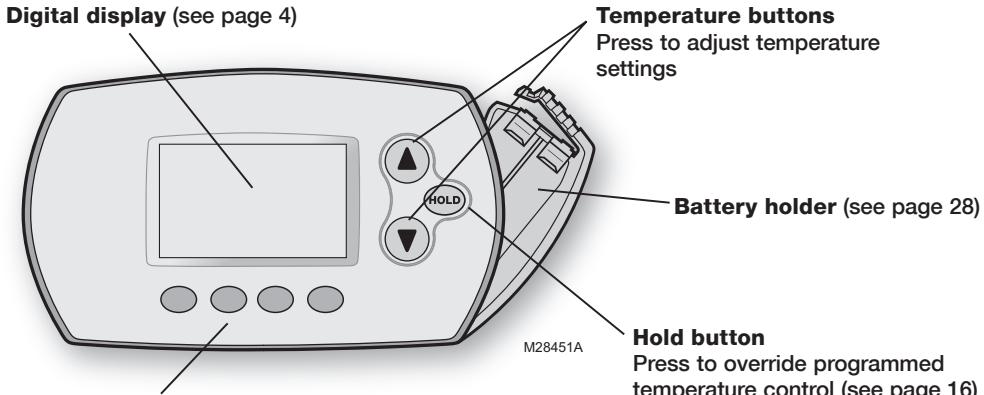
Function buttons
Press to select the function displayed just above each button.
(Functions change depending on the task.)
Quick reference to display screen
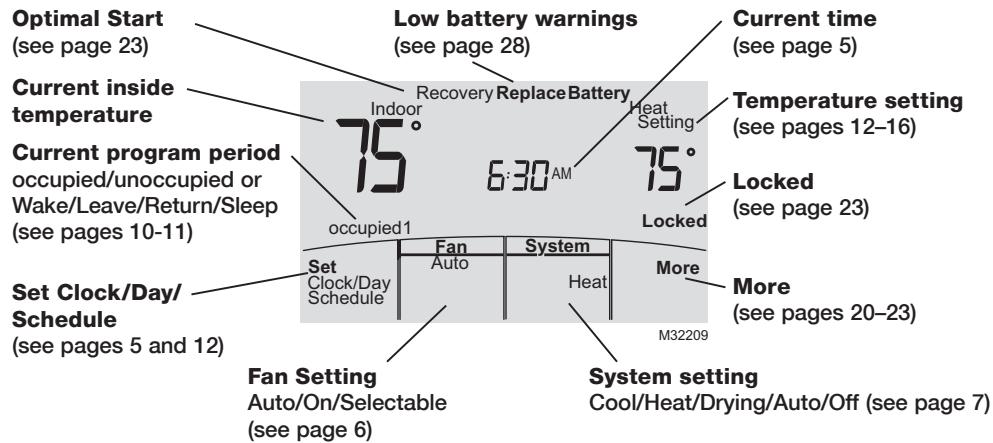

Note: Options may vary depending on your equipment.
Set the time and day
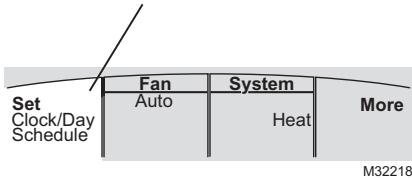
Press SET CLOCK/DAY/SCHEDULE, then adjust time
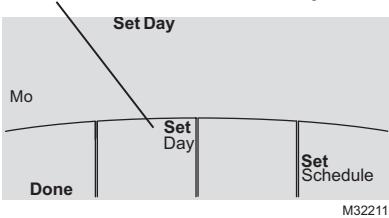
Press SET DAY, then select current day
- Press SET CLOCK/DAY/SCHEDULE, then press or to set clock.
- Press SET DAY, then press or to select the day of week.
- Press DONE to save.

Note: If the SET CLOCK/DAY/SCHEDULE option is not displayed, press DONE or CANCEL.

Note: If the display flashes "Set Clock," the remote controller will follow your settings for the weekday "occupied1" (or "Wake") time period until you reset the time and day.
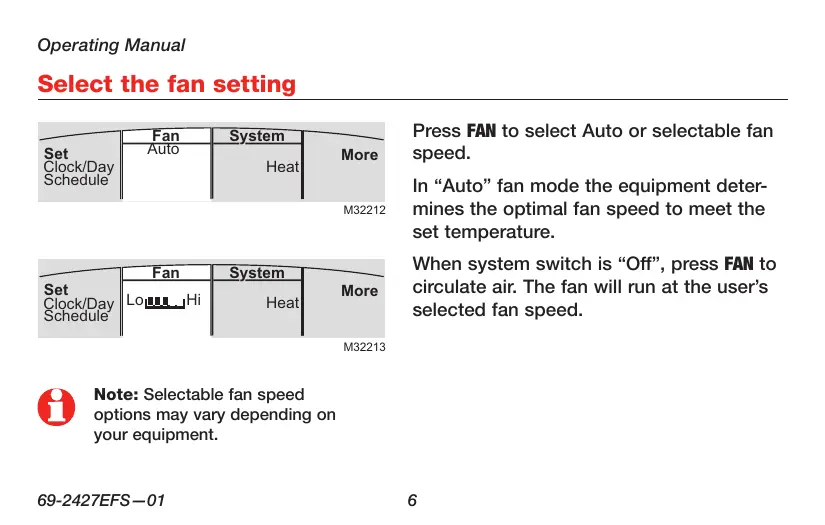
M32212
M32213

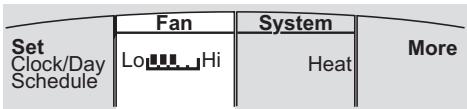
Note: Selectable fan speed options may vary depending on your equipment.
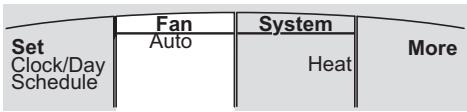
Press FAN to select Auto or selectable fan speed.
In "Auto" fan mode the equipment determines the optimal fan speed to meet the set temperature.
When system switch is "Off", press FAN to circulate air. The fan will run at the user's selected fan speed.
Select the system setting
| Set Clock/Day Schedule | Fan | System | More |
| Auto | Cool | ||
| M32214 | |||
| Set Clock/Day Schedule | Fan | System | More |
| Auto | Heat | ||
| M32215 | |||
| Set Clock/Day Schedule | Fan | System | More |
| Auto | Drying | ||
| M32300 | |||
| Set Clock/Day Schedule | Fan | System | More |
| Auto | Auto | ||
Press SYSTEM to select:
- Cool: Remote controller controls only in the cooling mode.
- Heat: Remote controller controls only in the heating mode.
- Drying: Remote controller directs indoor unit to remove moisture out of the air. May result in temperatures below your cool setting.
- Auto: Remote controller automatically selects heating or cooling depending on the indoor temperature.
- Off: Indoor unit is off.
Multi-zone configurations
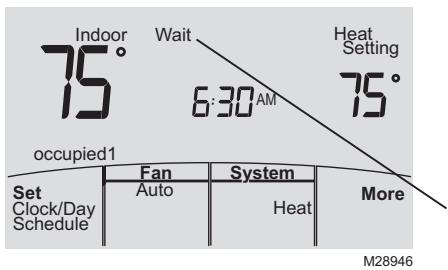
In multi-zone configurations, each zone is typically set to the same mode (Cool, Heat, or Drying).
If zones are set to different modes, the first indoor unit to call for heat or cool will take priority. Other zones go into standby, and "Wait" will be displayed on the screen.
Drying mode (if configured)
| Set Clock/Day Schedule | Fan | System | More |
| Auto | Drying |
Drying mode removes moisture from the air and works differently depending on the type of equipment installed. The temperature setting might or might not be displayed.
The indoor unit will determine the Drying mode temperature setting. The setting will be either:
- the cool temperature setting, or
3^ (2^) below room temperature.
Program default settings
This remote controller is pre-set to use energy saving program settings. We recommend these settings, since they can reduce your heating/cooling expenses. (See page 12 to adjust times and temperatures of each time period.)
| Heat (Mon-Fri) | Cool (Mon-Fri) | Heat (Sat-Sun) | Cool (Sat-Sun) | |
| occupied1(8:00 am) | 70° | 75° | 70° | 75° |
| unoccupied1(10:00 pm) | 55° | 85° | 55° | 85° |
| occupied 2 | -- | -- | -- | -- |
| unoccupied 2 | -- | -- | -- | -- |

occupied 2 and unoccupied 2 periods may be programmed as needed, depending on installed configuration.
Residential program default settings
This remote controller is pre-programmed to use commercial energy saving program settings. For use in a home, change the program to match your schedule. (See page 12 to adjust times and temperatures of each time period.)
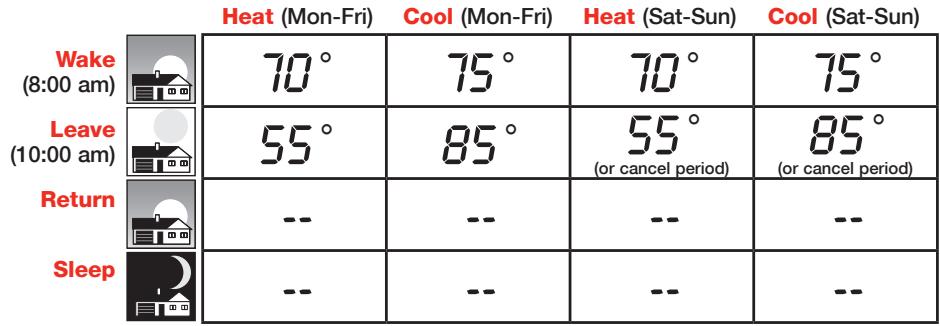

May cancel Leave, Return and Sleep periods.
To adjust program schedules
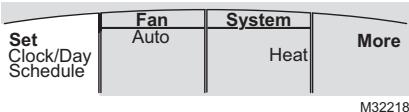
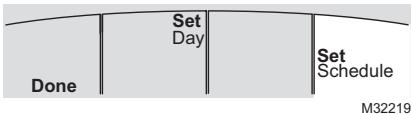
- Press SET CLOCK/DAY/SCHEDULE, then SET SCHEDULE.
- Press or to set your weekday occupied1/Wake time (Mon-Fri), then press NEXT.
- Press or to set the heat temperature for this time period, then press NEXT.
- Press or to set the cool temperature for this time period, then press NEXT.
- Set time and temperature for the next time period (unoccupied1/Leave). Repeat steps 4 and 5 for each weekday time period.
- Press NEXT to set weekend time periods (Sat-Sun), then press DONE to save & exit.

Note: You may cancel a period using the CANCEL PERIOD button. If configured, you may power the system completely off during the period by using the POWER OFF PERIOD button.
Schedule override (commercial only)
Press to temporarily adjust temperature.
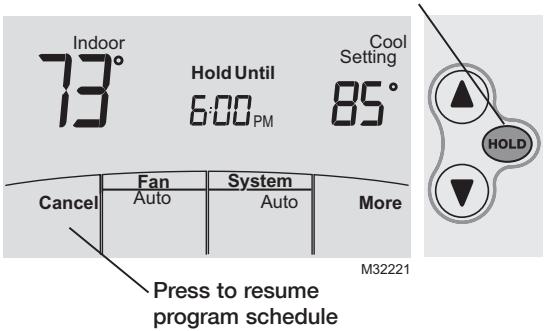
If a person is present during an unoccupied period, press HOLD to temporarily use occupied temperature. Each additional press of HOLD extends the HOLD UNTIL duration by 1 hour to a limit set by the installer.
The timer will expire automatically or schedule may be manually resumed by pressing CANCEL.

Note: Permanent hold not available on commercial configuration.
Holiday override (commercial only)
M28948
M28950
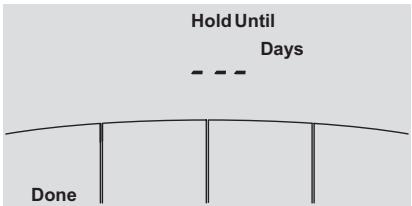
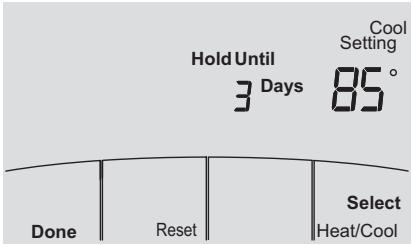
If the building will be unoccupied for more than one day, you can use Holiday override to maintain an unoccupied temperature.
Press MORE until the Hold Until screen appears.
Press or to set the number of days, then press NEXT.
Press or to set the heat or cool temperature setting, then press DONE.
The cool temperature setting can only be set higher and the heat temperature setting can only be set lower than the unoccupied program schedule.
To clear the Holiday override from the home screen, press CANCEL.
Temporary hold (residential only)
Press to temporarily adjust temperature.
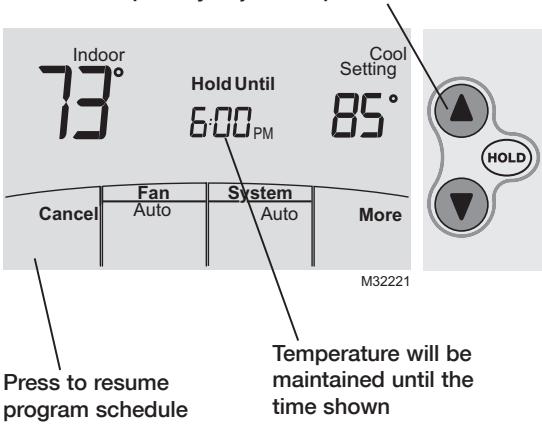
Press or to immediately adjust the temperature. This will temporarily override the temperature setting for the current time period.
The new temperature will be maintained only until the next programmed time period begins (see page 11).
To cancel the temporary setting at any time, press CANCEL.
Press to permanently adjust temperature.
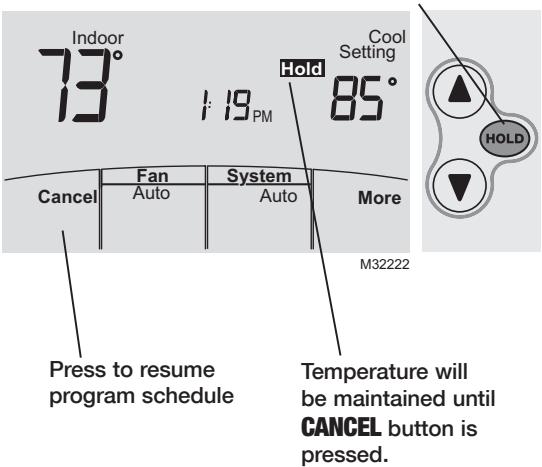
Press HOLD to permanently adjust the temperature. This will override the temperature settings for all time periods.
The HOLD feature turns off the program schedule and allows you to adjust the temperature manually, as needed.
The system will maintain the set temperature until you manually change it or you press CANCEL to resume the program schedule.
System Changeover
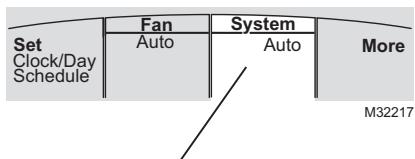
Press until screen displays "Auto"
System Changeover is a feature used in climates where both air conditioning and heating are often used on the same day. When the system is set to "Auto," the remote controller automatically selects heating or cooling depending on the indoor temperature.
Heat and cool settings must be at least 2 degrees apart, depending how your remote controller was configured. The remote controller will automatically adjust settings to maintain this 2 (or more) degree separation.

Note: The "Auto" system setting may not appear, depending on how your remote controller was configured.
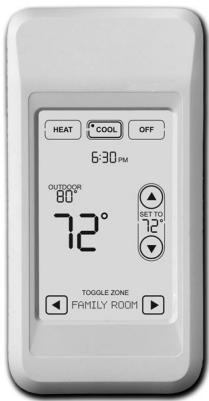
The optional Portable Central Controller can manage temperatures of multiple split-zoning systems from almost anywhere on the property.
The Portable Central Controller also works with other RedLINK™ devices used with other types of heating and cooling equipment.
One Portable Comfort Control can adjust up to 16 zones on a single property.

Note: The remote controller may take up to 15 seconds to respond to commands entered at the Portable Central Controller.
Outdoor air sensor (optional)
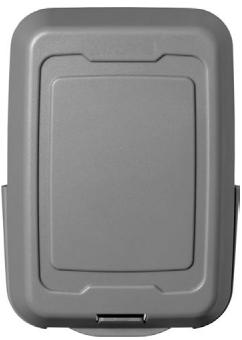
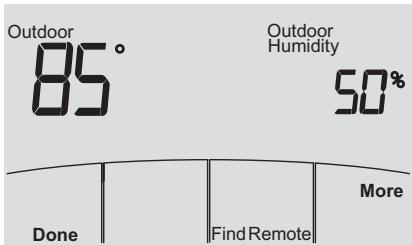
The outdoor air sensor allows outdoor air temperature and humidity to be shown on your remote controller.
The outdoor air sensor also works with other RedLINK™ devices used with other types of heating and cooling equipment.
Only use AA lithium batteries for the outdoor air sensor.
Remote Controller additional features
To display outdoor temperature and humidity
If you have an outdoor air sensor, press MORE to display the current outdoor temperature and humidity. Press DONE to exit.
M32302
To find a lost Portable Central Controller
If you misplace a Portable Central Controller, press MORE, then FIND REMOTE. The Portable Central Controller will beep for two minutes to help you locate it. Press anywhere on the display screen of the Portable Central Controller to stop the beeping.
Remote Controller additional features (continued)
To set up/down airflow direction (vane control)
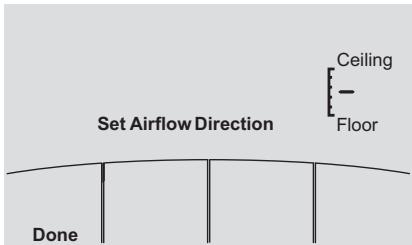
If you would like to manually set the airflow direction, press MORE, then or to select the desired position, "Auto" or "Oscillate."
M32305

Note: "Auto" position is determined by the system equipment to provide maximum efficiency and comfort. Top and bottom positions may change after 1 hour to prevent condensation.

Note: Airflow direction positions may vary depending on your equipment.
Remote Controller additional features (continued)
Set a timer to automatically power off the indoor unit (if configured)
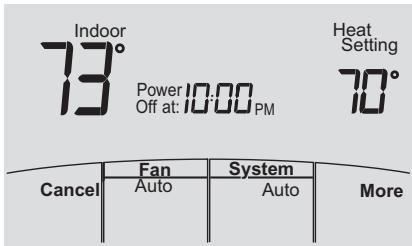
Press MORE until "Power Off At" is displayed. Press or to set the time at which you would like the unit to turn off. Press DONE to exit. Note: This is not a recurring timer.
This timer can be set up to 24 hours in advance. Depending on how this feature was installed, the indoor unit will either:
A) Stay turned Off indefinitely until the user changes the system mode.
B) Stay turned Off until the next scheduled period
Example:
If a room will be unoccupied at 10:00 PM, press MORE until "Power Off At" appears. Press ▲ until 10:00 PM. Press DONE to exit.
To clear the "Power Off At" timer from the home screen, press CANCEL.
M32304
Remote Controller additional features (continued)
Optimal Start: This feature eliminates the guesswork when setting your schedule. It allows the remote controller to "learn" how long your Split-Zoning System takes to reach programmed temperature settings, so the temperature is reached at the time you set.
Locked: To prevent tampering, features can be fully or partially locked. When a selected feature is locked, the word "Locked" is displayed on the screen for approximately 5 seconds.
Press and hold the MORE button until the display changes. "WAIT" will be displayed for up to 17 seconds.
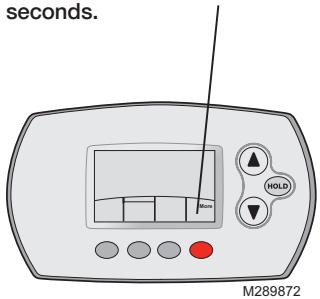
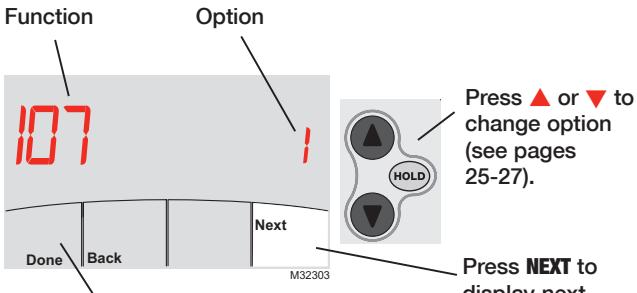
Press DONE to save & exit.
Press NEXT to display next function screen (see pages 25-27).
Advanced functions
Press / to change option, then press NEXT.
| Filter Change Reminder | |
| Function 107 | This feature displays an alert to remind you to change the filter in the indoor unit. |
| Options: | 1 = 100 Hours 2 = 2500 Hours 3 = OFF (no reminder to change filter) |
| Schedule Format | |
| Function 148 | Press ▲/▼ to change the schedule format. |
| Options: | 0 = 5-2 (Monday – Friday) (Sat-Sun) 1 = 5-1-1 (Monday – Friday) (Sat) (Sun) |
| Optimal Start | |
| Function 150 | See page 23 for description of feature. |
| Options: | 1 = ON 0 = OFF |
| Fahrenheit or Celsius Display | |
| Function 156 | Press ▲/▼ to change the display. |
| Options: | 0 = Fahrenheit 1 = Celsius |
Advanced functions
| Full Lockout | |
| Function 160 | This feature prevents users from changing all settings. |
| Options: | 0 = OFF 1 = ON |
| Lockout OFF Mode | |
| Function 162 | This feature prevents users from changing the system mode to OFF. |
| Options: | 0 = OFF 1 = ON |
| Lockout System Mode | |
| Function 164 | This feature prevents users from changing the system setting (Heat, Cool, Off, Auto etc.). |
| Options: | 0 = OFF 1 = ON |
| Lockout Fan Mode | |
| Function 165 | This feature prevents users from changing the fan setting. |
| Options: | 0 = OFF 1 = ON |
Advanced functions
| Lockout Temperature Setting | |
| Function 166 | This feature prevents users from changing the temperature setting. |
| Options: | 0 = OFF 1 = ON |
| Lockout Set Clock/Day/Schedule | |
| Function 168 | This feature prevents users from changing the clock, current day and the schedule. |
| Options: | 0 = OFF 1 = ON |
| Maximum Heat Temperature Setting Allowed | |
| Function 170 | This feature prevents users from changing the Heat temperature setting above the selected temperature limit. |
| Options: | 90 = 90°F (32°C) Temperature Limit 40-89 = 40 to 89°F (4 to 32°C) |
| Minimum Cool Temperature Setting Allowed | |
| Function 172 | This feature prevents users from changing the Cool temperature setting below the selected temperature limit. |
| Options: | 50 = 50°F (10°C) Temperature Limit 51-99 = 51 to 99°F (11 to 37°C) |
Battery replacement (remote controller)
Press down and pull to remove.
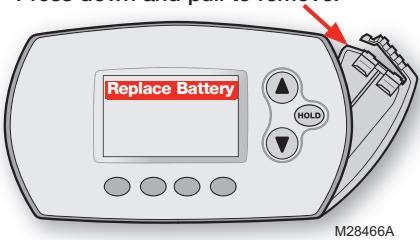
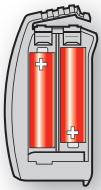
Insert fresh AA alkaline batteries, then reinstall battery holder.
M28442
Install fresh batteries when the "REPLACE BATTERY" warning begins flashing. The warning flashes about two months before the batteries are depleted.
Remove the battery holder and install 2 fresh AA alkaline batteries.
After batteries are installed, the remote controller will automatically restore communication with the wireless network within a few minutes.

Note: If batteries are inserted within 2 minutes, the time and day will not have to be reset. All other settings are retained in memory.
Battery replacement (Portable Central Controller)
M28475
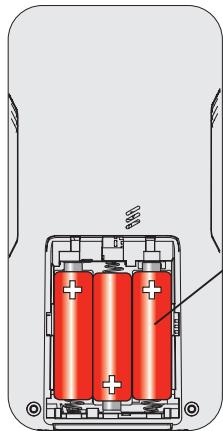
Install fresh batteries when the "REPLACE BATTERY" warning begins flashing. The warning flashes about two months before the batteries are depleted.
Remove the battery cover and install 3 fresh AA alkaline batteries.
After batteries are installed, the Portable Central Controller will automatically restore communication with the wireless network within a few minutes.
Battery replacement (outdoor air sensor)
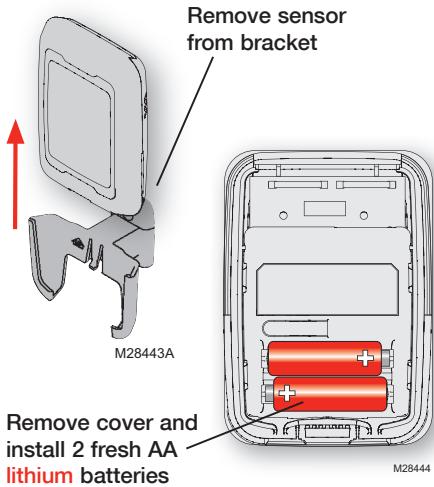
Replace outdoor sensor batteries when the "Replace Battery Outdoor" warning begins flashing on the remote controller. The warning flashes about two months before the batteries are depleted.
Remove the sensor from the bracket, remove the cover and install 2 fresh AA lithium batteries.
After batteries are installed, the sensor will automatically restore communication with the wireless network within a few minutes.
In case of difficulty
Indoor unit does not respond
- Check circuit breaker and reset if necessary.
- Make sure power switch at equipment is on.
- Wait 5 minutes for the system to respond.
Screen displays "No Signal"
Remote controller has lost radio contact with the wireless network (usually because of a power outage). To restore power:
- Check circuit breaker and reset if necessary.
- Make sure power switch at indoor unit is on.
After power is restored, the remote controller will automatically restore wireless communication within a few minutes.
FCC Compliance Statement (Part 15.19) (USA only)
This device complies with Part 15 of the FCC Rules. Operation is subject to the following two conditions:
1 This device may not cause harmful interference, and
2 This device must accept any interference received, including interference that may cause undesired operation.
FCC Warning (Part 15.21) (USA only)
Changes or modifications not expressly approved by the party responsible for compliance could void the user's authority to operate the equipment.
FCC Interference Statement (Part 15.105 (b)) (USA only)
This equipment has been tested and found to comply with the limits for a Class B digital device, pursuant to Part 15 of the FCC Rules. These limits are designed to provide reasonable protection against harmful interference in a residential installation. This equipment generates uses and can radiate radio frequency energy and, if not installed and used in accordance with the instructions, may cause harmful interference to radio communications. However, there is no guarantee that interference will not occur in a particular installation. If this equipment does cause harmful interference to radio or television reception, which can be determined by turning the equipment off and on, the user is encouraged to try to correct the interference by one of the following measures:
Reorient or relocate the receiving antenna.
- Increase the separation between the equipment and receiver.
- Connect the equipment into an outlet on a circuit different from that to which the receiver is connected.
- Consult the dealer or an experienced radio/TV technician for help.
Wireless receiver, remote controller and outdoor sensor
To comply with FCC and Industry Canada RF exposure limits for general population/ uncontrolled exposure, the antenna(s) used for these transmitters must be installed to provide a separation distance of at least 20~cm from all persons and must not be co-located or operating in conjunction with any other antenna or transmitter.
Portable Central Controller
This portable transmitter with its antenna complies with FCC and Industry Canada RF exposure limits for general population/ uncontrolled exposure.
Section 7.1.5 of RSS-GEN
Operation is subject to the following two conditions:
1 this device may not cause interference, and
2 this device must accept any interference, including interference that may cause undesired operation of the device.
Limited warranty
Refer to warranty statement in equipment documentation.
Aide-mémoire
| Set Clock/Day Schedule | Fan | System | More |
| Auto | Drying |
Fonction 107 This feature displays an alert to remind you to change the filter in the indoor unit.
Choix: 1 = 100 heures
2 = 2500 heures
3 = ARRÉT (no reminder to change filter)
Format de programme
Fonction 148 Press / to change the schedule format.
Choix: 0 = 5 - 2 (Lun.-Ven.) (Sam.-Dim.)
1 = 5-1-1 (Lun.-Ven.) (Sam.) (Dim.)
Démarrage optimal
Fonction 150 See page 57 for description of feature.
Choix : 1 = MARCHE
0 = ARRÉT
Affichage Fahrenheit/Celsius
Fonction 156 Press / to change the display.
| Verrouillage complet | |
| Fonction 160 Choix : | This feature prevents users from changing all settings. 0 = ARRÊT 1 = MARCHE |
| Arrêt verrouillage | |
| Fonction 162 Choix : | This feature prevents users from changing the system mode to OFF. 0 = ARRÊT 1 = MARCHE |
| Mode système verrouillage | |
| Fonction 164 Choix : | This feature prevents users from changing the system setting (Heat, Cool, Off, Auto etc.). 0 = ARRÊT 1 = MARCHE |
| Mode ventilateur verrouillage | |
| Fonction 165 Choix : | This feature prevents users from changing the fan setting. 0 = ARRÊT 1 = MARCHE |
Fonctions évoluées
| Point de consigne de verrouillage | |
| Fonction 166 | This feature prevents users from changing the temperature setting. |
| Choix : | 0 = ARRÊT |
| 1 = MARCHE | |
| Verrouillage Régler horloge/jour/calendrier | |
| Fonction 168 | This feature prevents users from changing the clock, current day and the schedule. |
| Choix : | 0 = ARRÊT |
| 1 = MARCHE | |
| Point de consigne de chauffage max. | |
| Fonction 170 | This feature prevents users from changing the Heat temperature setting above the selected temperature limit. |
| Choix : | 90 = 32°C (90°F) Temperature Limit |
| 40-89 = 4 à 32°C (40 à 89°F) | |
| Point de consigne de refroidissement min. | |
| Fonction 172 | This feature prevents users from changing the Cool temperature setting below the selected temperature limit. |
| Choix : | 50 = 10°C (50°F) Temperature Limit |
| 51-99 = 11 à 37°C (51 à 99°F) | |
| Fan | System | More | |
| Set Clock/Day Schedule | Auto | Cool |
| Fan | System | More | |
| Set Clock/Day Schedule | Auto | Heat |
| Set Clock/Day Schedule | Fan | System | More |
| Auto | Drying |
| Fan | System | More | |
| Set Clock/Day Schedule | Auto | Auto |

| Set Clock/Day Schedule | Fan | System | More |
| Auto | Drying |
Paraocular control of central portability
FunciOn 107 This feature displays an alert to remind you to change the filter in the indoor unit.
3 = Apagado (no reminder to change filter)
Formato del cronograma
FunciOn 148 Press to change the schedule format.
Opciones: 0 = 5 - 2 (lun.-vie.) (sab.-dom.)
FunciOn 150 See page 91 for description of feature.
The three diamond logo is a registered trademark of Mitsubishi Electric Corporation. Printed in U.S.A.
- Quick Reference Card
- Battery Holder
- Need Help?
- Read and save these instructions.
- Contents
- About your new remote controller
- Programming & Operation
- Appendices
- About your remote controller
- Quick reference to controls
- Function buttons
- Quick reference to display screen
- Set the time and day
- Select the system setting
- Press SYSTEM to select:
- Multi-zone configurations
- Drying mode (if configured)
- Program default settings
- Residential program default settings
- To adjust program schedules
- Schedule override (commercial only)
- Holiday override (commercial only)
- Temporary hold (residential only)
- System Changeover
- Outdoor air sensor (optional)
- Remote Controller additional features
- To display outdoor temperature and humidity
- To find a lost Portable Central Controller
- Remote Controller additional features (continued)
- To set up/down airflow direction (vane control)
- Set a timer to automatically power off the indoor unit (if configured)
- Example:
- Advanced functions
- Battery replacement (remote controller)
- Battery replacement (Portable Central Controller)
- Battery replacement (outdoor air sensor)
- In case of difficulty
- FCC Compliance Statement (Part 15.19) (USA only)
- FCC Warning (Part 15.21) (USA only)
- FCC Interference Statement (Part 15.105 (b)) (USA only)
- Wireless receiver, remote controller and outdoor sensor
- Portable Central Controller
- Section 7.1.5 of RSS-GEN
- Limited warranty
- Aide-mémoire
- Format de programme
- Démarrage optimal
- Affichage Fahrenheit/Celsius
- Fonctions évoluées
- Paraocular control of central portability
- Formato del cronograma
Brand : MITSUBISHI
Model : MRCH1
Category : Air-conditioner