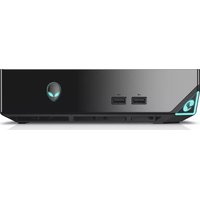
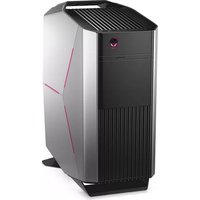
Steam Machine ASM07 - Desktop computer ALIENWARE - Free user manual and instructions
Find the device manual for free Steam Machine ASM07 ALIENWARE in PDF.


Pick your language and provide your email: we'll send you a specifically translated version.
| Type of product | Gaming Desktop Computer |
| Brand | Alienware |
| Model | Steam Machine ASM07 |
| Operating system | SteamOS (Linux-based) |
| Processor | Intel Core i5-4590 Quad-Core @ 3.3 GHz (up to 3.7 GHz with Turbo Boost) |
| Graphics | NVIDIA GeForce GTX 860M 2 GB GDDR5 |
| Memory | 8 GB DDR3L at 1600 MHz |
| Storage | 1 TB 7200 RPM SATA HDD |
| Wireless connectivity | Wi-Fi 802.11 ac, Bluetooth 4.0, Gigabit Ethernet |
| Ports | 3x USB 3.0, 2x USB 2.0, HDMI 2.0 out, DisplayPort 1.2, headphone/microphone combo, SD card reader |
| Power supply | External 180 W power adapter |
| Product dimensions (approx.) | 220 mm x 200 mm x 55 mm |
| Weight (approx.) | 3.2 kg |
| Main functions | Steam gaming library, Steam Big Picture, game streaming, 4K video streaming, media center |
| Audio | Supports 5.1 surround sound via HDMI or DisplayPort |
| Cooling system | Custom thermal solution with internal fan |
| Cleaning and maintenance | Wipe exterior with a soft dry cloth; clean vents regularly to prevent overheating |
| Security features | Kensington lock slot, BIOS password option, secure boot |
| Repair / parts replacement | RAM and HDD are user-accessible; for GPU/mainboard repairs contact Alienware support |
| General info | SteamOS preinstalled; compatible with Windows 8/10 via manual driver installation |
Frequently Asked Questions - Steam Machine ASM07 ALIENWARE
How do I update the graphics driver on my Alienware Steam Machine?
On SteamOS, go to Settings > System > System Update to install the latest system updates. For manual driver installation, use the terminal command sudo apt-get install nvidia-driver after adding the Valve repository. Check the manual for detailed steps.
Can I install Windows on the Steam Machine ASM07?
Yes, it is a standard x86 PC. You can install Windows 8.1 or 10 via USB. After installation, download the necessary drivers from the Alienware support website, especially the NVIDIA graphics and Wi-Fi drivers.
How can I reset the Steam Machine to factory settings?
To reset, turn off the system, then power it on while holding the Shift key on a keyboard. This opens the recovery menu. Select 'Factory Reset' and follow the on-screen instructions. This will restore SteamOS to its original state.
What are the gaming performance expectations for the ASM07?
With its Intel Core i5 and NVIDIA GTX 860M, the Steam Machine can play most modern games at 1080p resolution with medium settings. Lighter indie titles and older games run at high settings smoothly.
How do I connect the system to my HDTV?
Use an HDMI cable to connect the Steam Machine's HDMI output to your TV's HDMI input. For 4K video streaming, ensure you use an HDMI 2.0 cable and that the TV supports HDCP accordingly.
Does the Steam Machine support 4K output?
Yes, it supports 4K video output at 60 Hz via HDMI 2.0 and DisplayPort. However, gaming at 4K may not be playable due to the GTX 860M's performance; it's best suited for streaming 4K content.
How do I upgrade the storage or memory?
The hard drive and RAM are user-accessible. Turn off the system, remove the side panel (refer to the manual), then gently detach the SATA cable to replace the HDD with a 2.5-inch SSD. RAM modules are accessible; ensure you use DDR3L SODIMM sticks.
Why is my Steam Machine overheating or shutting down?
Overheating is often caused by blocked ventilation or dust buildup. Place the system in a well-ventilated area, clean the vents with compressed air, and ensure the cooling fan is spinning. Also check if the system needs a BIOS update from Alienware support.
How do I pair a Bluetooth controller?
Go to Settings > Controllers > Add Controller on SteamOS. Put the controller in pairing mode and select it from the list. For Steam Controllers, use the Steam button combo to open the pairing menu.
Can I use the Steam Machine as a regular PC?
Yes, you can access a desktop in SteamOS by selecting 'Switch to Desktop' from the Power menu. You can then browse the web, use Linux software, or install additional applications via the Discover store.
User questions about Steam Machine ASM07 ALIENWARE
0 question about this device. Answer the ones you know or ask your own.
Ask a new question about this device
No questions yet. Be the first to ask one.
Download the instructions for your Desktop computer in PDF format for free! Find your manual Steam Machine ASM07 - ALIENWARE and take your electronic device back in hand. On this page are published all the documents necessary for the use of your device. Steam Machine ASM07 by ALIENWARE.
USER MANUAL Steam Machine ASM07 ALIENWARE
Manual assistant
Powered by Anthropic
Waiting for your message
Product information
Brand : ALIENWARE
Model : Steam Machine ASM07
Category : Desktop computer