Flat A - Scale Melchioni - Free user manual and instructions
Find the device manual for free Flat A Melchioni in PDF.


Pick your language and provide your email: we'll send you a specifically translated version.
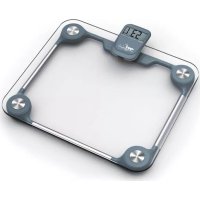
| Product Type | Digital Scale |
| Brand | Melchioni |
| Model | Flat A |
| Design | Flat platform |
| Display | LCD display |
| Weight Capacity | 180 kg / 396 lb / 28 st |
| Division (Graduation) | 100 g |
| Units | kg, lb, st (switchable) |
| Auto On | Step-on activation |
| Auto Off | Automatic shutdown after 10 seconds |
| Low Battery Indicator | Yes |
| Overload Indicator | Yes |
| Platform Material | Tempered glass |
| Base Material | ABS plastic |
| Power Supply | 1 x CR2032 battery (included) |
| Dimensions | 30 x 30 x 2.5 cm |
| Product Weight | 1.5 kg |
| Certifications | CE, RoHS |
| Included in Box | Scale, battery, user manual |
| Cleaning | Wipe with a soft damp cloth; do not immerse |
| Safety | Anti-slip base, safety glass |
| Repairability | Battery easily replaceable; no spare parts required |
Frequently Asked Questions - Flat A Melchioni
How do I turn on the Flat A scale?
Simply step onto the platform to activate the scale. It uses step-on technology and turns on automatically. Wait a few seconds for the display to stabilise.
How do I change the unit of measurement between kg, lb and st?
Press the unit button on the side of the scale until the desired unit appears on the LCD display. The available units are kilograms (kg), pounds (lb) and stones (st).
What battery does the scale require, and how do I replace it?
The scale uses one CR2032 lithium battery, located in the battery compartment on the underside. Slide the cover open, remove the old battery and insert a new one with the + symbol facing up, then close the cover.
Why does the scale show "Lo" on the display?
"Lo" indicates low battery. Replace the CR2032 battery as described in the manual. After replacing, the scale should function normally.
What should I do if the display shows "Err"?
"Err" means the scale is overloaded or the weight is not stable. Ensure you are standing still, and do not exceed the maximum capacity of 180 kg. If the error persists, place the scale on a flat, hard surface.
How do I clean the glass platform?
Use a soft damp cloth to wipe the glass surface. Do not use abrasive cleaners or submerge the scale in water, as this may damage the electronics.
Can I use the scale on carpet?
No, the scale should be placed on a flat, hard floor. Using it on carpet or uneven surfaces may cause inaccurate readings.
How accurate is the Flat A scale?
The scale has a division (graduation) of 100 g or 0.1 kg, meaning it measures in increments of 100 grams for reliable tracking of your weight.
Is the scale safe for people with pacemakers?
The scale uses a small electrical current to measure body impedance. If you have a pacemaker or other internal medical device, consult your doctor before use.
Why do readings vary between measurements?
Change in weight can be due to hydration levels, time of day, and surface. Always weigh yourself at the same time on a flat, hard surface with minimal clothing for consistent results.
User questions about Flat A Melchioni
0 question about this device. Answer the ones you know or ask your own.
Ask a new question about this device
No questions yet. Be the first to ask one.
Download the instructions for your Scale in PDF format for free! Find your manual Flat A - Melchioni and take your electronic device back in hand. On this page are published all the documents necessary for the use of your device. Flat A by Melchioni.
USER MANUAL Flat A Melchioni
Manual assistant
Powered by Anthropic
Waiting for your message
Product information
Brand : Melchioni
Model : Flat A
Category : Scale