Flat N - Scale Melchioni - Free user manual and instructions
Find the device manual for free Flat N Melchioni in PDF.


Pick your language and provide your email: we'll send you a specifically translated version.
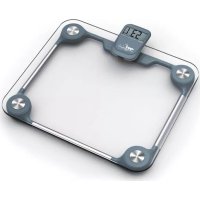
| Product Type | Digital Bathroom Scale |
| Brand | Melchioni |
| Model | Flat N |
| Category | Scale |
| Display Type | LCD |
| Maximum Weight Capacity | 180 kg (396 lb) |
| Graduation | 0.1 kg (100 g) |
| Measurement Units | kg / lb / st |
| Platform Material | Tempered glass |
| Power Source | 1 x CR2032 battery (included) |
| Auto Power On | Yes, by stepping on the platform |
| Auto Power Off | Yes, after a few seconds of inactivity |
| Overload Indication | Displays "O-Ld" when capacity is exceeded |
| Low Battery Indication | Displays battery symbol when replacement is needed |
| Anti-Slip Feet | Yes, four adhesive rubber pads |
| Dimensions (W x D x H) | 28 x 28 x 2.4 cm |
| Device Weight | 1.5 kg |
| Included In Box | Scale, battery, user manual |
| Cleaning Instructions | Wipe with a soft damp cloth; never immerse in water |
| Safety Features | Non-slip feet and overload protection |
| Repairability | Designed for safe disposal; no user-serviceable parts |
| Certification | CE marked |
Frequently Asked Questions - Flat N Melchioni
How do I calibrate the scale?
The Melchioni Flat N requires no manual calibration. It auto-calibrates on startup. For accurate readings, place the scale on a hard, flat surface and step gently.
Why does the weight appear unstable?
Unstable readings can be caused by an uneven floor or stepping on too quickly. Wait a few seconds for the display to settle, and ensure your feet are centered on the platform.
How do I change the battery?
Open the battery compartment on the back of the scale, remove the old CR2032 battery and insert a new one with the correct polarity. Dispose of the old battery properly.
What does "O-Ld" mean on the display?
"O-Ld" indicates overload. The scale has exceeded its maximum capacity of 180 kg (396 lb). Step off immediately to avoid damaging the sensors.
Can I use the scale on carpet?
For best accuracy, use the scale on a hard, flat surface. Carpet can cause inaccurate readings and may damage the anti-slip feet.
Does the scale have a body fat monitor?
No, this scale measures weight only. It is a simple digital scale with an LCD display.
How do I switch between units (kg/lb/st)?
A button on the back or side of the scale allows you to toggle between kilograms, pounds, and stones. Refer to the manual for the specific location.
Is the glass platform safe?
The platform is made of tempered glass, which is strong and shatter-resistant. It is designed to withstand daily use within the specified weight limit.
Why is the display showing a battery symbol?
The battery symbol indicates low battery. Replace the CR2032 battery as soon as possible to maintain accurate function.
Can I step on the scale with shoes?
It is recommended to use the scale barefoot for maximum accuracy. Wearing shoes can add extra weight and cause slight deviation.
User questions about Flat N Melchioni
0 question about this device. Answer the ones you know or ask your own.
Ask a new question about this device
No questions yet. Be the first to ask one.
Download the instructions for your Scale in PDF format for free! Find your manual Flat N - Melchioni and take your electronic device back in hand. On this page are published all the documents necessary for the use of your device. Flat N by Melchioni.
USER MANUAL Flat N Melchioni
Manual assistant
Powered by Anthropic
Waiting for your message
Product information
Brand : Melchioni
Model : Flat N
Category : Scale