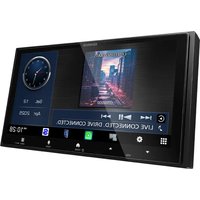
DDX9716BTSR - Car radio KENWOOD - Free user manual and instructions
Find the device manual for free DDX9716BTSR KENWOOD in PDF.


Pick your language and provide your email: we'll send you a specifically translated version.
| Product Type | Car Radio / Multimedia Receiver |
| Brand | Kenwood |
| Model Number | DDX9716BTSR |
| Display Size | 6.95 inch WVGA Touchscreen |
| Display Resolution | 800 x 480 pixels |
| Supported Discs | DVD, DVD-R/RW, CD, CD-R/RW |
| USB Ports | 2 x USB inputs |
| Bluetooth | Hands-free calling, audio streaming |
| Smartphone Integration | Apple CarPlay, Android Auto |
| Audio Output Power | 50 W x 4 channels (max) |
| Built-in Tuner | FM/AM |
| Rear Camera Input | Yes (composite and RGB) |
| Dimensions (W x H x D) | 178 x 100 x 160 mm |
| Installation Size | Double DIN (2-DIN) |
| Weight | 1.8 kg |
| Power Supply | 12 V DC (11-16 V) with fuse |
| Operating Temperature | -10°C to +60°C |
| Remote Control | Yes, wired mini remote |
| Maintenance | Wipe with soft dry cloth |
| Safety Features | Fuse protection, detachable front panel |
| Repairability | Replacement parts available through service center |
| Documentation | Free PDF manual available for download |
Frequently Asked Questions - DDX9716BTSR KENWOOD
How do I pair my iPhone with the DDX9716BTSR via Bluetooth?
Go to Settings > Bluetooth on the unit, enable BT on your phone, select KENWOOD DDX9716BTSR and enter code 0000 if requested. Use BT Audio and Handsfree modes.
Does the DDX9716BTSR support Apple CarPlay and Android Auto?
Yes, both are supported. Connect your phone to a front USB port and the unit automatically launches Apple CarPlay or Android Auto.
How do I reset the receiver to factory defaults?
Press the reset button located on the front panel (or use a thin pin) for a few seconds, or go to Setup > Initial > Factory Reset. This clears all settings and paired devices.
What should I do if the display doesn't turn on?
Check the fuse, power and ground wires. Ensure the ignition is in ACC/ON. Press the RESET button, then turn on the unit. If it persists, consult the service center.
How do I connect a backup camera?
Connect the camera's video cable to the REAR CAMERA IN RCA jack and trigger wire to the reversing light. In Setup, enable Camera and Reverse Trigger. The image appears automatically when shifting to reverse.
How can I adjust bass and treble?
Press Audio to open the audio menu. Use the touchscreen to set Bass, Treble, Balance, Fader, and Loudness.
Can I play DVD movies while driving?
No, for safety the video playback is disabled unless the parking brake is engaged. You can watch after setting the parking brake and pressing OK.
How do I update the firmware?
Download the latest update from Kenwood's official site to a USB drive, plug it into the unit, then go to Setup > System > Firmware Update. Do not disconnect power during update.
What is the ISO wiring harness standard for this unit?
The harness uses common ISO 10487 connectors. A wiring diagram is printed on the side of the chassis and in the manual.
How do I clean the touchscreen?
Use a soft, dry microfibre cloth to gently wipe the screen. Avoid liquids, alcohol and abrasive cleaners.
User questions about DDX9716BTSR KENWOOD
0 question about this device. Answer the ones you know or ask your own.
Ask a new question about this device
No questions yet. Be the first to ask one.
Download the instructions for your Car radio in PDF format for free! Find your manual DDX9716BTSR - KENWOOD and take your electronic device back in hand. On this page are published all the documents necessary for the use of your device. DDX9716BTSR by KENWOOD.
USER MANUAL DDX9716BTSR KENWOOD

Manual assistant
Powered by Anthropic
Waiting for your message
Product information
Brand : KENWOOD
Model : DDX9716BTSR
Category : Car radio