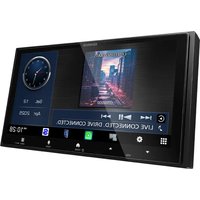
DMX7722DABS - Car radio KENWOOD - Free user manual and instructions
Find the device manual for free DMX7722DABS KENWOOD in PDF.


Pick your language and provide your email: we'll send you a specifically translated version.
| Product type | Multimedia car radio |
| Brand | Kenwood |
| Model | DMX7722DABS |
| Dimensions (W x H x D) | 178 x 100 x 160 mm |
| Weight | 1.5 kg |
| Power supply | 12 V DC (10.5 – 16 V) |
| Display | Touchscreen 6.95 inches, resolution 800 x 480 |
| Playable formats | CD, DVD, MP3, WMA, AAC, FLAC, WAV |
| Radio | FM/AM, RDS, DAB+ |
| Connectivity | Bluetooth 4.2, USB, AUX, camera input |
| Smartphone | Android Auto, Apple CarPlay (wired) |
| Output power | 4 x 50 W (max) |
| Equalization | 13 bands, presets |
| Line input | Front + rear (RCA) |
| Line output | Front + rear + subwoofer (RCA) |
| Bluetooth | Hands-free, audio streaming |
| Additional functions | Media display, Siri/Google voice control |
| Maintenance | Clean with a soft dry cloth |
| Security | Anti-theft code, removable faceplate (optional) |
| Spare parts | External microphone, USB cables, mounting kit |
| Repairability | Consult an authorized Kenwood center |
Frequently Asked Questions - DMX7722DABS KENWOOD
How to install the DMX7722DABS in my car?
Use the provided mounting kit. Connect the power harness to matching colors (yellow: constant, red: ignition, black: ground). Insert the device into the 2 DIN slot and secure with screws.
How to pair my phone via Bluetooth?
Enable Bluetooth on the car radio (menu > Bluetooth). On your phone, search for 'Kenwood DMX7722DABS' and pair. The default PIN is 0000.
Why doesn't DAB+ pick up any stations?
Check that the DAB+ antenna is properly connected and positioned. Perform an automatic station search. In low reception areas, use an amplified antenna.
How to use Android Auto or Apple CarPlay?
Connect your smartphone via the USB cable (dedicated port). The app launches automatically. Make sure the phone is unlocked and the car radio is in Android Auto or CarPlay mode.
What to do if the touchscreen is unresponsive?
Restart the car radio by pressing the Reset button (small hole on the front). If the problem persists, clean the screen with a microfiber cloth or contact support.
How to adjust the equalizer?
Go to Audio > Equalizer menu. You can choose a preset (Rock, Pop, Jazz...) or manually adjust the 13 frequency bands.
Can I connect a rear view camera?
Yes, connect the camera to the RCA input 'Rear View Camera' (blue). Enable the function in the Camera menu. The video displays automatically when in reverse.
How to update the firmware?
Download the latest version from the Kenwood website. Copy the file to a USB stick formatted in FAT32. Plug the stick into the car radio and follow the on-screen instructions.
The device won't turn on, what to do?
Check the fuses on the harness and in the car. Ensure the yellow wire (constant power) and red wire (ignition) are live. Test with another 12V source.
How to clean the car radio?
Use a soft dry cloth. Never use solvents, alcohol, or abrasive products. For the screen, prefer a slightly damp microfiber cloth.
User questions about DMX7722DABS KENWOOD
0 question about this device. Answer the ones you know or ask your own.
Ask a new question about this device
No questions yet. Be the first to ask one.
Download the instructions for your Car radio in PDF format for free! Find your manual DMX7722DABS - KENWOOD and take your electronic device back in hand. On this page are published all the documents necessary for the use of your device. DMX7722DABS by KENWOOD.
USER MANUAL DMX7722DABS KENWOOD


Manual assistant
Powered by Anthropic
Waiting for your message
Product information
Brand : KENWOOD
Model : DMX7722DABS
Category : Car radio