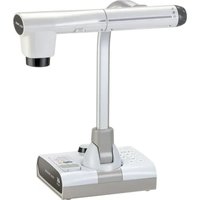
UN43H - Camera Elmo - Free user manual and instructions
Find the device manual for free UN43H Elmo in PDF.


Pick your language and provide your email: we'll send you a specifically translated version.
| Product Type | Document Camera / Visual Presenter |
| Brand | Elmo |
| Model | UN43H |
| Image Sensor | 8-megapixel CMOS sensor |
| Resolution | Full HD 1080p (1920 x 1080) |
| Optical Zoom | 4x digital zoom |
| Total Zoom | Up to 8x magnification |
| Frame Rate | 30 frames per second |
| Illumination | Built-in LED light with adjustable intensity |
| Interfaces | USB 2.0 and HDMI output |
| Compatibility | Windows, macOS, and Chromebook |
| Dimensions (Approx.) | 112 x 96 x 200 mm |
| Weight (Approx.) | 0.6 kg |
| Power Supply | USB powered (5V 2A) |
| Power Consumption | 5W max |
| Mounting | Foldable design with adjustable arm |
| Functions | Document capture, live video streaming, annotation capability |
| Maintenance | Wipe lens with soft dry cloth |
| Safety | RoHS compliant, low heat emission |
| Repairability | Modular components with available spare parts |
| Package Contents | Document camera, USB cable, user manual |
| Warranty | 1-year limited warranty |
Frequently Asked Questions - UN43H Elmo
How do I connect the Elmo UN43H camera to my computer?
Connect the included USB cable to the camera and your computer's USB port. The camera will be recognized automatically as a video device. For video conferencing or document capture, select the camera in your software settings.
Can I use the UN43H with interactive whiteboards or annotation software?
Yes, the UN43H works with most annotation programs. Install the software provided or use third-party annotation tools that support USB cameras, then use the camera as a live video source.
How do I adjust the zoom on the Elmo UN43H?
Use the zoom controls on the camera body or via the software interface. The 4x digital zoom plus up to 8x total magnification allows you to focus on details.
Does the camera have its own lighting?
Yes, it includes a built-in LED illuminator that ensures clear images even in low-light conditions. You can adjust the light intensity using the control button.
What maintenance does the UN43H require?
Keep the lens clean using a soft, dry cloth. Avoid using harsh liquids. Store the camera in a dry place when not in use. The LED lamp has a long lifespan.
Is the Elmo UN43H compatible with Mac computers?
Yes, it works with macOS and most video conferencing apps such as Zoom, Teams, and Google Meet, without additional drivers in most cases.
Can I use the camera to photograph documents for archiving?
Yes, the 8MP sensor captures sharp images of documents. Use the included or proprietary capture software to take high-resolution stills.
What should I do if the camera image is not showing?
Check the USB connection, ensure the correct input is selected in your software, and restart the application. Also confirm that the camera's LED indicator is on. If necessary, test on another USB port.
How do I clean the Elmo UN43H safely?
Power off and unplug the camera. Use a microfiber cloth to gently wipe the lens and exterior. For stubborn dirt, slightly dampen the cloth with water and avoid getting moisture inside the device.
Are replacement parts available for the UN43H?
Yes, Elmo provides spare parts such as lenses, LED modules, and cables. Contact authorized service centers to order replacements. The modular design facilitates repairs.
User questions about UN43H Elmo
0 question about this device. Answer the ones you know or ask your own.
Ask a new question about this device
No questions yet. Be the first to ask one.
Download the instructions for your Camera in PDF format for free! Find your manual UN43H - Elmo and take your electronic device back in hand. On this page are published all the documents necessary for the use of your device. UN43H by Elmo.
USER MANUAL UN43H Elmo


Manual assistant
Powered by Anthropic
Waiting for your message
Product information
Brand : Elmo
Model : UN43H
Category : Camera