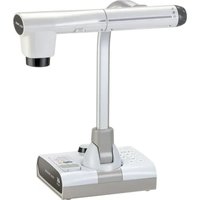
CN43H - Camera Elmo - Free user manual and instructions
Find the device manual for free CN43H Elmo in PDF.


Pick your language and provide your email: we'll send you a specifically translated version.
| Product Type | Document Camera / Visual Presenter |
| Brand | Elmo |
| Model | CN43H |
| Sensor | 4.3 Megapixel CMOS Image Sensor |
| Image Resolution | 2592 x 1944 pixels |
| Video Resolution | 1920 x 1080 (Full HD) at 30 fps |
| Zoom | 8x Digital Zoom |
| Focus | Autofocus / Manual Focus |
| Lighting | Built-in LED Light Bar |
| Connectivity | HDMI Output, USB 2.0 Output |
| Storage | SD/SDHC Memory Card Slot |
| Power Supply | AC Adapter (100-240V, 50/60Hz) |
| Dimensions | 273 x 215 x 430 mm (arm folded) |
| Weight | 1.2 kg |
| Compatibility | Windows, macOS |
| Included Accessories | AC Adapter, USB Cable, Remote Control, Quick Start Guide |
| Safety Certifications | CE, RoHS |
| Repairability | Modular components; spare parts available from authorized service centers |
Frequently Asked Questions - CN43H Elmo
What is the maximum resolution for still images on the Elmo CN43H?
The Elmo CN43H captures still images at a resolution of 2592 x 1944 pixels (4.3 megapixels). It also supports Full HD video recording at 1920 x 1080.
How do I connect the CN43H to a computer or projector?
To connect the CN43H to a computer, use the USB 2.0 port. For a projector or HDTV, use the HDMI output for high-definition video and audio.
Can the CN43H be used without a computer?
Yes, the CN43H can operate as a standalone document camera. You can connect it directly to a projector or monitor via HDMI and use built-in SD card storage to save captured images and videos.
How do I clean the lens and light bar?
Turn off the device and use a soft, dry microfiber cloth to gently wipe the lens. For the LED light bar, use a slightly damp cloth with a mild cleaning solution. Avoid abrasive materials.
What is the purpose of the built-in LED light?
The integrated LED light bar ensures even illumination for documents, objects, or 3D items. It improves image clarity in low-light conditions and can be adjusted in brightness.
Can I record video directly to an SD card?
Yes, the CN43H has a SD/SDHC card slot for recording video and storing images. It supports video recording at Full HD quality without requiring a computer.
How do I zoom in and out?
Use the zoom buttons on the device or the included remote control. The CN43H offers 8x digital zoom with smooth transitions.
Is the CN43H compatible with screen-sharing software?
When connected via USB, the CN43H can be used as a webcam/microscope with software like Zoom, Teams, or Google Meet. It installs as a standard UVC-compliant camera.
What should I do if the image appears blurry?
First, ensure the lens is clean and free of dust. Then use the autofocus button to refocus. If it still blurs, switch to manual focus using the focus ring on the lens.
Where can I find replacement parts or accessories?
Elmo provides spare parts and accessories through authorized dealers and service centers. You can also contact Elmo's official customer support for ordering replacement remotes, AC adapters, or cables.
User questions about CN43H Elmo
0 question about this device. Answer the ones you know or ask your own.
Ask a new question about this device
No questions yet. Be the first to ask one.
Download the instructions for your Camera in PDF format for free! Find your manual CN43H - Elmo and take your electronic device back in hand. On this page are published all the documents necessary for the use of your device. CN43H by Elmo.
USER MANUAL CN43H Elmo


Manual assistant
Powered by Anthropic
Waiting for your message
Product information
Brand : Elmo
Model : CN43H
Category : Camera