Expedition XP108w - Headphones SAMSON - Free user manual and instructions
Find the device manual for free Expedition XP108w SAMSON in PDF.


Pick your language and provide your email: we'll send you a specifically translated version.
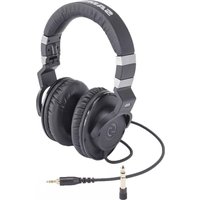
| Product Type | Wireless Over-Ear Headphones |
| Brand | Samson |
| Model | Expedition XP108w |
| Driver Diameter | 40 mm |
| Frequency Response | 20 Hz - 20 kHz |
| Impedance | 32 Ohms |
| Sensitivity | 98 dB |
| Bluetooth Version | 5.0 |
| Supported Profiles | A2DP, AVRCP, HFP |
| Battery Capacity | 400 mAh |
| Music Playback Time | Up to 25 hours |
| Charging Time | 2 hours |
| Standby Time | 200 hours |
| Weight | 250 g |
| Dimensions (W x H x D) | 180 x 170 x 80 mm |
| Connectivity | Bluetooth, 3.5 mm jack |
| Controls | Volume, Play/Pause, Call management on earcup |
| Microphone | Built-in omnidirectional |
| Ear Cushion Material | Memory foam with protein leather |
| Headband | Adjustable stainless steel |
| Foldable | Yes |
| Accessories | USB cable, audio cable, carrying pouch |
| Cleaning | Wipe with dry cloth, avoid liquids |
| Safety | Keep volume at moderate level, do not use near water |
| Spare Parts | Replaceable ear pads and cable |
Frequently Asked Questions - Expedition XP108w SAMSON
How do I pair the headphones with my device?
Turn on the headphones by pressing and holding the power button until the LED flashes. Activate Bluetooth on your device and select 'Expedition XP108w' from the available devices. The headphones will enter pairing mode automatically when no connection is established.
How long does the battery last?
The built-in battery provides up to 25 hours of music playback on a full charge. Standby time is up to 200 hours. Charging time is approximately 2 hours via the included USB cable.
Can I use the headphones while charging?
Yes, the headphones support passive use with the included 3.5 mm audio cable while charging. However, wireless playback during charging may not be supported, so it is recommended to charge before use.
How do I reset the headphones?
To reset, turn off the headphones, then press and hold the volume up and down buttons simultaneously for about 5 seconds until the LED flashes red and blue. This clears the pairing list and restores default settings.
Are the ear cushions replaceable?
Yes, the ear cushions are replaceable. You can gently pull them off and snap new ones into place. Replacement cushions can be obtained from the manufacturer or authorized dealers.
What is the Bluetooth range?
The Bluetooth 5.0 connection offers a range of up to 10 meters (33 feet) in open space. Walls and obstacles may reduce the range.
How do I clean the headphones?
Use a soft, dry cloth to wipe the ear cushions and headband. Do not use water, solvents, or abrasive cleaners. Remove ear cushions periodically and clean them separately if needed.
Can I connect to multiple devices simultaneously?
The headphones support multipoint connection, allowing you to connect to two devices at the same time. You can switch between calls and media playback seamlessly.
What is included in the box?
The package includes the headphones, a USB charging cable, a 3.5 mm audio cable, and a carrying pouch.
Can I use the headphones with a wired connection?
Yes, you can use the included 3.5 mm audio cable to connect to devices without Bluetooth. This allows you to enjoy music even when the battery is completely drained.
User questions about Expedition XP108w SAMSON
0 question about this device. Answer the ones you know or ask your own.
Ask a new question about this device
No questions yet. Be the first to ask one.
Download the instructions for your Headphones in PDF format for free! Find your manual Expedition XP108w - SAMSON and take your electronic device back in hand. On this page are published all the documents necessary for the use of your device. Expedition XP108w by SAMSON.
USER MANUAL Expedition XP108w SAMSON
Manual assistant
Powered by Anthropic
Waiting for your message
Product information
Brand : SAMSON
Model : Expedition XP108w
Category : Headphones