VX9W-S - Monitor Ikan - Free user manual and instructions
Find the device manual for free VX9W-S Ikan in PDF.


Pick your language and provide your email: we'll send you a specifically translated version.
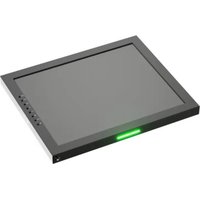
| Product Type | Professional 9-inch LCD Field Monitor |
| Brand | Ikan |
| Model | VX9W-S |
| Display Size | 9 inches (22.9 cm) diagonal |
| Aspect Ratio | 16:9 widescreen |
| Display Technology | TFT LCD |
| Native Resolution | 1024 x 600 pixels |
| Brightness | 500 cd/m² |
| Contrast Ratio | 1000:1 |
| Viewing Angle | 160° horizontal, 140° vertical |
| Video Inputs | HDMI, SDI, Composite |
| Video Outputs | HDMI and SDI loop-through |
| Audio Monitoring | 3.5mm headphone output |
| Power Supply | DC 12V adapter included |
| Power Consumption | Approximately 10W |
| Mounting | 1/4"-20 threaded socket on bottom |
| Controls | OSD joystick and function buttons |
| Image Assist Functions | Focus peaking, false color, zebra |
| Included Accessories | Power adapter, mounting bracket |
| Dimensions | 240 x 160 x 30 mm (approx) |
| Weight | 0.9 kg (approx) |
| Maintenance | Clean with a soft, dry microfiber cloth |
| Safety | Use only the supplied power adapter; do not expose to rain |
| Repairability | Contact Ikan authorized service center for spare parts and repair |
Frequently Asked Questions - VX9W-S Ikan
How do I power the Ikan VX9W-S monitor?
The monitor can be powered using the included DC 12V adapter. Some versions also support an optional camera battery plate for field operation. Always check the input label before connecting any power source.
What video signals can the VX9W-S accept?
It accepts HDMI, SDI, and composite video inputs. This allows connection to DSLR cameras, camcorders, and broadcast equipment. Use the on-screen menu to select the active input.
Does the VX9W-S have built-in speakers?
No, the VX9W-S is a professional monitoring display and does not include built-in speakers. Use the 3.5mm headphone output for audio monitoring if available.
Can I mount the VX9W-S on a camera rig?
Yes. The monitor has a standard 1/4"-20 tripod socket on the bottom, compatible with camera cages, articulating arms, and tripod mounts.
How do I clean the LCD screen safely?
Turn the monitor off and wipe the screen gently with a soft, dry microfiber cloth. Do not spray liquid directly on the panel; lightly dampen the cloth if needed.
Is the VX9W-S suitable for outdoor use?
With a brightness around 500 cd/m², it is usable in daylight but best viewed with a sun hood or in shaded conditions. Avoid direct exposure to rain.
What image assist tools are available?
The monitor includes focus peaking, false color, and zebra exposure functions to help you achieve accurate focus and exposure while shooting.
Can I connect the monitor to two devices at once?
Yes, the HDMI and SDI outputs provide loop-through capability, while the inputs let you switch between sources. You cannot display two sources simultaneously in a split-screen without a built-in feature.
Does the monitor support battery power?
Some versions support an optional camera battery plate for NP-F or similar batteries. Check your package contents or contact Ikan for compatible battery accessories.
How do I update the monitor's software?
The VX9W-S does not require user firmware updates for basic operation. For the latest information, visit the Ikan support website or contact their service team.
User questions about VX9W-S Ikan
0 question about this device. Answer the ones you know or ask your own.
Ask a new question about this device
No questions yet. Be the first to ask one.
Download the instructions for your Monitor in PDF format for free! Find your manual VX9W-S - Ikan and take your electronic device back in hand. On this page are published all the documents necessary for the use of your device. VX9W-S by Ikan.
USER MANUAL VX9W-S Ikan
Manual assistant
Powered by Anthropic
Waiting for your message
Product information
Brand : Ikan
Model : VX9W-S
Category : Monitor