BSTKH08BK - Keyboard BUFFALO - Free user manual and instructions
Find the device manual for free BSTKH08BK BUFFALO in PDF.


Pick your language and provide your email: we'll send you a specifically translated version.
| Product Type | Keyboard |
| Brand | Buffalo |
| Model | BSTKH08BK |
| Interface | USB wired |
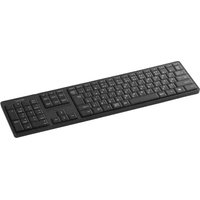
| Keyboard Layout | Full-size (104/109 keys) |
| Key Type | Membrane |
| Dimensions (W x D x H) | 450 x 150 x 30 mm |
| Weight | Approximately 500 g |
| Cable Length | 1.5 m |
| Power Source | USB powered |
| Supported OS | Windows, macOS |
| Multimedia Keys | Shortcut keys for volume and media control |
| Tilt Adjustment | Adjustable tilt legs |
| Maintenance | Wipe with a soft dry cloth |
| Safety Precautions | Keep away from liquids and extreme temperatures |
| Spare Parts | No user-replaceable parts |
| Repairability | Contact authorized service center |
| General Information | Designed for everyday office and home use |
Frequently Asked Questions - BSTKH08BK BUFFALO
How do I connect the Buffalo BSTKH08BK keyboard to my computer?
Plug the USB cable into an available USB port on your computer. The keyboard is plug-and-play, so no additional drivers are required for basic functionality.
Is the BSTKH08BK compatible with macOS?
Yes, the keyboard works with macOS as a standard USB keyboard. The multimedia keys may require additional configuration depending on your macOS version.
How do I clean the keyboard?
Disconnect the keyboard, then gently wipe the surface with a soft, dry cloth. For stubborn dirt, slightly dampen the cloth with water and ensure no liquid enters the keys.
Why are some keys not responding?
First, reconnect the USB cable and restart your computer. If the issue persists, try the keyboard on another device. For persistent problems, contact Buffalo support as the membrane may be damaged.
Does the keyboard have multimedia shortcuts?
Yes, it includes a row of shortcut keys for volume mute, volume down/up, and media playback controls such as play/pause.
Can I use this keyboard with a laptop?
Absolutely. Connect it to any laptop with a USB port. It functions as an external full-size keyboard and requires no special setup.
Is the keyboard plug-and-play?
Yes, the BSTKH08BK is plug-and-play. Simply connect the USB cable and the keyboard is immediately recognized by Windows, macOS, and Linux without installing drivers.
What should I do if the keyboard is not recognized?
Try a different USB port, preferably a USB 2.0 port directly on the computer. Restart your system. If it still fails, test on another computer to determine if the keyboard is faulty.
Can I adjust the keyboard tilt?
Yes, the keyboard has flip-out tilt feet on the underside, allowing you to adjust the typing angle for ergonomic comfort.
Is there a warranty for the Buffalo BSTKH08BK?
Buffalo provides a limited manufacturer's warranty, typically covering defects in materials and workmanship for one year from the date of purchase. Keep your receipt as proof.
User questions about BSTKH08BK BUFFALO
0 question about this device. Answer the ones you know or ask your own.
Ask a new question about this device
No questions yet. Be the first to ask one.
Download the instructions for your Keyboard in PDF format for free! Find your manual BSTKH08BK - BUFFALO and take your electronic device back in hand. On this page are published all the documents necessary for the use of your device. BSTKH08BK by BUFFALO.
USER MANUAL BSTKH08BK BUFFALO

Manual assistant
Powered by Anthropic
Waiting for your message
Product information
Brand : BUFFALO
Model : BSTKH08BK
Category : Keyboard