
CYBORG 5.1 HEADSET - Headphones SAITEK - Free user manual and instructions
Find the device manual for free CYBORG 5.1 HEADSET SAITEK in PDF.


| Product type | 5.1 surround audio headset |
| Brand | Saitek |
| Model | Cyborg 5.1 Headset |
| Audio technology | Multi-channel 5.1 surround sound |
| Number of speakers | 6 (4 earphones + 2 channels) |
| Microphone | Detachable with noise reduction |
| Connectivity | USB, 3.5 mm stereo jack |
| Power | Via USB port (5V) |
| Volume control | Wired control unit with volume +/- buttons and stereo/5.1 selector |
| Compatibility | PC, MP3 players, CD, portable devices |
| Included software | Drivers for Windows XP/Vista, audio control panel |
| Included accessories | USB cable, 3.5 mm jack adapter, driver CD, quick start guide |
| Special features | Cyborg logo lighting activated in 5.1 mode, rotating earphones, adjustable headband |
| Safety | Prolonged use at high volume may damage hearing |
| Maintenance and cleaning | Clean with a soft, slightly damp cloth. Do not use solvents. |
| Warranty | 2 years from date of purchase, upon presentation of proof of purchase |
Frequently Asked Questions - CYBORG 5.1 HEADSET SAITEK
User questions about CYBORG 5.1 HEADSET SAITEK
0 question about this device. Answer the ones you know or ask your own.
Ask a new question about this device
Download the instructions for your Headphones in PDF format for free! Find your manual CYBORG 5.1 HEADSET - SAITEK and take your electronic device back in hand. On this page are published all the documents necessary for the use of your device. CYBORG 5.1 HEADSET by SAITEK.
USER MANUAL CYBORG 5.1 HEADSET SAITEK
Installing your new Saitek Cyborg 5.1 surround sound headset
Features:
True 5.1 Surround sound using integrated USB sound card with in-line volume/mute controls
Low profile, rotating cans and adjustable headband for total comfort and portability
- Detachable noise-cancelling boom microphone
6 sonic drivers deliver precise directional audio
- Unique styling - 'Cyborg' logo illuminates when 5.1 sound is selected
3.5mm jack included for use with MP3/CD/Handheld devices (in stereo)
The Saitek Cyborg 5.1 surround sound headset adds surround sound when watching films, playing games or listening to music recorded in Dolby 5.1 surround sound. The headset also includes a boom microphone, making it ideal for communicating with team mates while playing games, or friends, family and colleagues via voice communication software.
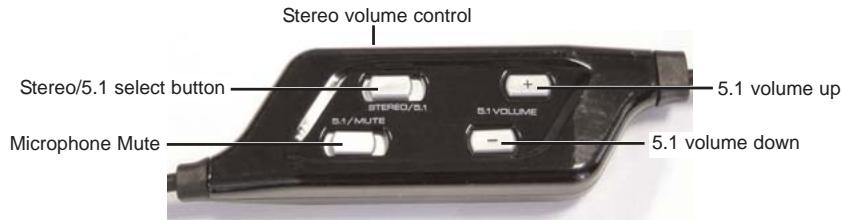
Installation
Stereo
Plug the green mini jackplug into the PC, CD or MP3 player's sound out socket. Make sure "stereo" is selected on the sliding "stereo/5.1" switch on the headphone control unit. Turn the stereo volume rotary control to the minimum and on your PC's sound or media player controls, increase the volume level to about three quarters. With music playing or with the game started, gradually increase the volume to the desired level by turning the volume control on the headset control unit. If you want to use the microphone, plug the pink mini jackplug into the computer's sound in or microphone socket.
5.1 Surround Sound
Plug the USB cable into one of your computer's free USB ports.
Insert the driver CD in the CD drawer of your PC. When prompted, open the CD and select the XP
or Vista folder depending on your PC's operating system. Click on the .exe file and follow on-screen instructions to install the driver software. When prompted, restart your PC.
Make sure "5.1" is selected on the sliding "stereo/5.1" switch on the headphone control unit and repeatedly press "volume -" to ensure the headphone volume level is at 0 before you put the headphones on.
With music playing or with the game started, gradually increase the volume to the desired level by pressing the "volume +" button on the headset control unit.
WARNING: Prolonged use at high volume may damage your hearing.
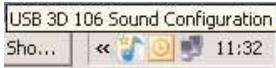
To change the sound settings of the Saitek Cyborg 5.1 Headset, click on the USB 3D 106 Sound configuration icon at the bottom right of your desktop. The Main Setting screen should appear.
You can use the Main Setting screen to adjust the output settings of the on-board sound card. Select two speakers for simple stereo, 4 or 6 speakers for 3.1 sound and 5.1 surround sound. Every time you select a different configuration, the new settings will be demonstrated through your headphones and the configuration shown in the graphic on the right.
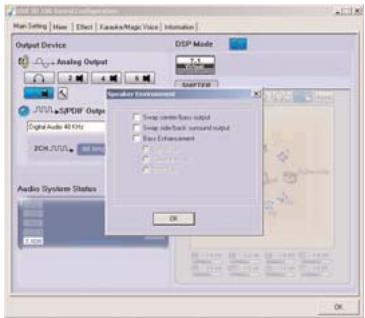
You can also swap speaker positions within the 5.1 surround sound set-up. Click on the settings hammer icon to open the speaker environment window and click the check boxes to customise speaker positions or to enhance bass.
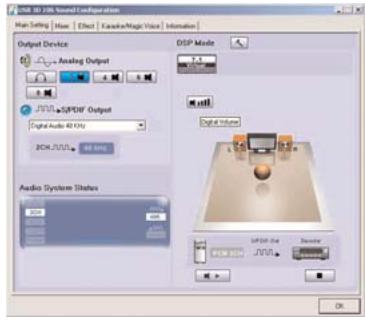
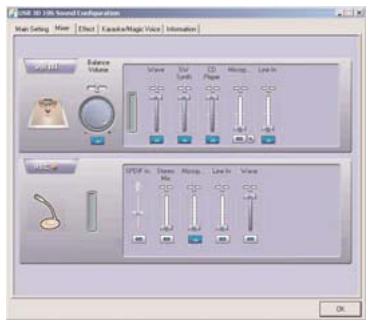
The Mixer tab allows you to change the volume and mix settings of the various sound inputs to your PC such as microphone, CD player etc.
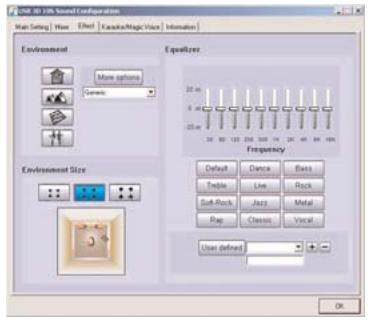
The Effect tab lets you change equaliser settings to suit the type of music you are listening to. You can also add effects such as reverb to emulate listening in a large hall or make the speakers seem nearer to your ears or further away.
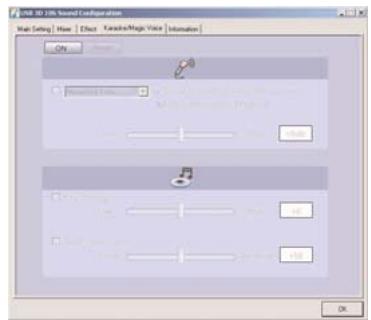
The Karaoke/Magic Voice tab allows you to sing along to your music. Click the On switch to activate the boom microphone on your headset.
We have also included a Surround Sound demo and a game. To play these, go to Windows Start>Programs>C Media USB 106 and select "helicopter" to demonstrate 5.1 Surround Sound or "Rockwar" to play a game.
Troubleshooting
My computer is turned on, music playing on the media player, but I cannot hear any sound through the Cyborg headphones.
This may be due to the PC using an incorrect sound device to play music. To rectify this, please follow the simple steps below:
1 Quit your media/dvd player application and then re-open it. You should now hear sound through the headphones.
2 If you still cannot hear sound through the headphones, go to Windows Start, Settings, Control Panel, select Sounds and Audio devices, Audio Device tab, and from the Sound Playback dropdown menu, select C Media USB 106 as default audio device. Click Apply to select. When you have closed the control panel window, restart your Media Player.
Technical Support
Nearly all the products that are returned to us as faulty are not faulty at all - they have just not been installed properly.
If you experience any difficulty with this product, please first visit our website www.saitek.com. The technical support area will provide you with all the information you need to get the most out of your product and should solve any problems you might have.
If you do not have access to the internet, or if the website cannot answer your question, please contact your local Saitek Technical Support Team. We aim to offer quick, comprehensive and thorough technical support to all our users so, before you call, please make sure you have all the relevant information at hand.
To find your local Saitek Technical Support Center, please see the separate Technical Support Center sheet that came packaged with this product.
Information for Customers in the United States
FCC Compliance and Advisory Statement
Warning: Changes or modifications to this unit not expressly approved by the party responsible for compliance could void the user's authority to operate the equipment.
This device complies with Part 15 of the FCC Rules. Operation is subject to the following two conditions:
1 This device may not cause harmful interference, and;
2 This device must accept any interference received, including interference that may cause undesired operation.
NOTE: This equipment has been tested and found to comply with the limits for a Class B digital device, pursuant to Part 15 of the FCC Rules. These limits are designed to provide reasonable protection against harmful interference in a residential installation. This equipment generates, uses
and can radiate radio frequency energy and, if not installed and used in accordance with the instructions, may cause harmful interference to radio communications. However, there is no guarantee that interference will not occur in a particular installation. If this equipment does cause harmful interference to radio or television reception, which can be determined by turning the equipment off and on, the user is encouraged to try to correct the interference by one or more of the following measures:
Reorient or relocate the receiving antenna;
- Increase the separation between the equipment and receiver;
- Connect the equipment into an outlet on a circuit different from that to which the receiver is connected;
- Consult the dealer or an experienced radio/TV technician for help.
Saitek Industries, 2295 Jefferson Street, Torrance, CA 90501, USA
Conditions of Warranty
1 Warranty period is 2 years from date of purchase with proof of purchase submitted.
2 Operating instructions must be followed.
3 Specifically excludes any damages associated with leakage of batteries.
Note: Batteries can leak when left unused in a product for a period of time, so it is advisable to inspect batteries regularly.
4 Product must not have been damaged as a result of defacement, misuse, abuse, neglect, accident, destruction or alteration of the serial number, improper electrical voltages or currents, repair, alteration or maintenance by any person or party other than our own service facility or an authorized service center, use or installation of non-Saitek replacement parts in the product or the modification of this product in any way, or the incorporation of this product into any other products, or damage to the product caused by accident, fire, floods, lightning, or acts of God, or any use violative of instructions furnished by Saitek plc.
5 Obligations of Saitek shall be limited to repair or replacement with the same or similar unit, at our option. To obtain repairs under this warranty, present the product and proof of purchase (eg, bill or invoice) to the authorized Saitek Technical Support Center (listed on the separate sheet packaged with this product) transportation charges prepaid. Any requirements that conflict with any state or Federal laws, rules and/or obligations shall not be enforceable in that particular territory and Saitek will adhere to those laws, rules, and/or obligations.
6 When returning the product for repair, please pack it very carefully, preferably using the original packaging materials. Please also include an explanatory note.
7 IMPORTANT: To save yourself unnecessary cost and inconvenience, please check carefully that you have read and followed the instructions in this manual.
This warranty is in Lieu of all other expressed warranties, obligations or liabilities. ANY
IMPLIED WARRANTYES, OBLIGATIONS, OR LIABILITIES, INCLUDING BUT NOT LIMITED TO THE IMPLIED WARRANTYES OF MERCHANTABILITY AND FITNESS FOR A PARTICULAR PURPOSE, SHALL BE LIMITED IN DURATION TO THE DURATION OF THIS WRITTEN LIMITED WARRANTY. Some states do not allow limitations on how long an implied warranty lasts, so the above limitations may not apply to you. IN NO EVENT SHALL WE BE LIABLE FOR ANY SPECIAL OR CONSEQUENTIAL DAMAGES FOR BREACH OF THIS OR ANY OTHER WARRANTY, EXPRESS OR IMPLIED, WHATSOEVER Some states do not allow the exclusion or limitation of special, incidental or consequential damages, so the above limitation may not apply to you. This warranty gives you specific legal rights, and you may also have other rights which vary from state to state.

This symbol on the product or in the instructions means that your electrical and electronic equipment should be disposed at the end of its life separately from your household waste. There are separate collection systems for recycling in the EU.
For more information, please contact the local authority or your retailer where you purchased the product.
Installation - 5.1 Surround Sound

m = 311 ;
Cyborg 5.1 Surround Sound Headset
www.saitek.com
© 2007 Saitek Ltd. Made and printed in China.
All trademarks are the property of their respective owners.
V.1.0 20/07/07
PH06

- Installing your new Saitek Cyborg 5.1 surround sound headset
- Features:
- Installation
- Stereo
- Surround Sound
- WARNING: Prolonged use at high volume may damage your hearing.
- Troubleshooting
- Technical Support
- Information for Customers in the United States
- FCC Compliance and Advisory Statement
- Conditions of Warranty
- Installation - 5.1 Surround Sound
- Cyborg 5.1 Surround Sound Headset
- www.saitek.com
Brand : SAITEK
Model : CYBORG 5.1 HEADSET
Category : Headphones