CB3-54-1000-BK - External hard drive Oyen Digital - Free user manual and instructions
Find the device manual for free CB3-54-1000-BK Oyen Digital in PDF.


Pick your language and provide your email: we'll send you a specifically translated version.
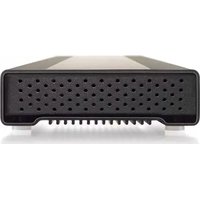
| Type of product | External hard drive |
| Brand | Oyen Digital |
| Model | CB3-54-1000-BK |
| Storage capacity | 1 TB |
| Interface | USB 3.0 (backward compatible with USB 2.0) |
| Drive form factor | 2.5-inch |
| Dimensions | 5.1 x 3.1 x 0.6 inches (130 x 80 x 15 mm) |
| Weight | 6 oz (170 g) |
| Power supply | Bus-powered via USB port |
| Main functions | Data storage, backup, file transfer, portable use |
| Housing material | Aluminum casing with matte black finish |
| Compatibility | Windows, macOS, Linux, and other USB-enabled devices |
| Data transfer rate | Up to 5 Gbps (USB 3.0) |
| Plug and play | Yes, no driver installation required |
| Maintenance and cleaning | Wipe with a soft, dry cloth to remove dust and fingerprints |
| Safety | Avoid drops, extreme temperatures, and exposure to liquids |
| Spare parts and repairability | Internal drive is replaceable; case is designed for basic disassembly with tools |
| General information | Includes USB cable; operates quietly and runs cool during use |
| Warranty | 1-year limited warranty from Oyen Digital |
Frequently Asked Questions - CB3-54-1000-BK Oyen Digital
How do I connect this external hard drive to my computer?
Simply connect the included USB cable to the drive and then to a free USB port on your computer. The drive will automatically appear as a removable disk in your operating system, no driver installation required.
Is this hard drive compatible with both Windows and Mac?
Yes, the Oyen Digital CB3-54-1000-BK works with Windows, macOS, and Linux out of the box. However, if you plan to use it with both Windows and Mac, you may want to reformat it to exFAT for cross-platform compatibility.
What is the default file system of the drive?
The drive comes preformatted with NTFS (for Windows). On macOS, you can read it, but to write files you may need to reformat it to exFAT or APFS depending on your needs.
Can I use this external drive with a gaming console like PS4 or Xbox?
Yes, this drive can be used with PS4 and Xbox One (and later) for storing games and media. The console may prompt you to format the drive specifically for game storage, which will erase all existing data.
How do I safely eject the drive before unplugging it?
On Windows, click the safely remove hardware icon in the system tray and select the device. On Mac, drag the drive icon to the Trash. This ensures all writes are completed and prevents data corruption.
Does the drive need an external power adapter?
No, it is bus-powered. It draws power directly from the USB port, so you only need to connect the USB cable. This makes it highly portable.
What is the maximum transfer speed of this drive?
The drive supports USB 3.0 with a theoretical speed of 5 Gbps. Real-world speeds are typically around 100-130 MB/s, depending on the source and target drives.
How can I format the drive for use with both Mac and Windows?
To use the drive on both platforms, format it to exFAT. On Windows, right-click the drive and choose Format. On Mac, use Disk Utility. This will erase all data, so backup any important files first.
What should I do if the computer does not recognize the drive?
First, try a different USB port or cable. Check Device Manager (Windows) or Disk Utility (Mac) for the drive. If it still isn't recognized, try connecting to another computer. If the drive is detected but not accessible, it may need partition repair or formatting.
Is this drive durable enough for traveling?
The aluminum enclosure provides good protection for daily transport, but it is not shockproof. To minimize risk, carry it in a padded case or sleeve and avoid dropping it during operation.
User questions about CB3-54-1000-BK Oyen Digital
0 question about this device. Answer the ones you know or ask your own.
Ask a new question about this device
No questions yet. Be the first to ask one.
Download the instructions for your External hard drive in PDF format for free! Find your manual CB3-54-1000-BK - Oyen Digital and take your electronic device back in hand. On this page are published all the documents necessary for the use of your device. CB3-54-1000-BK by Oyen Digital.
USER MANUAL CB3-54-1000-BK Oyen Digital
Manual assistant
Powered by Anthropic
Waiting for your message
Product information
Brand : Oyen Digital
Model : CB3-54-1000-BK
Category : External hard drive