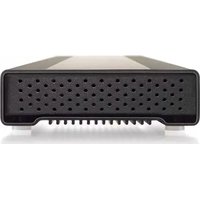
U34 Bolt - External hard drive Oyen Digital - Free user manual and instructions
Find the device manual for free U34 Bolt Oyen Digital in PDF.


Pick your language and provide your email: we'll send you a specifically translated version.
| Product Type | External Hard Drive |
| Model | U34 Bolt |
| Brand | Oyen Digital |
| Form Factor | 2.5-inch |
| Interface | USB 3.0 |
| Storage Capacity | Up to 2TB |
| Data Transfer Speed | Up to 5 Gbps |
| Power Source | USB Bus Powered |
| Dimensions (L x W x H) | 110 x 80 x 15 mm |
| Weight | 200 g |
| Operating Systems | Windows, macOS |
| Plug and Play | Yes |
| LED Indicator | Activity LED |
| Material | Aluminum shell |
| Cooling | Passive (no fan) |
| Shock Resistance | Rubber bumper |
| Security | None built-in |
| Warranty | 1 year limited |
| Package Contents | Drive, USB cable, quick start guide |
Frequently Asked Questions - U34 Bolt Oyen Digital
Is the Oyen Digital U34 Bolt compatible with USB 2.0 ports?
Yes, the U34 Bolt is backward compatible with USB 2.0. However, transfer speeds will be limited to USB 2.0 speeds (up to 480 Mbps).
Can I use this drive with a PlayStation or Xbox?
The U34 Bolt can be used with game consoles that support external storage via USB, such as PS4, PS5, Xbox One, and Xbox Series X/S. Formatting may be required.
Does it require an external power adapter?
No, the U34 Bolt is bus-powered via USB. It draws power directly from the USB port, so no external power adapter is needed.
What file system is pre-formatted on the drive?
The drive typically comes pre-formatted as exFAT, which is compatible with both Windows and macOS without additional software.
How do I safely eject the U34 Bolt?
Always use the 'Safely Remove Hardware' icon in Windows or 'Eject' in macOS before disconnecting to prevent data corruption.
Is the drive shock-resistant or rugged?
The U34 Bolt features a rubber bumper for some shock absorption, but it is not fully ruggedized. Handle with care.
What is the maximum capacity available for the U34 Bolt?
Oyen Digital offers the U34 Bolt in capacities up to 2TB. Check the specific product listing for exact options.
Can I use the drive as a bootable device?
Yes, you can create a bootable drive for operating systems like Windows or Linux, provided your BIOS supports booting from USB.
Does it come with backup software?
The U34 Bolt does not include proprietary backup software. You can use built-in OS backup tools like Time Machine (macOS) or File History (Windows).
How do I clean the drive's exterior?
Use a soft, dry cloth to wipe the aluminum shell. Avoid liquids and abrasive cleaners to prevent damage.
User questions about U34 Bolt Oyen Digital
0 question about this device. Answer the ones you know or ask your own.
Ask a new question about this device
No questions yet. Be the first to ask one.
Download the instructions for your External hard drive in PDF format for free! Find your manual U34 Bolt - Oyen Digital and take your electronic device back in hand. On this page are published all the documents necessary for the use of your device. U34 Bolt by Oyen Digital.
USER MANUAL U34 Bolt Oyen Digital

Manual assistant
Powered by Anthropic
Waiting for your message
Product information
Brand : Oyen Digital
Model : U34 Bolt
Category : External hard drive