
CASQUE QUIETCOMFORT - Headphones BOSE - Free user manual and instructions
Find the device manual for free CASQUE QUIETCOMFORT BOSE in PDF.


| Product Type | Active noise cancelling headset |
| Brand | BOSE |
| Model | QuietComfort |
| Power supply | 2 AAA alkaline batteries (LR03); average battery life of 80 hours |
| Main features | Active noise reduction (on/off on Hi or Lo); audio listening with two volume levels; compatible with CD, DVD, MP3, computer, stereo system sources |
| Maintenance and cleaning | Clean with a damp cloth; do not use sprays or chemicals; do not blow or vacuum into ports or earcups |
| Safety | Do not use while driving a vehicle on public roads; avoid prolonged exposure to high volume to prevent hearing damage; do not immerse in water |
| Spare parts and accessories | Replacement earcup kit, adapters (single plug, dual plug, 6.35 mm jack), extension cord, carry case, belt clip; available from Bose |
| Warranty | Limited one-year transferable warranty |
| Compliance | EMC Directive 89/336/EEC, standards EN50081-1 and EN50082-1 |
Frequently Asked Questions - CASQUE QUIETCOMFORT BOSE
User questions about CASQUE QUIETCOMFORT BOSE
0 question about this device. Answer the ones you know or ask your own.
Ask a new question about this device
Download the instructions for your Headphones in PDF format for free! Find your manual CASQUE QUIETCOMFORT - BOSE and take your electronic device back in hand. On this page are published all the documents necessary for the use of your device. CASQUE QUIETCOMFORT by BOSE.
USER MANUAL CASQUE QUIETCOMFORT BOSE
The Bose® QuietComfort™ Acoustic Noise Cancelling® Headset
Owner's Guide
CE
DECLARATION OF CONFORMITY
We, the offerer:
Bose® Corporation, The Mountain, Framingham, MA 01701-9168 USA
acknowledge our sole responsibility, that the product:
Kind of equipment: Headphones
Type designation: QuietComfort™ Acoustic Noise Cancelling® headset
In accordance with EMC Directive 89/336/EEC and Article 10(1) of the Directive, is in compliance with the following norm(s) or document(s):
Technical regulations: EN50081-1, EN50082-1 Accredited by:
Bose Corporation, The Mountain, Framingham, MA 01701-9168 USA
15 April 2000
Bose Products B.V.
Vice President Europe
Manufacturer's authorized
EU representative
Your QuietComfort™ Acoustic Noise Cancelling® Headset
Thank you for purchasing the Bose® QuietComfort Acoustic Noise Cancelling headset. Advanced design, integrated technologies, and high quality materials enable the headset to provide you with clearer, more lifelike sound reception, while reducing unwanted noise.
Wearing it comfortably and effectively
Notice the marking L or R on the headband just above each earcup. They indicate the proper position (L for left ear, R for right) to ensure a good fit and performance.
Put the headset on and adjust it so the headband rests gently on your head and the earcushions fit snugly (an effective seal) and comfortably around your ears (with your ears completely inside the ear cushions).
Remove any jewelry or earwear that affects the comfort and fit of the headset.
Using your headset
The headset has two volume settings - Hi and Lo. These settings are only volume levels for listening to audio and do not impact the noise reduction technology.
For noise reduction technology only, turn the unit on Hi or Lo and do not plug the headset into any audio source.
For audio use, begin listening in the Lo setting. Then adjust the volume on the audio source. For more volume, try the Hi setting. First turn down the volume on the audio source, then switch to the Hi setting. Finally, re-adjust the volume on the audio source.
The headset can be used with a variety of audio sources: CD, DVD, MP3, laptop computers, and home stereo.
Headset parts
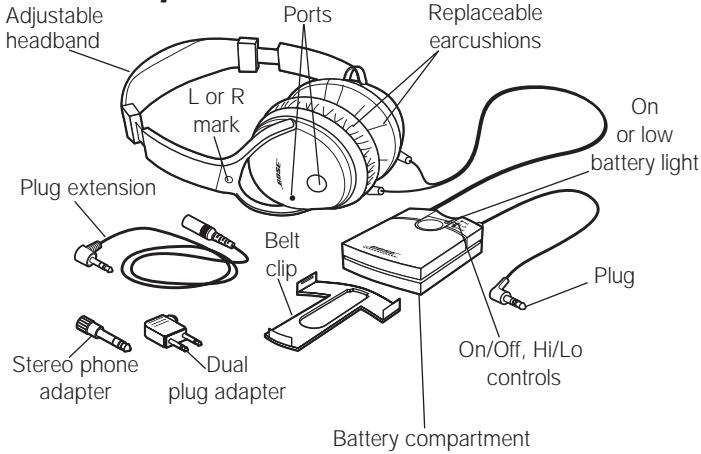
You may find various jack configurations on airplanes, as depicted below. This chart will help you determine how to connect your headset:
A single, 1/8 jack (and most portable sources): use the single plug. No adapter needed.
- Two 1/8 '' jacks: use the dual plug adapter.
One 18 " jack and one power jack: use the single plug in the 18 " jack (the larger one). The smaller jack does not need a connection.
Two 1/8 "jacks and one power jack: use the dual plug adapter for the two 1/8 "jacks. The smaller jack does not need a connection.
One 14 " jack (for home stereos): use the 14 " stereo phone adapter.
Note: Airline audio may not equal the high quality you can achieve with home stereo or a portable source.
The maximum input voltage is 10 Vrms.
Replacement parts and accessories
The following replacement parts and accessories can be purchased by calling Bose®. See the back cover for a list of phone numbers:
-
Headband assembly
-
Drawstring carry bag
-
Dual plug adapter
-
Deluxe carry bag
-
Belt clip
-
Replacement earmcushion kit
-
Accessory kit (adapters, extension cord, 2 AAA batteries)
Cleaning
- Be sure to keep the ports on the outside of each earcup free from debris. Do not blow air into or vacuum the ports or the earcups.
- Use a damp, clean cloth to remove dirt or smudges from the various headset parts. Do not allow moisture to enter the ports or inner earcup openings.
Avoid use of sprays or chemical cleaning fluids.
Cautions
Long-term exposure to loud music may cause hearing damage. It is best to avoid extreme volume when using this headset, especially for extended periods.
Do not use the headset for reproducing sound when operating a motor vehicle on a public road or where the inability to hear outside sounds may present a danger to the user or others.
Sounds that you rely on as reminders or warnings may have an unfamiliar character when you are using the headset. Be aware of how those sounds may vary in character, so you can recognize them as needed.
Do not drop, sit on, or allow the headset to be immersed in water.
Earcushion reattachment
If the earcushions come off, replace them as follows:
- Fit the plastic skirting around the rim of the earmcup.
- Make sure it attaches smoothly and uniformly around the entire earcup. (Do not remove the earcup lining material).
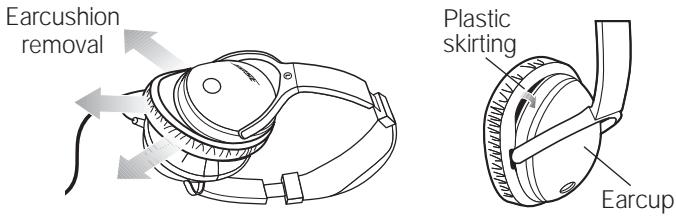
Earcushions may need to be replaced due to normal wear and tear. Replacement kits can be purchased by calling Bose®. See the back cover of this owner's guide for a list of phone numbers.
Battery replacement
In this application, battery life averages 80 hours. With the headset turned on, a flashing light on the control box indicates a minimum of 8 hours of use remains.
- When replacement is indicated, use 2 AAA alkaline batteries (IEC LR03). Dispose of used batteries properly.
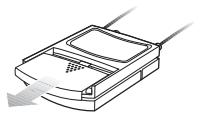
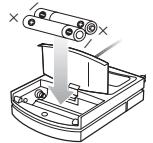
Note: Rechargeable batteries can be used, averaging half the life of alkaline (NimH are recommended). However, the low battery indicator light is not calibrated to these batteries and may not function properly.
Troubleshooting
| Problem | Possible Cause | Solution |
| • Noise reduction absent | No power to headset | Turn it on, check battery |
| • Low/no volume | Sound source setting | Turn up volume, set on Hi |
| • Crackling noise or intermittent loss of noise reduction | Low batteries | Replace batteries |
| • Low rumbling | Poor earcup fit, audio ports blocked | Adjust fit, clear ports |
For additional help, please call Bose® customer service. See back cover for phone numbers.
Other needs
This headset is not engineered to meet the needs of pilots or civil aviation authority standards for aviation communications.
For that purpose, Bose offers the Aviation Headset X, which features a microphone with the appropriate power and intelligibility for transmission of flight information. It is engineered to withstand the altitude and temperature conditions common in non-commercial aircraft.
For information on the Bose Aviation Headset X, contact Bose Corporation by calling 1-800-242-9008. For calls made from outside the United States, 1-508-766-1099.
Warranty
The Bose QuietComfort™ Acoustic Noise Cancelling® headset is covered by a one-year transferrable, limited warranty.
BOSE®
Better sound through research®
©2004 Bose Corporation
The Mountain, Framingham, MA 01701-9168 USA
254864-ENGvo AM Rev.03