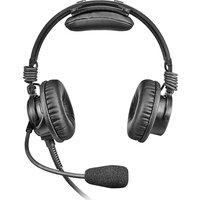
Air 3500 - Headphones Telex - Free user manual and instructions
Find the device manual for free Air 3500 Telex in PDF.


Pick your language and provide your email: we'll send you a specifically translated version.
| Type of Product | Aviation headset |
| Brand | Telex |
| Model | Air 3500 (Airman 3500) |
| Compatibility | General aviation aircraft with standard GA audio jacks |
| Ear Coupling | Circumaural (over-ear) |
| Noise Reduction | Passive noise reduction with dual earcup seals |
| Microphone | Noise-cancelling electret boom microphone |
| Volume Control | Dual volume controls on earcups for individual adjustment |
| Impedance | 150 ohms per earcup (typical) |
| Frequency Response | 100 Hz – 15 kHz (voice communication optimized) |
| Weight | Approximately 150 g (5.3 oz) |
| Dimensions | Approximately 19 x 14 x 9 cm (7.5 x 5.5 x 3.5 in) |
| Cable Length | Coiled cord extending to about 2.4 m (8 ft) |
| Connector | Dual GA plugs (two 0.206-inch monaural plugs) |
| Power Supply | None (passive, no battery required) |
| Main Functions | Two-way communication, hearing protection, noise reduction for aviation use |
| Care and Cleaning | Wipe earcups and headband with a soft, dry cloth; clean ear seals with mild soap and water; allow to air dry completely before reuse |
| Safety | Not rated as industrial hearing protection; ensure proper fit and function before flight |
| Spare Parts and Repairability | Ear seals, mic cover, cable assemblies, and headband pad are user-replaceable; durable construction for easy maintenance |
| General Information | Designed for clear communication in cockpit environments; meets TSO C57a and TSO C58a standards |
Frequently Asked Questions - Air 3500 Telex
Does the Telex Air 3500 require batteries?
No, the Air 3500 is a passive headset. It doesn't need batteries for normal operation since it does not have active noise cancellation.
How do I clean and maintain my headset?
Wipe the earcups and headband with a soft, dry cloth. For the ear seals, use a mild soap and water solution, then let them air dry completely before reinstalling. Avoid submerging the headset.
Can I use this headset with a smartphone or computer?
The Air 3500 is specifically designed for general aviation aircraft with standard GA audio jacks. To use it with personal devices, you would need an adapter that converts the dual GA plugs to a 3.5mm headset jack.
How does the noise-cancelling microphone work?
The electret boom microphone is noise-cancelling, meaning it picks up your voice from close range while reducing background cockpit noise. Position the mic 1-2 cm from the corner of your mouth for optimal performance.
Can I replace the ear cushions?
Yes, the ear seals are user-replaceable. Simply pull the old ones off the earcups and press the new ones into place. Replacement parts can be ordered from Telex or authorized dealers.
What type of connectors does it use?
The headset uses dual GA plugs, which are two 0.206-inch monaural plugs (one for headphones, one for microphone). These are standard in most GA aircraft.
How do I adjust the microphone position?
The boom microphone is flexible and adjustable. Gently bend the mic boom so the microphone is placed at the corner of your mouth, just 1-2 cm away for clear voice pick-up without breathing noise.
Is the Air 3500 suitable for high-noise environments?
It provides passive noise reduction ideal for typical cockpit noise levels. However, it is not certified as industrial hearing protection for extremely high-noise environments like factories.
How should I store the headset when not in use?
Store the headset in a cool, dry place, ideally in the provided bag. Hang it freely or place it in a protective case to prevent cable damage and ear seal deformation.
Does the Telex Air 3500 come with a warranty?
Yes, it typically comes with a 2-year limited warranty against defects in materials and workmanship. Check the included documentation for details, and register your product to validate the warranty.
User questions about Air 3500 Telex
0 question about this device. Answer the ones you know or ask your own.
Ask a new question about this device
No questions yet. Be the first to ask one.
Download the instructions for your Headphones in PDF format for free! Find your manual Air 3500 - Telex and take your electronic device back in hand. On this page are published all the documents necessary for the use of your device. Air 3500 by Telex.
USER MANUAL Air 3500 Telex

Manual assistant
Powered by Anthropic
Waiting for your message
Product information
Brand : Telex
Model : Air 3500
Category : Headphones