
ESPRIMO P5905 (I945G) - Desktop computer FUJITSU SIEMENS - Free user manual and instructions
Find the device manual for free ESPRIMO P5905 (I945G) FUJITSU SIEMENS in PDF.


User questions about ESPRIMO P5905 (I945G) FUJITSU SIEMENS
0 question about this device. Answer the ones you know or ask your own.
Ask a new question about this device
Download the instructions for your Desktop computer in PDF format for free! Find your manual ESPRIMO P5905 (I945G) - FUJITSU SIEMENS and take your electronic device back in hand. On this page are published all the documents necessary for the use of your device. ESPRIMO P5905 (I945G) by FUJITSU SIEMENS.
USER MANUAL ESPRIMO P5905 (I945G) FUJITSU SIEMENS
Are there any technical problems or other questions you need clarified?
Please contact:
The latest information and updates (e.g. BIOS update) on our mainboards can be found on the Internet under: http://www.fujitsu-siemens.com/mainboards
Intel, Pentium and Celeron are registered trademarks of Intel Corporation, USA.
Microsoft, MS, MS-DOS and Windows are registered trademarks of Microsoft Corporation.
PS/2 and OS/2 Warp are registered trademarks of International Business Machines, Inc.
All other trademarks referenced are trademarks or registered trademarks of their respective owners, whose protected rights are acknowledged.
All rights, including rights of translation, reproduction by printing, copying or similar methods, even of parts are reserved.
Offenders will be liable for damages.
All rights, including rights created by patent grant or registration of a utility model or design, are reserved. Delivery subject to availability.
Right of technical modification reserved.
This manual has been printed on recycled paper.
Printed in the Federal Republic of Germany
AG 06/05
Ausgabe/Edition 2
List of onboard features
| Chipset | Intel®945G |
| Board size | μATX |
| VGA | ✓ |
| Audio / 6-channel / S/PDIF | ✓/-/- |
| Buzzer / int. Speaker Support | - / ✓ |
| LAN 1 Gbit / 100 Mbit / 10 Mbit | ✓ / ✓ / ✓ |
| LAN ASF / AoL / WoL / Boot | ✓/-/✓/✓ |
| Serial ATA2 / ATA / RAID | ✓ / ✓ / - |
| FireWire™ / USB 2.0 | - / ✓ |
| FAN monitored PSU** / CPU (FAN1) / AUX1 (FAN2) / AUX2 (FAN3) | ✓ / ✓ / ✓ / - |
| FAN controlled PSU** / CPU (FAN1) / AUX1 (FAN2) / AUX2 (FAN3) | ✓ / ✓ / ✓ / - |
| TEMP monitored CPU/ONB1/ONB2/HDD | ✓ / ✓ / ✓ / ✓ |
| SmartCard SystemLock (USB / serial) | ✓ / - |
| Fujitsu Siemens Computers Keyboard Power Button Support | ✓ |
List of special onboard features
| Silent Fan / Silent Fan LT | ✓ / - |
| System Guard / Silent Drives | ✓ / ✓ |
| Recovery BIOS / Desk Update / Multi Boot / Safe Standby | ✓ / ✓ / ✓ / ✓ |
| HDD Password / USB Security | ✓ / - |
| Logo Boot / Intel On Screen Branding | ✓ / ✓ |
** not supported by standard Power Supplies
| Special Features | |
| Green Edition | Halogen-free and lead-reduced product |
| Silent Fan | Independent temperature related processor and fan supervision and control |
| System Guard | View and adjust Silent Fan |
| Silent Drives | Noise reduction for optical and hard disk drives |
| Safe Standby | Prevents data loss in S3 (Save-to-RAM) |
| Recovery BIOS | Restores a disrupted BIOS |
| Desk Update | Simple driver update with DU CD |
| Multi Boot | Comfortable boot from any boot device |
| HDD Password | Access protection for ATA5/ATAPI5 hard disk drives |
Power Supply Requirements - for onboard components (worst case)
| Source | Voltage | Maximal variation | Mainboard current (Maximal) |
| Main Power Supply | + 12 V | 5 % | 10.0 A |
| - 12 V | 10 % | 0.05 A | |
| + 5 V | 5 % | 6 A | |
| + 3.3 V | 5 % | 4 A | |
| Aux. Power Supply | + 5 V | 5 % | 2 A |
Mainboard D2151

Audioeingang (Line in), hellblau
USB - Universal Serial Bus, schwarz

Information about boards
Be sure to observe the following for boards with ESD:
- You must always discharge static build up (e.g. by touching a grounded object) before working.
The equipment and tools you use must be free of static charges. - Remove the power plug from the mains supply before inserting or removing boards containing ESDs.
Always hold boards with ESDs by their edges. - Never touch pins or conductors on boards fitted with ESDs.
An overview of the features is provided in the data sheet.
Special features
Your mainboard is available in different configuration levels. Depending on the configuration, your mainboard is equipped with or supports special features.
This manual describes the most important properties of this mainboard.
Additional information on mainboards is contained in the manual "Basic information on mainboard" on the "User Documentation" or "OEM Mainboard" CDs, or on the Internet.
Interfaces and connectors
The location of the interfaces and connectors of your mainboard is specified at the beginning of the manual.
The components and connectors marked are not necessarily present on the mainboard.
External ports
The location of the external connections of your mainboard is specified at the beginning of the manual.

PS/2 keyboard port, purple

Serial interface, turquoise

Parallel port/Printer, burgundy

PS/2 mouse port, green

LAN port (RJ-45)

Microphone jack (mono), pink

Audio input (Line in), light blue

USB - Universal Serial Bus, black

Audio output (Line out), light green
Installing/removing or replacing processor (with heat sink)

Disconnect the system from the mains voltage before performing any of the tasks described below. Details are contained in the operating manual of your system.
Technical data
Intel Pentium 4 with 533, 800 or 1066 MHz front side bus in the LGA775 design
Intel Celeron D with 533 MHz Front Side Bus in the LGA775 design
- A current list of the processors supported by this mainboard is available on the Internet at: www.fujitsu-siemens.com/mainboards.

Never touch the underside of the processor. Even minor soiling such as grease from the skin can impair the processor's operation or destroy the processor.
Place the processor in the socket with extreme care, as the spring contacts of the socket are very delicate and must not be bent.
If one or more spring contacts are bent do not insert the processor in any case as it may be damaged by doing so. Please contact the responsible vendor.
Remove the heat sink.

The processor socket ist covered with a protective cap to protect the spring contacts In a warranty case the mainboard can only be taken back by Fujitsu Siemens Computers with the protective cap secured!
Press down the lever and unhook it.
Fold up the frame.
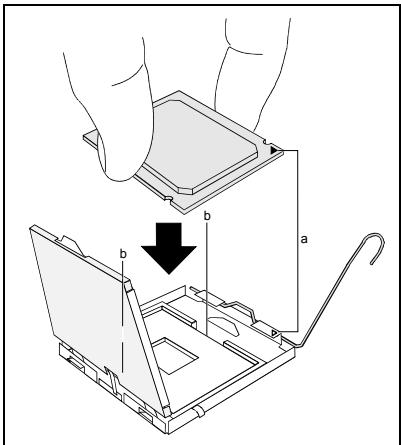
Hold the processor between your thumb and index finger and insert it into the socket (b) so that the marking of the processor is aligned with the marking on the socket (a).
Fold down the frame.
Press the lever downward until it is hooked in again.
Remove the protective cap and keep it.

Please note that, depending on the heat sink used, different heat sink mounts are required on the mainboard.
Depending on the configuration variant, you must pull a protective foil off the heat sink or coat the heat sink with heat conducting paste before fitting it.
Secure the heat sink - depending on the model - with four screws or push it into the mounts.
Installing/removing or replacing main memory
Technical data
Technology: DDR2 400 / DDR2 533 / DDR2 667 unbuffered DIMM modules 240-Pin; 1.8 V; 64 Bit, no ECC
Size: 256 MB to 4 GB DDR2
Granularity: 256, 512 or 1024 Mbyte for one socket
A current list of the memory modules recommended for this mainboard is available on the Internet at: www.fujitsu-siemens.com/mainboards.
At least one memory module must be installed. Memory modules with different memory capacities can be combined.

You may use only unbuffered 1.8V memory modules without ECC.
DDR2-memory modules must meet the PC2-3200U, PC2-4200U or PC2-5300U specification.

If you use more than one memory module, then make sure to distribute the memory modules over both memory channels. By doing this you use the performance advantages of the dual-channel mode.
The maximum system performance is given when the same memory size is used in Channel A and Channel B.
To simplify equipping, the slots are colour coded.
With a memory configuration of 4 Gbytes the visible and usable main memory can be reduced down to 3 Gbytes (depending on the system configuration).

| Number of inserted memory modules | ||||
| slot to be used | 1 | 2 | 3 | 4 |
| Channel A, slot 1 | X | X | X | X |
| Channel A, slot 3 | X | X | ||
| Channel B, slot 2 | X | X | X | |
| Channel B, slot 4 | X | |||
The installation/removal is described in the "Basic information on mainboard" manual.
PCI bus interrupts - Selecting correct PCI slot
Extensive information on this section is contained in the manual "Basic information on mainboard".

To achieve optimum stability, performance and compatibility, avoid the multiple use of ISA IRQs or PCI IRQ Lines (IRQ sharing). Should IRQ sharing be unavoidable, then all involved devices and their drivers must support IRQ sharing.
Which ISA IRQs are assigned to the PCI IRQ Lines is normally automatically specified by the BIOS (see "BIOS Setup" description).
Monofunctional expansions cards
PCI/PCI Express expansion cards require a maximum of one interrupt, which is called the PCI interrupt INT A. Expansion cards that do not require an interrupt can be installed in any desired slot.
Multifunctional expansion cards or expansion cards with integrated PCI-PCI bridge
These expansion cards require up to four PCI interrupts: INT A, INT B, INT C, INT D. How many and which of these interrupts are used is specified in the documentation provided with the card.
The assignment of the PCI interrupts to the IRQ Lines is shown in the following table:
| PCI INT LINE | Controller or slot INT | |||||||||||||
| On board controller | Mechanical slot | |||||||||||||
| 1 | 2 | 3 | 4 | - | ||||||||||
| USB 1.1 | USB 2.0 | SMBus | HD Audio | LAN | PCIe | PCI | ||||||||
| 1st | 2nd | 3rd | 4th | x16 | x1 | - | 1 | 2 | - | |||||
| 1 (A) | - | - | - | - | - | - | X | X | A | D | - | - | - | - |
| 2 (B) | - | - | - | - | - | - | - | - | B | A | - | - | - | - |
| 3 (C) | - | - | - | - | - | - | - | - | - | B | - | D | C | - |
| 4 (D) | - | - | - | - | - | X | - | - | - | C | - | C | D | - |
| 5 (E) | - | - | - | X | - | - | - | - | - | - | - | - | - | - |
| 6 (F) | - | - | X | - | - | - | - | - | - | - | - | B | A | - |
| 7 (G) | - | X | - | - | - | - | - | - | - | - | - | A | B | - |
| 8 (H) | X | - | - | - | X | - | - | - | - | - | - | - | - | - |
Use first PCI/PCI Express slots that have a single PCI IRQ Line (no IRQ sharing). If you must use another PCI/PCI Express slot with IRQ sharing, check whether the expansion card properly supports IRQ sharing with the other devices on this PCI IRQ Line. The drivers of all cards and components on this PCI IRQ Line must also support IRQ sharing.
BIOS update
When should a BIOS update be carried out?
Fujitsu Siemens Computers makes new BIOS versions available to ensure compatibility to new operating systems, new software or new hardware. In addition, new BIOS functions can also be integrated.
A BIOS update should always also be carried out when a problem exists that cannot be solved with new drivers or new software.
Where can I obtain BIOS updates?
The BIOS updates are available on the Internet at www.fujitsu-siemens.com/mainboards.
How does a BIOS update work?
You have two ways of doing this:
- BIOS update under DOS with bootable BIOS update floppy disk - brief description
Download the update file from out website to your PC.
Insert an empty floppy disk (1.44 Mbyte).
Run the update file (e.g. 2151103.EXE).
A bootable update floppy disk is created. Leave this floppy disk in the drive.
Restart the PC.
Follow the instructions on screen.

Detailed information on the BIOS update under DOS is provided in the manual on "BIOS Setup" ("Drivers & Utilities" CD).
2. BIOS update under Windows with DeskFlash utility
A BIOS update can also be carried out directly under Windows with the DeskFlash utility. DeskFlash is contained on the "Drivers & Utilities" CD (under DeskUpdate).
Graphics port
Technical data
Function: Intel GMA 950, 2D/3D graphics controller, Dynamic Video memory Technology, 400 Mhz integrated 24-bit RAMDAC
Features: Display Data Channel (DDC), 2 SDVO channels (up to 165 megapixels per channel), dual-view support for ADD2+ boards
Screen resolution
Depending on the operating system used, the screen resolutions in the following table refer to the mainboard screen controller.
If you are using an external screen controller, you will find details of supported screen resolutions in the operating manual or technical manual supplied with the controller.
| Display resolution | Refresh rate (Hz) | Colour |
| 640 x 480 | 120 | 32 bit |
| 800 x 600 | 120 | 32 bit |
| 1024 x 768 | 100 | 32 bit |
| 1280 x 1024 | 100 | 32 bit |
| 1600 x 1200 | 100 | 16 bit |
| 1920 x 1440 | 75 | 16 bit |
| 2048 x 1536 | 75 | 16 bit |
Mainboard D2151

Yka3aHnI IO MoDyJIaM
Дя мodyн e EGB oba3aTeIbHo yuHtBiaIte cneIyUoIee:
- Ipeed pa60toC moyJnMn Tpe6yeTc StaHueckn pa3pndt CBOe TeNo (Hapimep nocpeDCTBOM kacaHna KAKORo-JIn6o 3aemJeHHoro npdeMeTa).
- ICKHIOHTB BO3MOXHOCTb CTaTNUeCKOTo 3apraIa IcNoJIb3yEmbIX yCTpOJCTB INHCTPymENTOB.
- Pered yctaHOBKoI INI CHrTneM MOyIe BbIHbTe BnIKy CeTeBOrO Ka6eJIa I3 p03eTKI.
KacaiTeCb TOnbKO KpOMOK MoUJeI.
He npikacaiTecb K uTioTOBbIM BbIOaM uJIneuAHTbIM npOBOdHnKam MOdyIa.
O630p npo13B0dCTBeHHbIX poka3aTeNe Bbl naJeTe B texHnueckom nacIopTe!
OTJNUHTeJIbHbIe OcO6eHHoCTn
Bb mokeTe npno6peCTn BaUy MaTePHCKYIOIaTy B pa3JIuHbIX KOHcHpyraCIOHOHbIX NcOJIHeHnx. Ba7a MaTePHckAIIATA OblaAet ONpeDeJeHHbIMN NOKa3aTeJIaMNI JIN NOdEprKbNAeT INB 3aBNCIMoCTn OT eKoHcHpypaCIn.
B 3TOM PykoBoOCTBe NO 3KcPiyyatauIN Bbl NaIeTe OINCAHne BaxHeiux CBOICTB 3TOI MaTePHCKOIIaTbI.
Дальншую Иформачио O MaTePNHCKnx Пл Tax Bы Надente В руковдгve "Basic information on mainboard" («БаЗИСЧА Иформачио O MaTePNHCKоI ПлТe») Ha KOMпakT-ДиСke "User Documentation" Или "OEM Mainboard" Или якв Иntepнete.
CpeIcTba cOpjXeHn I wTeKeHbI pa3beMbl
HnΦopMaζI O paçnoJoxeHn CpeIcTB cOpJx Hx p3bEmOB Ha BaIe MaTeHnCKo IπaTe Bb I haIeTe B hauane PykoOdCTBa n 3KcnIyatauI.
IomeueHHbIe KOMnoHHeTbI N TeKepeHbIe pa3beMbI MOrYT OTCyTCTBOBaTb Ha MaTePHNcKoI PnlaTe.
BheHnne cpeDcTba copjxehnna
HnΦopMaζIIO O paCnOJIoxeHm BHeUHnx CpeIcTB CoPjaKeHna BaUeM MaTeHncko INaTe BbI NaIe T BHaJANE PyKOBODCTBa IOn 3KcPnyatauN.

IopT KJIaBnAtypb1 PS/2, fnoJeToBbI

nocneObaTeIbHbI INHTeppeic, 6npi03OBbl

IapannelbHbI INThepfeic/npInTeP,TEMHO-KpachbI

AydnoBxOa (Line in), CBeTnO-cnHn

USB - Universal Serial Bus (yHnBepcaJIbHaNЯ nOcNeIOBaTeJIbHaY shHa), cepHbIy

AynobbixoJ (Line out), CBeTIO-3eJIeHbI
MoHTaJ/TeMOHTaJ nn 3aMeHa IpoueccopoB (c paDnaTopom)

Дя осуцьпеня BCex onиcaHHbIX 3decb pa6ot BaIa cnCTema Длжна 6bIbT bIOJIHOCTbIO OTKIQUeHa OT cTeBOrO HanpЯЖeHЯ! BoIee NOdpo6Hy IOHΦopMauIIO 6bTOM BbI NaIDeTe BpyKOBoDCTBe no 3KcPnyaTaUIMn BaIe cnCTembl.
Texnueckne daHhble
Intel Pentium 4 c 533, 800 mJn 1066 MfC Front Side Bus B KOHCTpykTBHOM MCNOJIHeHIM LGA775
Intel Celeron D c 533 MfC Front Side Bus B KOHCTpykTNBOM IcnoJIHeHIM LGA775
- Aktyальный сиюск поочеров, подержимаьх STОМ MaTePинсКо ПпАТо, ВИnteрнete на саite: www.fujitsu-siemens.com/mainboards.

Hn B Koem cIyue He npKacaiTecB K HxHHe CToPoHe npOecoppa. Yke MaJeUne 3arp3HeHn, KaHapmEep, KInp Ha KOKe, MOrY HeraTINBHO Cka3aTbCra Ha pa6ote npOecoppa nn Ke pa3pyuHTb erO.
UcTaHaBnBaIte Ipoceccop B pa3bem OeyHb OCTopoXHO, NCKOJIbKpyPjxHHbIe KOHTaKTbI Ha pa3bEme OeyH cyBCTBtEJbHbI INx HEnb3r N3r6aTb.
B TOM CNYaee, ecnI ODNH NII HecKoNbKO npyXHHbIX KOHTaKTOB 30rHyTbI, HN B KOem Cnyae He yCTaHaBnBaIte IpoUeCCOp, NCKoJbKy 13-3a 3TORO OH MOxET 6bITb NOBpeXdH. PoxaIyIcTa, ObpaTInTeCb HENOCpeDCTBeHNO K KomPeTeHTHomy npodabuy.
Udaintpaunatop.

Pa3bEm nIpyoecccopa 3aKpbIT 3aunTHOII pAACTHKOI dJI 3aUHTbI pyjxHHbIX KOHTAeB. B cnyae npedbYBHeNRA rapAHINbIX npTeH3N BO3BpaUaemMaTePHNcKa IPIATA MOKeT 6bIT II pInHraTo TLbKO II pI HAIuNN pInKpEnJIeHHO3aUnTHO II pAACTHKn fIpMbI Fujitsu Siemens Computers!
Haxmnte ha pbyar nnoDnMnte ero.
IopHmMTe yCtpoiCTBO KpeJIeHnBvEx.
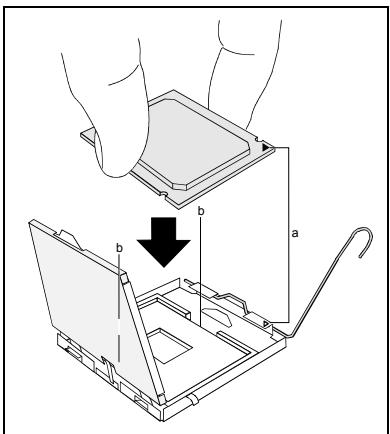
Держпглочьбдддддддддддддддддддддддддддддддддддддддддддддддддддддддддддддддддддддддддддддддддддддддддддддддддддд徳ын bctabte erB pa3bem (b) TaK, yTo6bl MapKnipOBka Ha npOceCope no CBOeMy paCNoJIOXeHnO NOJIHOCTbIO COBnAa C mapKnipOBkOHa pa3beme (a).
Onyctnte yctpoiCTBO KpeJIeHnBn3.
Haxmnte Ha pbyar Bn3 do uejka, 03haaouero, yTo npoceccop 3akpenneH.
YdaJInte 3aunTHyU nIactnHky u coXpaHraIte ee.

IoxaJyNCTa,yuTbBaIteTO,UToB 3aBnCIMOCTNoITNCIOb3yeMOro paDnAtopa Ha MaTePnHcKoPiNaTe Tpe6yIoTcra pa3NIuHbIe yCTpOoiCTBa KpeNIIeHnra paDnAtopa.
B 3aBnCmOCTn OT BapnaHTa KOHfNpyaunnepeyctaHOBKo paNaTopa BbdoJHKb CHrTB 3aUnTHyU pIeHky c paNaTopa, nnn Je pOKpbItb paNaTOp TepnonpOBOJaue nactOn.
Ykpene panaTop (B 3aBcHmocTn OT KOHpuraun) npn NMOU qETbIpex UpynoB nn JKe BCTabTe erO B Kpenek.
MoHTax/ДeMOHTax nIи 3aMeHa O3y
Texnueckne daHbie
Texhono: DDR2 400 / DDR2 533 / DDR2 667 moулд DIMM 6e3 6byfeprn3aun 240-Pin; 1,8 B; 64 6nt, 6e3 ECC
O6uŋ pa3mep: 256 M6aɪTa do 4 Γ6aɪTOB DDR2
Pa3mepbMoynpei: 256, 512 nIu 1024 M6aHTOB Ha kaxdOM Moynpe
AkyaIbHbI CNUCOK MOyJeN pAmrTn, peKoMeHNIOBaHbIX dIra 3ToI MaTePHCKO IIaTbI, Bbl NaIeTe B INTEPHeTe Ha caIte: www.fujitsu-siemens.com/mainboards.
HeoXoDIMO BCTpOHTb XOTa 6bl OJINH MOyIb nAMrTn. MoxHO KOM6HnHPOBaTb MOyIi nAmrTn c pa3JIuHoi EMKoCTbO 3Y.

Donyckaetra npimmeHne ToIbko moynen naTn 6e3 6yfepnzauin 1,8B 6e3 ECC.
MódyNJ nAMyTT DDR2 DOLJXHbI COOTBEcTBOBaTb CneuΦnKaU IN PC2-3200U, PC2-4200U nIN PC2-5300U.

EcIn BbI nCnOJIb3yete 6oJIbIe OJHOrO MoDyJIa nAMrTn, CneIITe 3a TeM, YTObI MoDyJI nAMrTn 6bJIIN paCnpEdeJeHbI Ha oBOnx KaHaJax C nAMrTbIO. 3a Cuet EToR OBi 6yDeTe IcNtOB30BaTb npEnMyUeCTBa pa6OuHx xapaKTePncTKn DByXKaHaNbHorO peKIma Dual- Channel-Mode.
MaKcImaJIbHbIe pa6OuHne XapakTePncTnKIOCTnraOTcB TOM cIyuae,ecnHa KaHaJIax Channel A n Channel B IcNoJIb3yOTcMoDyIn pAmrTc OndHaKOBbIMn pa3MepaMn.
Port microphone, rose

Entrée audio (Line in), bleu ciel

USB - Universal Serial Bus, noir

Sortie audio (Line out), vert clair