
DISCOVERY 610 - Bluetooth Headset PLANTRONICS - Free user manual and instructions
Find the device manual for free DISCOVERY 610 PLANTRONICS in PDF.


| Product Type | Bluetooth Headset |
| Brand | PLANTRONICS |
| Model | Discovery 610 |
| Approximate Dimensions | 5 x 2 x 1.5 cm |
| Approximate Weight | 10 g |
| Power Supply | Rechargeable lithium-ion battery, charges via AC adapter or USB port |
| Charging Time | 1 hour (minimum), 3 hours (full charge) |
| Talk Time | Up to 6 hours |
| Bluetooth Range | Up to 10 meters |
| Bluetooth Version | Bluetooth 2.0 (compatible with later versions) |
| Main Functions | Answer/end call, volume, secret mode, last number redial, voice dialing, call transfer |
| Status Indicators | Blue/red LED indicator: power on, charging, low battery, pairing mode, missed call, ringing |
| Box Contents | Headset, 3 gel ear tips (small, medium, large), ear stabilizer, AC adapter, safety guide, warranty card |
| Care and Cleaning | Clean with a soft, dry cloth. Do not immerse in water. |
| Safety | Do not use at high volume for extended periods to prevent hearing damage. Do not use while driving if prohibited by law. |
| Spare Parts and Accessories | Ear tips (70385-01), ear stabilizer (70384-01), AC charger (69520-01), USB charger (69519-01) |
| Repairability | Replacement parts available on the Plantronics website. Technical support by phone (0825 082599) or online. |
| Warranty | See included warranty card or visit www.plantronics.com/warranty |
| General Information | Complies with FCC Part 15 and Canadian RSS-210 standards. Manufactured by Plantronics, Inc., Santa Cruz, CA 95060, USA. |
Frequently Asked Questions - DISCOVERY 610 PLANTRONICS
User questions about DISCOVERY 610 PLANTRONICS
0 question about this device. Answer the ones you know or ask your own.
Ask a new question about this device
Download the instructions for your Bluetooth Headset in PDF format for free! Find your manual DISCOVERY 610 - PLANTRONICS and take your electronic device back in hand. On this page are published all the documents necessary for the use of your device. DISCOVERY 610 by PLANTRONICS.
USER MANUAL DISCOVERY 610 PLANTRONICS
This User Guide provides instructions for setup and use of the Plantronics Discovery™ 610 Bluetooth® Headset.
Before getting started, please review the safety booklet included in your package. For additional help, service or support information, refer to your product warranty card or visit www.plantronics.com.
DE WILLKOMMEN
Welcome. 2
Package contents and features 6
Charging. 8
Powering 10
Bluetooth pairing. 14
Fitting your headset. 18
Using your headset 24
Status indicators. 25
Troubleshooting 46
Spare parts and accessories 57
Register your product. 59
Technical assistance. 61
- Headset
- Headset status indicator
- Call control button (on/off)
- Volume/mute button
- Optional ear stabiliser
- Soft gel ear tip
a. Small b. Medium c. Large
- Microphone
- AC power adapter
DE PAKETINHALT UND PRODUKTMERKMALE
Prior to first use, the Plantronics Discovery 610 headset must be charged for a minimum of 1 hour; 3 hours for full charge. An AC power adapter is included. The headset status Indicator glows red during charging and turns off when fully charged.
Using the Included AC Power Adapter
CAUTION: Do not use headset while charging and do not connect the charger while the headset is in use.
- Plug the AC charger into the base of the headset and connect it to your power source.
DE AUFLADEN DES HEADS
DK OPLADNING AF HEADSET
GB POWERING ON AND OFF
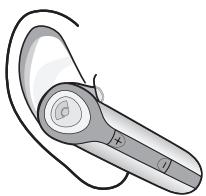
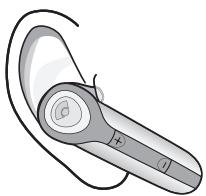
- Power on the headset by pressing and holding the call control button until the headset status indicator glows blue. If you are wearing the headset, you will hear a beep when the power turns on. The headset status indicator will flash blue every 6 seconds when the headset power is on.
NOTE When the headset is turned on, the headset status indicator will indicate the charge level of the headset.
Greater than 2/3 battery charge = 3 red flashes.
1/3 to 2/3 battery charge = 2 red flashes.
Less than 1/3 battery charge = 1 red flash.
- Power off the headset by pressing the call control button for 6-8 seconds until the headset status indicator glows red or until you hear the beep. The headset status indicator remains unlit when the power is off.
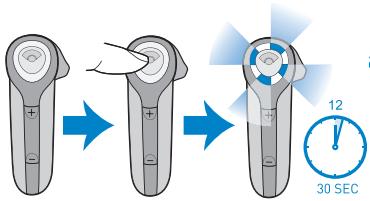
Before using your headset for the first time, you must pair it with another Bluetooth device, such as a mobile phone. Make sure the headset is fully charged.
Look in your Bluetooth device manual for the section that describes how to set up a Bluetooth wireless connection.
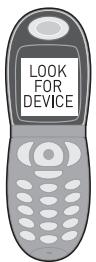
- Move through the menu selections on your phone until the phone display shows "Look for Devices," or equivalent, as a selection.
- With your headset turned off, hold down the call control button until the headset status indicator briefly glows blue, then flashes red and blue. The headset is now in discovery mode and will stay that way for 30 seconds.
- On your phone, highlight and select "Look for Devices," or equivalent, to activate the scan for the headset.
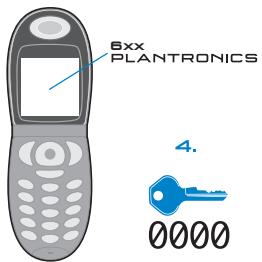
- When the phone display shows the scan results, select "6xx Plantronics". The phone will continue to search for the headset.
- When the phone display asks for a passkey, type "0000" and press Enter.
Your headset is now linked to your phone.
DE BLUETOOTH-PAARUNG
DK PARRING MED BLUETOOTH
The headset comes with three soft gel ear tips and an optional ear stabiliser. The medium sized ear tip is installed for wearing on the right ear.
- Twist the ear tip to the right for left ear wearing.
- Place the headset into your ear with the elongated side of the ear tip pointing up and forward.
If the fit is not comfortable, either too tight or too loose, remove the ear tip from the headset by turning the ear tip to the neutral* position and pulling the ear tip away from the headset.
- Next, select the ear tip size that fits most comfortably in your ear.
- Hold the ear tip with the elongated edge pointing down and push the ear tip post into the opening on the headset.
- Twist the ear tip to the left for right ear wearing or to the right for left ear wearing.
- Place the headset into your ear with the elongated side pointing up and forward.
USING THE OPTIONAL EAR STABILISER
The ear loop may be attached to the headset to improve stability.
- Remove the ear tip from the headset by turning the ear tip to the centre or neutral position* and pulling the ear tip away from the headset.
- Attach the stabiliser in-between the ear tip and the headset.
- Replace the ear tip.
DE ANPASSEN DES HEADSETS
ANSWERING AND ENDING CALLS
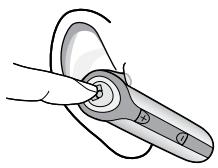
- To answer a call, briefly press the call control button or the volume/mute button.
- To answer or end a call, press the call control button.
ADJUSTING THE VOLUME
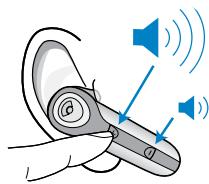
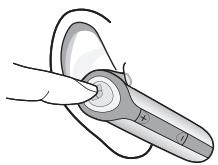
To increase the listening volume of the headset, press the upper end (+) of the volume/mute button.
To decrease the listening volume, press the lower end [-].
WARNING: Do not use headphones/headsets at high volumes for an extended period of time. Doing so can cause hearing loss. Always listen at moderate levels.
LAST NUMBER REDIAL
To activate last number radial, double click the call control button. You will hear a high tone for each key press.
NOTE: Last number radial must be supported by your device or mobile phone provider.
USING THE MUTE
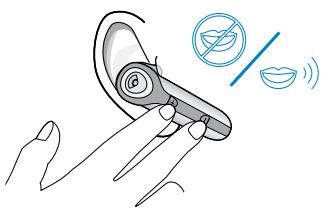
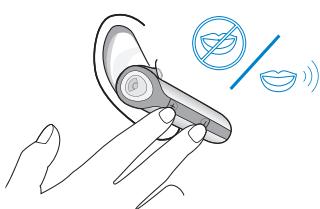
To turn the mute on whilst on a call, press both sides of the volume/mute button simultaneously until you hear a beep.
To turn the mute off, press both buttons again.
MOVING OUT OF RANGE
As the headset is moved away from the mobile phone or Bluetooth device, the following could occur:
Audio quality will degrade.
A beep will be heard in the headset.
Only the power off function will operate.
After 30 seconds, the headset will make one attempt to reconnect to the phone or device.
USING VOICE ACTIVATED DIALLING
NOTE: To use voice activated dialling, the voice activated dialling feature must be enabled on your device. See your Bluetooth device manual for instructions. With the headset on, one long press on the call control button activates the voice activated dialling feature on the headset.
MULIPLE USES OF A LONG PRESS ON THE CALL CONTROL BUTTON
| HEADSET FUNCTION | STATE OF THE BLUETOOTH DEVICE | RESULT |
| Turn on power | Power off | Turns the power on |
| Re-link to Bluetooth device | Power on Link dropped | Re-links the device |
| Reject call | Power on Linked Incoming call | Disconnects the call or sends the call to voice mail depending on your device |
| Transfer a call between Headset and Bluetooth device | Power on Linked On a call | Transfers the call from one device to another |
| Voice activated dialling | Power on Linked No call | Activates the voice recognition feature |
STATUS INDICATORS
| HEADSET STATUS | HEADSET STATUS INDICATOR |
| Powering on | Blue light appears and flashes every 6 seconds |
| Power on | Blue light flashes every 6 seconds |
| Powering off | Red light appears and goes off |
| Power off | Indicator is not lit |
| Charging battery | Red light is on |
| Battery fully charged | Red light is off |
| Discovery state | Indicator flashes blue and red for 30 seconds |
| Missed call | Infrequent flashing blue/redPress any button to cancel |
| Ringing | Rapid flashing blue/red |
| On Line Indicator (OLI) | Blue flash every 10 seconds |
| Low battery | Flashes red |
DE VERWENDEN DES HEADSETS
BESVARELSE OG AFSLUTNING AP OPKALD
Paraacular (+)-lateral aspect of the volucre, pulse of the extremo superior (+)lateral aspect of the volucre, pulse of the extremo superior (+)lateral aspect of the volucre, pulse of the extremo superior (+)lateral aspect of the volucre, pulse of the extremo superior (+)lateral aspect of the volucre, pulse of the extremo superior (+)lateral aspect of the volucre, pulse of the extremo superior (+)lateral aspect of the volucre, pulse of the extremo inferior (-)lateral aspect of the volucre, pulse of the extremo inferior (-)lateral aspect of the volucre, pulse of the extremo inferior (-)lateral aspect of the volucre, pulse of the extremo inferior (-)lateral aspect of the volucre, pulse of the extremo inferior (-)lateral aspect of the volucre, pulse of the extremo inferior (-)lateral aspect of the volucre, pulse of the extremol inferior (-)lateral aspect of the volucre, pulse of the extremol inferior (-)lateral aspect of the volucre, pulse of the extremol inferior (-)lateral aspect of the volucre, pulse of the extremol inferior (-)lateral aspect of the volucre, pulse of the extremol inferior (-)lateral aspect of the volucre, pulse of the extremol inferior (-)lateral aspect of the volucre, pulse of
BESVARA OCH AVSLUTA SAMTAL
MY HEADSET DOES NOT WORK WITH MY PHONE.
| POSSIBLE CAUSE | SOLUTION |
| Headset was not in discovery mode when mobile phone menu selections were made. | See page 14 “Pairing”. |
| Incorrect menu selections were made on your cellular phone. | See page 14 “Pairing”. |
I DID NOT ENTER MY PASS KEY.
| POSSIBLE CAUSE | SOLUTION |
| Your phone did not locate the headset. | Repeat the pairing process on page 14. |
| Incorrect menu selections were made on your cellular phone. | Repeat the pairing process on page 14. |
CALLERS CANNOT HEAR ME.
| POSSIBLE CAUSE | SOLUTION |
| Mute is turned on. | Press both sides of the volume/mute button simultaneously. |
I CANNOT HEAR CALLER/DIALLING TONE.
| POSSIBLE CAUSE | SOLUTION |
| The headset is not turned on. | Press the call control button for 2 seconds until you hear a beep or see the headset status indicator glow blue. |
| Your headset is out of range. | Move the headset closer to the phone or Bluetooth device. |
| Your headset battery is flat. | Charge your battery using the AC power adapter supplied. |
| The listening volume is too low. | Press the top part of the volume/mute button to increase the sound heard in the headset. |
DE FEHLERBEHEBUNG
MEIN HEADSET FUNKTIERTNICTMIT MEINEM TELEFON.
PARTS AND ACCESSORIES

75311-01
Headset
Headset
Headset
Auric
Kevtykuuloke
Oreillette
Auricolare
Headset
Hodesett
Auricular
Headset

70384-01
Ear stabiliser
Ohrbügel
Ørestabilisator
Orekrog
AC/DC car lighter adapter charger
PARTS AND ACCESSORIES
GB TO ORDER
To order, please contact your Plantronics supplier or go to www.plantronics.com
DE BESTELLUNG
This is not a condition of your warranty, but will assist us in providing the best possible service and technical support for your product. Visit www.plantronics.com/productregistration.
DE REGISTRIEREN SIE IHR PRODUKT ONLINE
For warranty information, please refer to the included product warranty card or visit www.plantronics.com/warranty.
DE GARANTIE
The Plantronics Technical Assistance Center (TAC) is ready to assist you! Dial 0800 410 014 or visit the support section of our web site at www.plantronics.com/support.
DE TECHNISCHE
UNTERSTÜTZUNG
Citywest Business Campus
Dublin 24
Office: +353 [0]1 4693725
Service ROI: 1800551896
Plantronics B.V.
Plantronics Acoustics
Italia Sri
Milano, Italia
Numero Verde: 800 950934
Plantronics Iberia, S.L.
Madrid, Espana
Tel: 902415191
Nordic Region
Tel: Finland: 0800117095
Tel: Sverige: 02002 14681
Tel: Danmark: 8088 4610
Plantronics Middle East
Eastern Europe, and Africa
Tel: +44 1793 842 443
Plantronics, Inc.
345 Encinal St.
Santa Cruz, CA 95060
Tel: 18314265868
www.plantronics.com

PLANTRONICS
SOUND INNOVATION

© 2006 Plantronics, Inc. All rights reserved. Plantronics, the logo design, Plantronics Discovery and Sound Innovation are trademarks or registered trademarks of Plantronics, Inc. The Bluetooth® word mark and logos are owned by Bluetooth SIG, Inc. and any use of such marks by Plantronics, Inc. is under licence. All other trademarks are the property of their respective owners.
Patents U.S. 5,210,791; D517,053; 392600-0002 Patents Pending
USER GUIDE
PLANTRONICS DISCOVERY™ 610
BLUETOOTH* HEADSET
WELCOME
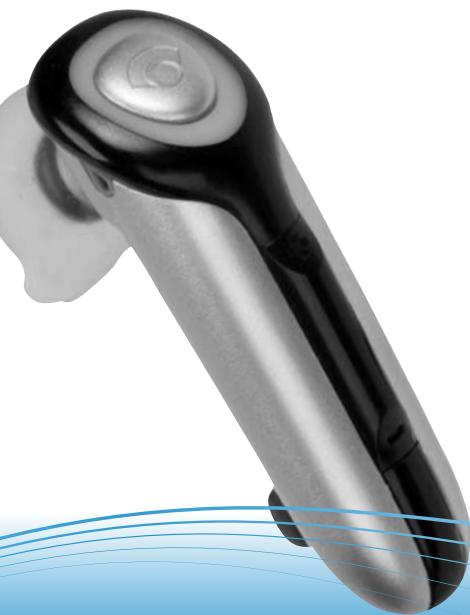
This User Guide provides instructions for setup and use of the Plantronics Discovery™ 610 Bluetooth® Headset.
Please refer to the separate safety instructions booklet for important product safety information prior to installation or use of the product.
TABLE OF CONTENTS
Welcome. 2
Package contents and features 3
Charging. 3
Powering 4
Bluetooth pairing 5
Fitting your headset. 6
Using your headset. 7
Status indicators. 8
Troubleshooting 9
Spare parts and accessories 10
Register your product. 10
Technical assistance. 10
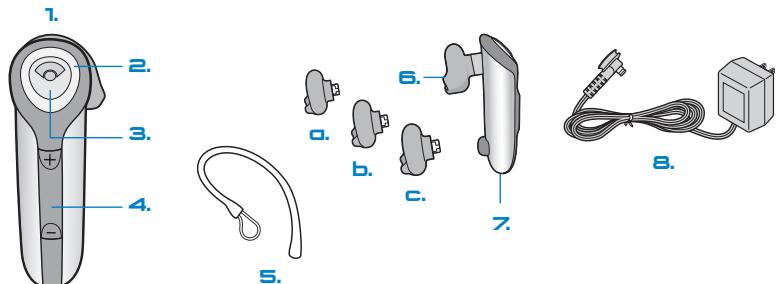
PACKAGE CONTENTS AND FEATURES
- Headset
- Headset status indicator
- Call control button (on/off)
- Volume/mute button
-
Optional ear stabilizer
-
Soft gel ear tip
a. Small
b. Medium
c. Large - Microphone
- AC power adapter
CHARGING YOUR HEADSET
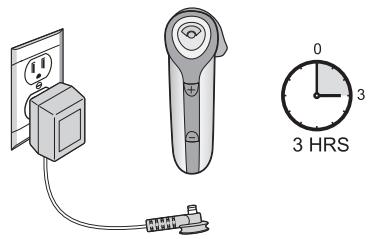
Prior to first use, the Plantronics Discovery 610 headset must be charged for a minimum of 1 hour; 3 hours for full charge. An AC power adapter is included. The headset status indicator glows red during charging and turns off when fully charged.
USING THE INCLUDED AC POWER ADAPTER
CAUTION: Do not use headset while charging and do not connect the charger while the headset is in use.
- Plug the AC charger into the base of the headset and connect it to your power source.
POWERING ON AND OFF
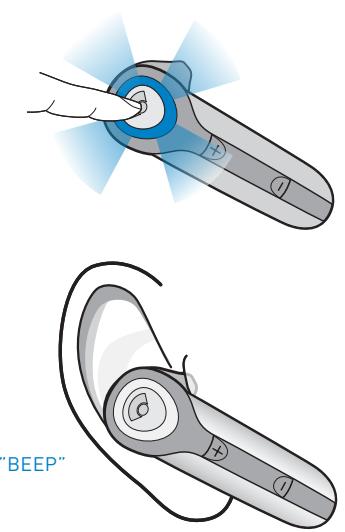
- Power on the headset by pressing and holding the call control button until the headset status indicator glows blue. If you are wearing the headset, you will hear a beep when the power turns on. The headset status indicator will flash blue every 6 seconds when the headset power is on.
NOTE When the headset is turned on, the headset status indicator will indicate the charge level of the headset.
Greater than 2/3 battery charge = 3 red flashes.
1/3 to 2/3 battery charge = 2 red flashes.
Less than 1/3 battery charge = 1 red flash.
- Power off the headset by pressing the call control button for 6-8 seconds until the headset status indicator glows red or until you hear the beep. The headset status indicator remains unlit when the power is off.
7.
2.
3.
BLUETOOTH PAIRING
Before using your headset for the first time, you must pair it with another Bluetooth device, such as a mobile phone. Make sure the headset is fully charged.
Look in your Bluetooth device manual for the section that describes how to set up a Bluetooth wireless connection.
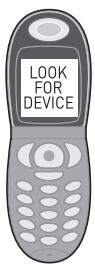
- Move through the menu selections on your phone until the phone display shows "Look for Devices," or equivalent, as a selection.
-
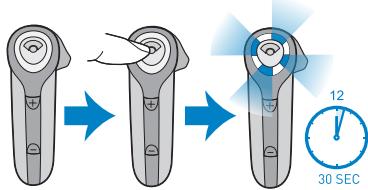
With your headset turned off, hold down the call control button until the headset status indicator briefly glows blue, then flashes red and blue. The headset is now in discovery mode and will stay that way for 30 seconds.
-
On your phone, highlight and select "Look for Devices," or equivalent, to activate the scan for the headset.
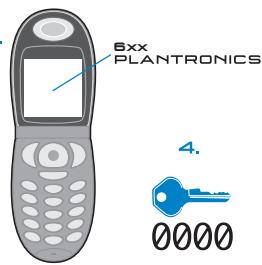
- When the phone display shows the scan results, select "6xx Plantronics". The phone will continue to search for the headset.
- When the phone display asks for a passkey, type "0000" and press Enter.
Your headset is now linked to your phone.
FITTING YOUR HEADSET
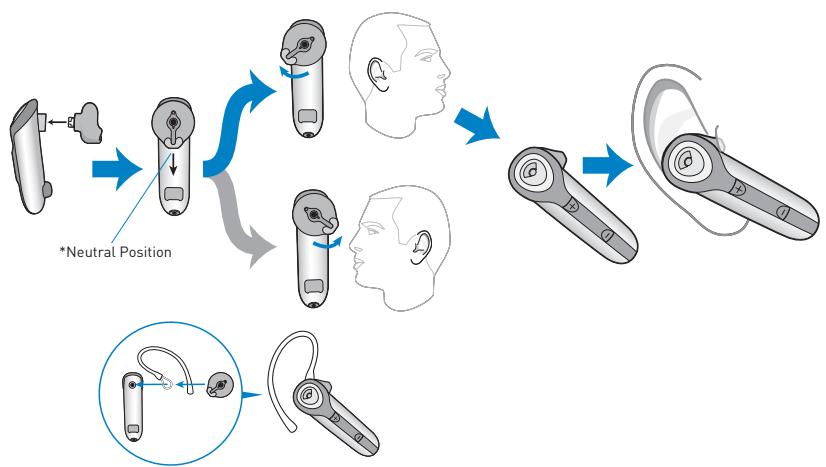
The headset comes with three soft gel ear tips and an optional ear stabilizer. The medium sized ear tip is installed for wearing on the right ear.
- Twist the ear tip to the right for left ear wearing.
- Place the headset into your ear with the elongated side of the ear tip pointing up and forward.
If the fit is not comfortable, either too tight or too loose, remove the ear tip from the headset by turning the ear tip to the neutral* position and pulling the ear tip away from the headset.
- Select the ear tip size that fits most comfortably in your ear.
- Hold the ear tip with the elongated edge pointing down and push the ear tip post into the opening on the headset.
- Twist the ear tip to the left for right ear wearing or to the right for left ear wearing.
- Place the headset into your ear with the elongated side pointing up and forward.
ANSWERING AND ENDING CALLS
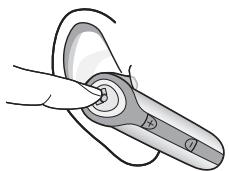
- To answer a call, briefly press the call control button or the volume/mute button.
- To end a call, briefly press the call control button.
ADJUSTING THE VOLUME
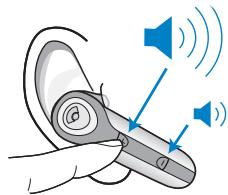
To increase the listening volume of the headset, press the upper end (+) of the volume/mute button.
To decrease the listening volume, press the lower end (-).
WARNING: Do not use headphones/headsets at high volumes for an extended period of time. Doing so can cause hearing loss. Always listen at moderate levels. See www.plantronics.com/healthsafety for more information on headsets and hearing.
LAST NUMBER REDIAL
To activate last number radial, double click the call control button. You will hear a high tone for each key press.
NOTE: Last number radial must be supported by your device or cellular provider.
USING THE MUTE
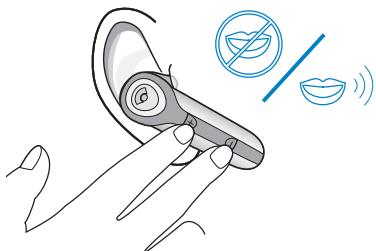
To turn the mute on whilst on a call, press both sides of the volume/mute button simultaneously until you hear a beep.
To turn the mute off, press both buttons again.
MOVING OUT OF RANGE
As the headset is moved away from the mobile phone or Bluetooth device, the following could occur:
Audio quality will degrade.
- A beep will be heard in the headset.
- Only the power off function will operate.
After 30 seconds, the headset will make one attempt to reconnect to the phone or device.
USING VOICE ACTIVATED DIALLING
NOTE: To use voice activated dialling, the voice activated dialling feature must be enabled on your device. See your Bluetooth device manual for instructions. With the headset on, one long press on the call control button activates the voice activated dialling feature on the headset.
MULTIPLE USES OF A LONG PRESS ON THE CALL CONTROL BUTTON
| HEADSET FUNCTION | STATE OF THE BLUETOOTH DEVICE | RESULT |
| Turn on power | Power off | Turns the power on |
| Re-link to Bluetooth device | Power on Link dropped | Re-links the device |
| Reject call | Power on Linked Incoming call | Disconnects the call or sends the call to voice mail depending on your device |
| Transfer a call between Headset and Bluetooth device | Power on Linked On a call | Transfers the call from one device to another |
| Voice activated dialing | Power on Linked No call | Activates the voice recognition feature |
STATUS INDICATORS
| HEADSET STATUS | HEADSET STATUS INDICATOR |
| Powering on | Blue light appears and flashes every 6 seconds |
| Power on | Blue light flashes every 6 seconds |
| Powering off | Red light appears and goes off |
| Power off | Indicator is not lit |
| Charging battery | Red light is on |
| Battery fully charged | Red light is off |
| Discovery state | Indicator flashes blue and red for 30 seconds |
| Missed call | Infrequent flashing blue/redPress any button to cancel |
| Ringing | Rapid flashing blue/red |
| On Line Indicator (OLI) | Blue flash every 10 seconds |
| Low battery | Flashes red |
TROUBLESHOOTING
MY HEADSET DOES NOT WORK WITH MY PHONE.
| POSSIBLE CAUSE | SOLUTION |
| Headset was not in discovery mode when mobile phone menu selections were made. | See page 5 "Bluetooth Pairing". |
| Incorrect menu selections were made on your cellular phone. | See page 5 "Bluetooth Pairing". |
I DID NOT ENTER MY PASS KEY.
| POSSIBLE CAUSE | SOLUTION |
| Your phone did not locate the headset. | Repeat the Pairing process on page 5. |
| Incorrect menu selections were made on your cellular phone. | Repeat the Pairing process on page 5. |
CALLERS CANNOT HEAR ME.
| POSSIBLE CAUSE | SOLUTION |
| Mute is turned on. | Press both sides of the volume/mute button simultaneously. |
I CANNOT HEAR CALLER/DIALLING TONE.
| POSSIBLE CAUSE | SOLUTION |
| The headset is not turned on. | Press the call control button for 2 seconds until you hear a beep or see the headset status indicator glow blue. |
| Your headset is out of range. | Move the headset closer to the phone or Bluetooth device. |
| Your headset battery is flat. | Charge your battery using the AC power adapter supplied. |
| The listening volume is too low. | Press the top part of the volume/mute button to increase the sound heard in the headset. |
PARTS AND ACCESSORIES
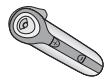
75311-01 Headset


Large

70384-01
Ear stabilizer
70385-01 Soft gel ear tip kit
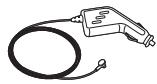
69520-01 AC/DC car lighter adapter charger
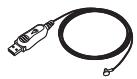
69519-01 USB headset charger
TO ORDER
To order, please contact your Plantronics supplier or go to www.plantronics.com
REGISTER YOUR PRODUCT ONLINE
This is not a condition of your warranty, but will assist us in providing the best possible service and technical support for your product. Visit www.plantronics.com/productregistration.
WARRANTY
For warranty information, please refer to the included product warranty card or visit www.plantronics.com/warranty.
TECHNICAL ASSISTANCE
The Plantronics Technical Assistance Center (TAC) is ready to assist you! In the UK, dial 0800 410 014. In Australia, dial 1800 793 150 or 1800 428 526. In New Zealand, dial 00 800 5444 6600.
Or visit the support section of our web site at www.plantronics.com/support.
MODEL AND COUNTRY INFORMATION
See package for product model number and refer to the table below for approved use.
| 74422-04 | GBR | CE |
| 74422-09 | Australia, New Zealand |
Plantronics Ltd.
Wootton Bassett, UK
Tel: 0800 410 014
Plantronics Pty Ltd.
Level 2
5 Everage St.
Moonee Ponds, VIC 3039
Tel: (03) 83710050
www.plantronics.com

PLANTRONICS
SOUND INNOVATION

© 2006 Plantronics, Inc. All rights reserved. Plantronics, the logo design, Plantronics Discovery and Sound Innovation are trademarks or registered trademarks of Plantronics, Inc. The Bluetooth® word mark and logos are owned by Bluetooth SIG, Inc. and any use of such marks by Plantronics, Inc. is under licence. All other trademarks are the property of their respective owners.
Patents U.S. 5,210,791; D517,053; 392600-0002 Patents Pending
USERGUIDEGUIDE DE L'UTILISATEUR_GUIA DEL USUARIO GUIA DO USUARIO
PLANTRONICS DISCOVERY™610
BLUETOOTHHEADSET
MICRO-CASQUE BLUETOOTH
AURICULAR BLUETOOTH
HEADSET BLUETOOTH
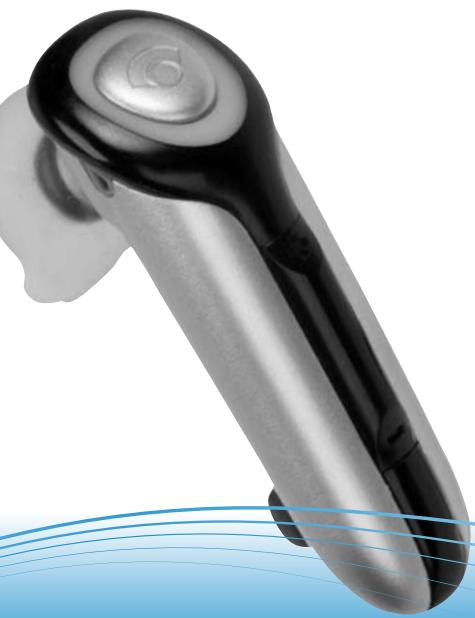
EN WELCOME
This User Guide provides instructions for setup and use of the Plantronics Discovery™ 610 Bluetooth® Headset.
Before getting started, please review the safety booklet included in your package. For additional help, service or support information, refer to your product warranty card or visit www.plantronics.com.
ES BIENVENIDO
Package Contents and Features 3
Charging. 4
Powering 5
Bluetooth Pairing 6
Fitting Your Headset 8
Using Your Headset 10
Status Indicators. 12
Troubleshooting 16
Spare Parts and Accessories. 20
Register Your Product. 21
Technical Assistance. 21
FCC Requirement Information 22
ES CONTENIDO
Bienvenido 2
Contedio del paquete ycharacteristicas.....3
Carga. 4
Encendido 5
- Headset
- Headset status indicator
- Call control button (on/off)
- Volume/mute button
- Optional ear stabilizer
- Soft gel ear tip
a. Small
b. Medium
c. Large
- Microphone
- AC power adapter
FR CONTENU DE LA BOITE ET CARACTERISTIQUES
Prior to first use, the Plantronics Discovery 610 headset must be charged for a minimum of 1 hour; 3 hours for full charge. An AC power adapter is included. The headset status Indicator glows red during charging and turns off when fully charged.
USING THE INCLUDED AC POWER ADAPTER
- Plug the AC power adapter into the base of the headset and connect it to your power source.
FR CHARGE DU MICRO-CASQUE
EN POWERING ON AND OFF
- Power on the headset by pressing and holding the call control button until the headset status indicator glows blue. If you are wearing the headset, you will hear a beep when the power turns on. The headset status indicator will flash blue every 6 seconds when the headset power is on.
NOTE When the headset is turned on, the headset status indicator will indicate the charge level of the headset.
Greater than 2/3 battery charge = 3 red flashes.
1/3 to 2/3 battery charge = 2 red flashes.
Less than 1/3 battery charge = 1 red flash.
- Power off the headset by pressing the call control button for 6-8 seconds until the headset status indicator glows red or until you hear the beep.
The headset status indicator remains unlit when the power is off.
ES ENCENDIDO YAPAGADO
FR MISE SOUS TENSION/HORS TENSION
Before using your headset for the first time, you must pair it with another Bluetooth device, such as a mobile phone. Make sure the headset is fully charged.
Look in your Bluetooth device manual for the section that describes how to set up a Bluetooth wireless connection.
- Move through the menu selections on your phone until the phone display shows "Look for Devices," or equivalent, as a selection.
- With your headset turned off, hold down the call control button until the headset status indicator briefly glows blue, then flashes red and blue. The headset is now in discovery mode and will stay that way for 30 seconds.
- On your phone, highlight and select "Look for Devices," or equivalent, to activate the scan for the headset.
- When the phone display shows the scan results, select "6xx Plantronics". The phone will continue to search for the headset.
- When the phone display asks for a passkey, type "0000" and press Enter.
Your headset is now linked to your phone.
FRÉTABILISSEMENT D'UNELIAISON BLUETOOTH
The headset comes with three soft gel ear tips and an optional ear stabilizer. The medium sized ear tip is installed for wearing on the right ear.
- Twist the ear tip to the right for left ear wearing.
- Place the headset into your ear with the elongated side of the ear tip pointing up and forward.
If the fit is not comfortable, either too tight or too loose, remove the ear tip from the headset by turning the ear tip to the neutral* position and pulling the ear tip away from the headset.
- Next, select the ear tip size that fits most comfortably in your ear.
- Hold the ear tip with the elongated edge pointing down and push the ear tip post into the opening on the headset.
- Twist the ear tip to the left for right ear wearing or to the right for left ear wearing.
- Place the headset into your ear with the elongated side pointing up and forward.
USING THE OPTIONAL EAR STABILIZER
The ear tip stabilizer may be attached to the headset to improve stability.
- Remove the ear tip from the headset by turning the ear tip to the centre or neutral position* and pulling the ear tip away from the headset.
- Attach the stabilizer in-between the ear tip and the headset.
- Replace the ear tip.
FR AJUSTEMENT DU MICRO-CASQUE
EN ANSWERING AND ENDING CALLS
- To answer a call, briefly press the call control button or the volume/mute button.
- To answer or end a call, press the call control button.
ADJUSTING THE VOLUME
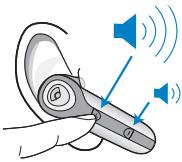
To increase the listening volume of the headset, press the upper end (+) of the volume/mute button.
To decrease the listening volume, press the lower end [-].
WARNING: Do not use headphones/headsets at high volumes for an extended period of time. Doing so can cause hearing loss. Always listen at moderate levels.
LAST NUMBER REDIAL
To activate last number redial, double click the call control button. You will hear a high tone for each key press.
NOTE: Last number radial must be supported by your device or mobile phone provider.
FR RESPONDRE AUX APPELS ET RACCROCHER
To turn the mute on whilst on a call, press both sides of the volume/mute button simultaneously until you hear a beep.
To turn the mute off, press both buttons again.
MOVING OUT OF RANGE
As the headset is moved away from the mobile phone or Bluetooth device, the following could occur:
Audio quality will degrade.
A beep will be heard in the headset.
Only the power off function will operate.
After 30 seconds, the headset will make one attempt to reconnect to the phone or device.
FR UTILISATION DE LA FONCTION DE DISCRIPTION
To use voice activated dialling, the voice activated dialling feature must be enabled on your device. See your Bluetooth device manual for instructions. With the headset on, one long press on the call control button activates the voice activated dialling feature on the headset.
EN MULTIPLE USES OF A LONG PRESS ON THE CALL CONTROL BUTTON
| HEADSET FUNCTION | STATE OF THE BLUETOOTH DEVICE | RESULT |
| Turn on power | Power off | Turns the power on |
| Re-link to Bluetooth device | Power on Link dropped | Re-links the device |
| Reject call | Power on Linked Incoming call | Disconnects the call or sends the call to voice mail depending on your device |
| Transfer a call between Headset and Bluetooth device | Power on Linked On a call | Transfers the call from one device to another |
| Voice activated dialling | Power on Linked No call | Activates the voice recognition feature |
EN STATUS INDICATORS
| HEADSET STATUS | HEADSET STATUS INDICATOR |
| Powering on | Blue light appears and flashes every 6 seconds |
| Power on | Blue light flashes every 6 seconds |
| Powering off | Red light appears and goes off |
| Power off | Indicator is not lit |
| Charging battery | Red light is on |
| Battery fully charged | Red light is off |
| Discovery state | Indicator flashes blue and red for 30 seconds |
| Missed call | Infrequent flashing blue/redPress any button to cancel |
| Ringing | Rapid flashing blue/red |
| On Line Indicator (OLI) | Blue flash every 10 seconds |
| Low battery | Flashes red |
FR UTILISATION DE LA COMPOSITION VOCALE
EN MY HEADSET DOES NOT WORK WITH MY PHONE.
| POSSIBLE CAUSE | SOLUTION |
| Headset was not in discovery mode when mobile phone menu selections were made. | See page 6 “Pairing”. |
| Incorrect menu selections were made on your mobile phone. | See page 6 “Bluetooth Pairing”. |
EN I DID NOT ENTER MY PASSWORD.
| POSSIBLE CAUSE | SOLUTION |
| Your phone did not locate the headset. | Repeat the pairing process on page 6. |
| Incorrect menu selections were made on your mobile phone. | Repeat the pairing process on page 6. |
EN CALLERS CANNOT HEAR ME.
| POSSIBLE CAUSE | SOLUTION |
| Mute is turned on. | Press both sides of the volume/mute button simultaneously. |
EN I CANNOT HEAR CALLER/DIALLING TONE.
| POSSIBLE CAUSE | SOLUTION |
| The headset is not turned on. | Press the call control button for 2 seconds until you hear a beep or see the headset status indicator glow blue. |
| Your headset is out of range. | Move the headset closer to the phone or Bluetooth device. |
| Your headset battery is flat. | Charge your battery using the AC power adapter. |
| The listening volume is too low. | Press the top part of the volume/mute button to increase the sound heard in the headset. |
FR DÉPANNAGE
FR LE MICRO-CASQUENE FONCTIONNE PAS AVEC MON TELLEPHONE.
PT NAO DIGITEI MINHA CHAVE-MESTRA.
To order, please contact your Plantronics supplier or go to www.plantronics.com
ES PIEZAS DE REPUESTO
75311-01 Auricular


Pequeño

Mediano

Grande
This is not a condition of your warranty, but will assist us in providing the best possible service and technical support for your product. Visit www.plantronics.com/productregistration.
EN WARRANTY
For warranty information, please refer to the included product warranty card or visit www.plantronics.com/warranty.
EN TECHNICAL ASSISTANCE
The Plantronics Technical Assistance Center (TAC) is ready to assist you on 866-363-BLUE [2583], or visit the Support section of our Web site at www.plantronics.com for technical support. You can also call the technical assistance center for accessibility information.
ES REGISTRO DEL PRODUCTO EN LINEA
Operation is subject to the following two conditions:
- This device may not cause harmful interference.
- This device must accept any interference received, including interference that may cause undesired operation.
This equipment has been tested and found to comply with the limits for a Class B digital device, pursuant to Part 15 of the FCC Rules. These limits are designed to provide reasonable protection against harmful interference in a residential installation. This equipment generates, uses, and can radiate radio frequency energy and, if not installed and used in accordance with the instructions, may cause harmful interference to radio communications.
However, there is no guarantee that interference will not occur in a particular installation. If this equipment does cause harmful interference to radio or television reception which can be determined by turning the radio or television off and on, the user is encouraged to try to correct interference by one or more of the following measures:
- Reorient or relocate the receiving antenna.
- Increase the separation between the equipment and receiver.
- Connect the equipment into an outlet on another circuit.
- Consult the dealer or an experienced radio/ TV technician for help.
EXPOSURE TO RADIO FREQUENCY RADIATION
This device and its antenna must not be collocated or operated in conjunction with any other antenna or transmitter. To comply with FCC RF exposure requirements, only use supplied antenna. Any unauthorized modification to the antenna or device could void the user's authority to operate this device.
INDUSTRY CANADA NOTICE RADIO EQUIPMENT
The term "IC:" before the radio certification number only signifies that Industry Canada technical specifications were met. Operation is subject to the following two conditions: (1) this device may not cause interference, and (2) this device must accept any interference, including interference that may cause undesired operation of the device. "Privacy of communications may not be ensured when using this telephone." This product meets the applicable Industry Canada technical specifications of the RSS210.
AVIS RÉGLEMENTAIRES
EXIGENCES DE LA SECTION 15 DU REGLEMENT DE LA FCC
© 2006 Plantronics, Inc. All rights reserved.
Plantronics, the logo design, Plantronics Discovery and Sound Innovation are trademarks or registered trademarks of Plantronics, Inc. The Bluetooth® word mark and logos are owned by the Bluetooth SIG, Inc. and any use of such marks by Plantronics is under licence. All other trademarks are the property of their respective owners.
Patents U.S. 5,210,791; D517,053; EM392600-0002
Patents Pending
75358-05 [11.06]
ES
Plantronics, Inc.
345 Encinal Street
PykoBoDCTBO noIb3ObaTeia
Kullanim kilavuzu
PLANTRONICS DISCOVERY™ 610
BLUETOOTHHEADSET
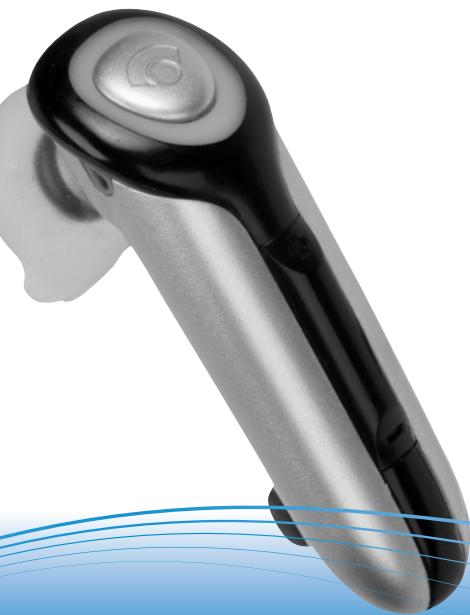
Plantronics DISCOVERY™ 610 • Bluetooth* Headset
*Plantronics DISCOVERY™ 610 • Bluetooth
Plantronics DISCOVERY™ 610· Akouotiko Bluetooth
Plantronics DISCOVERY™ 610·Bluetooth* fejhallgató
*Plantronics DISCOVERY™ 610 • Bluetooth®
Plantronics DISCOVERY™ 610 • Słuchawka Bluetooth*
Casca Plantronics DISCOVERY™ 610 • Bluetooth®
TapHnTypa Plantronics DISCOVERY™ 610 • Bluetooth*
Plantronics DISCOVERY™ 610 • Bluetooth® Kulaklik

Bluetooth
WELCOME
EN WELCOME
This User Guide provides instructions for setup and use of the Plantronics Discovery™ 610 Bluetooth® Headset.
Before getting started, please review the safety booklet included in your package. For additional help, service or support information, refer to your product warranty card or visit www.plantronics.com.

AR
eau pluus uus 160 160 160 160 160 160 160 160 160 160 160 160 160 160 160 160 160 160 160 160 160 160 160 160 160 16
EL AIA ANOIA IATON AGOPA2TH
Welcome 2
Package contents and features.. 6
Charging. 8
Powering 10
Bluetooth pairing. 13
Fitting your headset. 17
Using your headset 22
Status indicators. 23
Troubleshooting 40
Spare parts and accessories. 49
Register your product 51
Technical assistance. 53
AR
1
i. j. 10
A
1.
Bluetooth
V
Y
yo
1
\$9
01
or 2
EL ΠINAKAΣ ΠΕPIEXOMENΩN
Aiyia loyia yia tov ayopaootn. 2
περιεύμενο συακευασίας καλ εραρακηριοίκα 6
ΦoPTiOn Tou akouotikoU 8
EvapEnTepaiooic aeitoupyiac 10
Zeuyonoinon Bluetooth 14
PpOaepoyTouakouotikoU. 18
Xpən tou akouotiko' 26
Evdekiktec luxvie c kataoataon 27
Aviuetwion npoBnmuatov. 42
Avtaakikakai npekoueva. 49
o i o v t o c 51
Texvikn Bontheta 53
HU TARTALOMJEGYZEK
- Headset
- Headset status indicator
- Call control button (on/off)
- Volume/mute button
- Optional ear stabiliser
- Soft gel ear tip
a. Small b. Medium c. Large
- Microphone
- AC power adapter
EL ΠΕPIEXOMENO ΣΥΣKEYAΣIAΣ KAI XAPAKTHPIΣTIKA
- AKOUOTIKO
- Evdekikn kuxvia kataoaonc akouotikoou
- Koupié lÉvxyou kλησεωv (on/off)
- Kouμπi puθμιοης ενταοης/ σίγαοης
- PpOaipEtikn diataEg ot aTeepoOnoinonc
- Éçâptjμa yiao tu aotui anó μαλακο τελε A. miko B. meaio A. meyáo
- Mikofoovo
- DoptiOnTic
jall jolll jil
wifelaw .1
aaiiae aieaae
(1jai jai) 1
gall 1
yj 0
pLi gda u j 1
yS.c buaa.b yaa.a
S OBC = S BOC + S_ BOC
all 100
AB
HU A CSOMAG TARTALMA, FÖBB TULAJDONSÁGOK
Prior to first use, the Plantronics Discovery 610 headset must be charged for a minimum of 1 hour; 3 hours for full charge. An AC power adapter is included. The headset status Indicator glows red during charging and turns off when fully charged.
Using the Included AC Power Adapter
CAUTION: Do not use headset while charging and do not connect the charger while the headset is in use.
- Plug the AC charger into the base of the headset and connect it to your power source.
AR
Jll aclaw jy Jl 5 yall ldal alldal J
Jl 5 5d, al ad alad Plantronics Discovery 610
Jd 5 5d all Jd all Jd all Jd all Jd all Jd all Jd all Jd all Jd all Jd all Jd all Jd all Jd all Jd all Jd all
jaiaiai jaiiiaai jaiiaai jaiiaai
RU 3APJDKA FAPHNTyPbI
Perepe npBbM mNoPb3OBaHmeprHnTpyb Plantronics Discovery 610 cneUyert zapdYtbe e TcehenHe Me HeeMe 1 qaca; pnoHaJzapdka OocJeCTBIAIETcB TcehenHe 3 qacob. CTeBoi adAnpTe BxOITM B KOMNKeT. Bo BPm3 zapdKn INHdkatop COToTHnR HApTpyb ToRipKpaChbIM OH bIKNuOHTae nOcne nOJIHOuZapdKn.
IcnoIb3OBAHnE npnilaraemoro ceteBoro aadTepa
OCTOPOXKHO: He nCnObnb3yIte raphNtpyu B npOcEce 3apdKn u He nDcoEdnHne K Nei 3aprAHOe yCToPcTBO BO BpeMnCnObn3oBaHmR raphNtpybl.
- Пдклоче сетеваяAdapterТКбазарн'tурьи ВКИОчITE erВИСТОЧИКПТАНДА.
TR KULAKLIGI SARJ ETME
Plantronics Discovery 610 kulaklik, ilk kullanimdan once en az 1 staat sarj edilmidir; tam sarj suresi 3 saattir. Bir AC guc adaptororu de urun paketine dahildir. Kulaklin durum goftergesi sarj suresince kirmizi olarak yanar ve kulaklik tamamen sarj oldugunda söner.
Paketteki AC Guç Adaptörünün Kullanilmasi
"BEEP"
"di#s##"
"MIPII"
"SIPS20"
"di#y"
"SYGNAL"
"BIP"
"TYDOK"
"BIP" SESI
aiaag aaii bllly ayj
AR

aill j 11111111111111111111111111111111111111
jia jia jiu jiu jiu jiu jiu jiu jiu jiu jiu jiu jiu jiu jiu jiu jiu jiu jiu jiu jiu jiu jiu jiu jiu jiu jiu jiu jiu jiu jiu jiu jiu jiu jiu jiu jiu jiu jiu jiu jiu jiu jiu jiu jiu jiu jiu jiu jiu jiu jiu jiu jyu jiuyu jiuyu jiuyu jiuyu jiuyu jiuyu jiuyu jiuyu jiuyu jiuyu jiuyu jiuyu jiuyu jiuyu jiuyu jiuyu jiuyu jiuyu jiuyu jiuyu jiuyu jiuyu jiuyu jiuyu jiuyu jiuyu jiuyu jiuyu jiuyu jiuyu jiuyu jiuyu jiuyu jiuyu
clalall jai jai s jia jai clalai
4.1.2.1.1.1.1.1.1.1.1.1.1.1.1.1.1.1.1.1.1.1.1.1.1.1.1.1.1.1.1.1.1.1.1.1.1.1.1.1.1.1.1.1.1.1.
Jusily Cilao,
42
Jusy 1
=2yjlaia1/1n
1
EN POWERING ON AND OFF
- Power on the headset by pressing and holding the call control button until the headset status indicator glows blue. If you are wearing the headset, you will hear a beep when the power turns on. The headset status indicator will flash blue every 6 seconds when the headset power is on.
NOTE: When the headset is turned on, the headset status indicator will indicate the charge level of the headset.
Greater than 2/3 battery charge = 3 red flashes.
1/3 to 2/3 battery charge = 2 red flashes.
Less than 1/3 battery charge = 1 red flash.
- Power off the headset by pressing the call control button for 6-8 seconds until the headset status indicator glows red or until you hear the beep. The headset status indicator remains unlit when the power is off.
EL ENAPÉH/ TEPMATIΣMOΣ ΛEITOYPΓIAΣ
- Tia va theoTeTo aoukOtiko oE Aeitoupyia, nattoe Kai kpatnoTe nato mevo To koumi eAeyxou Kaaneuw lexpic Otou neEvEktikn Auxvia kataotaoc Tou akouotiko avaiei mLe.Aev opateTo aoukOtiko,8a aoukOeE evaumolcTo aoukOtiko TeBei ot Aeitoupyia. Otav to aoukOtiko eiva ot Aeitoupyia, neEvEktikn Auxvia kataotaoc Tou aoukOtiko va avaooBneVie mLeia qopa kahe6 deutepoleitta.
SHMEIOSS:OTAVTOAKOUIKIOEiVAIe
aIEIoUpyia, nEvOEIKITKluXvua KAToAaONc
Tou AKOUOTIKIO UMOEIKVUEI Tn OTAun
pOFTIONC TOU AKOUOTIKOu.
ΦOpTIO MEyALATEPO TuV 2/3 TnC
xWnpTIKOTNTAC TnC mAtapTAc = 3KOKVIEC AVaALaJInc
Meta1/3Kai 2/3 TnC xWnpTIKOTNTAC = 2KOKVIEC AVaALaJInc
AIyTEPO ano 1/3 TnC xWnpTIKOTNTAC = 1KOKVIIN AVaALaJInc
- Tia va theeTo akouotiko EKTOc LEIToupyiac, nATOTKe iKa pTnTe nATJmuEvTo kOUmI neElyxou kAnoeW eTI 6-8 DeutepOeTTa MEpic OTU n EvEIKtIKu LVXua KATAoTaON tou Akouotikou AVaJIe KoKKIVn NkAoueTe TO mH.IN H EvEIKtIKu LVXca KATAoON tou Akouotikou napaIeV aBnOri, oTAV to Akouotiko EivaEKTc AEIToupyiac.
HU BE-ÉS KIKAPCSOLÁS
"BEEP"
"di#s##"
"MIPII"
"SIPSZ0"
"di#y"
"SYGNAL"
"BIP"
"TYDOK"
"BIP" SESI
TR KULAKLIGI ACMA/KAPAMA
Before using your headset for the first time, you must pair it with another Bluetooth device, such as a mobile phone. Make sure the headset is fully charged.
Look in your Bluetooth device manual for the section that describes how to set up a Bluetooth wireless connection.
- Move through the menu selections on your phone until the phone display shows "Look for Devices," or equivalent, as a selection.
- With your headset turned off, hold down the call control button until the headset status indicator briefly glows blue, then flashes red and blue. The headset is now in discovery mode and will stay that way for 30 seconds.
- On your phone, highlight and select "Look for Devices," or equivalent, to activate the scan for the headset.
- When the phone display shows the scan results, select "6xx Plantronics". The phone will continue to search for the headset.
- When the phone display asks for a passkey, type "0000" and press Enter.
Your headset is now linked to your phone.
BLUETOOTH
J 1
J 1
J 1
J 1
J 1
J 1
J 1
J 1
J 1
J 1
J 1
J 1
J 1
J 1
J 1
J 1
J 1
J 1
J 1
J 1
J 1
J 1
J 1
J 1
J 1
J 1
BLUETOOTH PAIRING
7.
2.
3.
EL ZEYTONOIHSH BLUETOOTH
IpoTOX npOIOHOETe AOAKOTKO Yia npOTn
oPoa, _a pTeiVA to CEoyOIOHOETe ME ia dAAn
ouakeun Bluetooth, BeaaiOEtE ot i n mpatia Tou
AOAKOTKO Eivai nipoc fopriouevn.
Avatopé Étre TnV evotnta Tou éxyepidoiu xpnnc
Tnc oukeun, Bluetooth nepi anokataotaanc, miaac
auapatniu vcv6eNc, Bluetooth
- Kávte TIC avaykaiec émloyec éoaa o Ta mevou tou kivnoiu, eupeic otou otiv obovi tou kivnoiu eupavioiTe i evtolnpiaviCtnong ouokceuwv.
- Me to akoutikO EKTOC LEITOUpyiAC, TATNE KAI kpatneTATE naiTeVIO TO kouMI EIYEYOU KLIeovu MEpICOTou nIevEIKTIKU LVXIVa KATAOAnC TOUAKOTIKO AVaIEIVAIyIOJAE KAI KAtoniv apxiei VAvaBooJIeVEvALAAc KOKKINKAI mIaNTE.ToTe, to akoutIKO EVAI OE tpoI aeLTOUpyiac EvapEnC CEUYOToinNc KAI 0a npaueivei Oe autovTo vTo pTo AEITOUpyiac ENI 30 SeutepeoAETTA.
- Tso KIVNTo TnIePwvo, EINIOJAVETe KAI EIIAECTe TVEOTAn Npei AcaNtnc OuaKEUw, POKOEIEVOU To KIVNTo VA apXiaTe IVa aCHTnTou AKoAUITKOU.
- Mólic otnv oθovn tou ηεφωvou εμφaviotou v ta anoteλeajata tnc avacηntong, emλeEte "6x7 Plantronicu. To ηεφωνo 8a ouvexiaei va avacτe i to akoutikó.
- EadvTo KInTTo CInTHei KuDIO npoAoBaANC,
nAnKTpoAoVoyTeOo000"Kai KarTOnIV natiOTe
to KouMIiEioaayvNc.
"nnn nnnn nn nnnn nnnn nnnn nnnn nnnn nnnn nnnn nnnn nnnn nnnn nnnn nnnn nnnn nnnn nnnn nnnn nnnn nnnn nnnn nnnn nnnn nnnn nnnn nnnn nnnn nnnn nnnn nnnn nnnn nnnn nnnn nnnn nnnn nnnn nn
n, n" 4
n nn nn nn nn nn nn nn nn nn nn nn nn nn nn nn nn nn nn nn nn nn nn nn nn nn nn nn nn nn nn nn nn nn nn nn nn nn nn nn nn nn nn nn nn nn nn nn nn nn nn nn nn nn nn nn nn nn nn nn nn nn nn nn nn nn nn nn nn nn nn nn nn nn nn nn nn nn nn nn nn nn nn nn nn nn nn nn nn nn nn nn nn nn nn nn nn nn nn nn nn.
n nn nnnnnnnnnnnnnnnnnnnnnnnnnnnnnnnnnnnnnnnnnnnnnnnnnnnnnnnnnnnnnnnnnnnnnnnnnnnnnnnnnnnnnnnnnnnnnnnnnnnnnnnnnnnnnnnnnnnnnnnnnnnnnnnnnnnnnnnnnnnnnnnnn
11777777777777777777
PL PAROWANIE BLUETOOTH
RU COINPRAXEHEME C BLUETOOTH
The headset comes with three soft gel ear tips and an optional ear stabiliser. The medium sized ear tip is installed for wearing on the right ear.
- Twist the ear tip to the right for left ear wearing.
- Place the headset into your ear with the elongated side of the ear tip pointing up and forward.
If the fit is not comfortable, either too tight or too loose, remove the ear tip from the headset by turning the ear tip to the neutral* position and pulling the ear tip away from the headset.
- Next, select the ear tip size that fits most comfortably in your ear.
- Hold the ear tip with the elongated edge pointing down and push the ear tip post into the opening on the headset.
- Twist the ear tip to the left for right ear wearing or to the right for left ear wearing.
- Place the headset into your ear with the elongated side pointing up and forward.
USING THE OPTIONAL EAR STABILISER
The ear loop may be attached to the headset to improve stability.
- Remove the ear tip from the headset by turning the ear tip to the centre or neutral position* and pulling the ear tip away from the headset.
- Attach the stabiliser in-between the ear tip and the headset.
- Replace the ear tip.
a
AR
ANSWERING AND ENDING CALLS
- To answer a call, briefly press the call control button or the volume/mute button.
- To answer or end a call, press the call control button.
ADJUSTING THE VOLUME
To increase the listening volume of the headset, press the upper end (+) of the volume/mute button.
To decrease the listening volume, press the lower end (-).
WARNING: Do not use headphones/headsets at high volumes for an extended period of time. Doing so can cause hearing loss. Always listen at moderate levels.
LAST NUMBER REDIAL
To activate last number redial, double click the call control button. You will hear a high tone for each key press.
NOTE: Last number radial must be supported by your device or mobile phone provider.
USING THE MUTE
To turn the mute on whilst on a call, press both sides of the volume/ mute button simultaneously until you hear a beep.
To turn the mute off, press both buttons again.
MOVING OUT OF RANGE
As the headset is moved away from the mobile phone or Bluetooth device, the following could occur:
Audio quality will degrade.
A beep will be heard in the headset.
Only the power off function will operate.
After 30 seconds, the headset will make one attempt to reconnect to the phone or device.
USING VOICE ACTIVATED DIALLING
NOTE: To use voice activated dialling, the voice activated dialling feature must be enabled on your device. See your Bluetooth device manual for instructions. With the headset on, one long press on the call control button activates the voice activated dialling feature on the headset.
MULTIPLE USES OF A LONG PRESS ON THE CALL CONTROL BUTTON
| HEADSET FUNCTION | STATE OF THE BLUETOOTH DEVICE | RESULT |
| Turn on power | Power off | Turns the power on |
| Re-link to Bluetooth device | Power on Link dropped | Re-links the device |
| Reject call | Power on Linked Incoming call | Disconnects the call or sends the call to voice mail depending on your device |
| Transfer a call between Headset and Bluetooth device | Power on Linked On a call | Transfers the call from one device to another |
| Voice activated dialling | Power on Linked No call | Activates the voice recognition feature |
STATUS INDICATORS
| HEADSET STATUS | HEADSET STATUS INDICATOR |
| Powering on | Blue light appears and flashes every 6 seconds |
| Power on | Blue light flashes every 6 seconds |
| Powering off | Red light appears and goes off |
| Power off | Indicator is not lit |
| Charging battery | Red light is on |
| Battery fully charged | Red light is off |
| Discovery state | Indicator flashes blue and red for 30 seconds |
| Missed call | Infrequent flashing blue/red Press any button to cancel |
| Ringing | Rapid flashing blue/red |
| On Line Indicator (OLI) | Blue flash every 10 seconds |
| Low battery | Flashes red |
iJil iElaw al
IW
laolal
i/s/ jj j j j j j j j j j j j j j j j j j
aallSally sall jbjual 1gj ai Sla 1
all 1
j(+) jll jll jll jll jll jll jll jll jll
.
.(-)jlll jlll lalil
s jai aille c g s u w s uue aie aui jll cie gaaal/ joi jil caleau y: jia
aaiy
.
411
iuee eae eae eae eae eae eae eae eae eae eae eae eae eae eae eae eae eae eae eae eae eae eae eae eae eae eae eae eae eae eae eae eae eae eae eae eae eae eae eae eae eae eae eae eae eae eae eae eae eae eae eee
C. a_1 + a_2 = 1
i j 1 1
Jgss
C. = 12( 4 - x)
()
A
120000000000000000000000000000000000000
all 1234567890
Bluetooth jgsjgssll gse wll aclaw sles
1
G
a
Jaaaalall Jaaa aai bla
y
.
aullsally aessll jj gilgbalnol ostaic otaii
OTBET N 3ABEPUJEHNE Bbl3OBOB
1.IIAnOTbEA Hb3OB 6bCTPO HAKMHTe KHONKY pRABNEHnB Bb3OAMBA INI KHNK PERYIUPOBKK/OKTNIQUEHNY 3BNYka.
2.ДЯТOBETAИМOKOVAHANIA 3BOHKA HAKMITE KHOKNKY ynpABENBEH Bb3OBAMY.
HACTPOIKA YPOBHA FOMKOCTN
Даги велегеняграюнг STBуka в раднTypeнхмITE ВЕХIOH YaCtB(+)KHONKpyerinyPOBKBY/OTKNoYeHENBJyBA.
SES SEVIYESINI AYARLAMA
MY HEADSET DOES NOT WORK WITH MY PHONE.
| POSSIBLE CAUSE | SOLUTION |
| Headset was not in discovery mode when mobile phone menu selections were made. | See page 13 “Pairing”. |
| Incorrect menu selections were made on your cellular phone. | See page 13 “Pairing”. |
I DID NOT ENTER MY PASS KEY.
| POSSIBLE CAUSE | SOLUTION |
| Your phone did not locate the headset. | Repeat the pairing process on page 13. |
| Incorrect menu selections were made on your cellular phone. | Repeat the pairing process on page 13. |
CALLERS CANNOT HEAR ME.
| POSSIBLE CAUSE | SOLUTION |
| Mute is turned on. | Press both sides of the volume/mute button simultaneously. |
I CANNOT HEAR CALLER/DIALLING TONE.
| POSSIBLE CAUSE | SOLUTION |
| The headset is not turned on. | Press the call control button for 2 seconds until you hear a beep or see the headset status indicator glow blue. |
| Your headset is out of range. | Move the headset closer to the phone or Bluetooth device. |
| Your headset battery is flat. | Charge your battery using the AC power adapter supplied. |
| The listening volume is too low. | Press the top part of the volume/mute button to increase the sound heard in the headset. |
Lalol g biall alisiAR
a
TAPHNTYPA HE PABOTAET C TEJIFOHOM.
PARTS AND ACCESSORIES
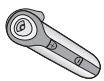
75311-01
Headset
Akouotiko
Fejhallgato
N
Słuchawka
Casca
TapHnTpya
Kulaklik

70384-01
Ear stabiliser
j 1
Δiαεησαθεροποηη
Füllstabilizáló
T
Korvaosa
Zaczep na ucho
Stabilizator auricular
UHHOKpOOK
Sabitleyici


70385-01
Soft gel ear tip kit
-small/medium/large
yj/s/bsj/sj/cclg jgl jgl a
aai
y
KIT Eeapntmuatw yia to auti ano maakoc tEa
-μikpó/μεσaio/μεγálo
-MaJIeHbKa/creHra/60nbua
Yumusak jelden kulaki kulaklik seti
-kučuk/orta/buyuk boy
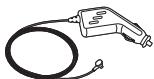
69520-05
AC/DC car lighter adapter charger
PARTS AND ACCESSORIES
EN TO ORDER
To order, please contact your Plantronics supplier or go to www.plantronics.com.
AR
Jannnnnnaa aee annnnnnae
EL NAPARTEIA
Tia va ta napayyeiTe,
aneuovteite OTov
npouhveut npoiovtwv TNC
Plantronics n EIOKEeTe iTv
Itooelaia macn tsiEduovon
www.plantronics.com.
HU MEGRENDELESHEZ
RU OΦOPMJIΕΗΝΕ 3AKA3A
This is not a condition of your warranty, but will assist us in providing the best possible service and technical support for your product. Visit www.plantronics.com/productregistration.
Cui jiu you gaiu Jusui AR
Laii Jia jiy iie liuee kui 1
Jaaa aaii iiaai jao 1jao
. www.plantronics.com/productregistration
EL H TOY IPOIONTO ME AIAIKTYOY
De pkeiia iia kaoiov 6o nec eynunanc, aal
anwc ia diaibikacia nov a mac bosnfoe va
napoeoue tvk aluteep duvaat eumpeton
kai teviiknuoortipriy ia to ouykepkiye
piov. Eniakceite tie nduoy
www.plantronics.com/productregistration.
HU REGISZTRÁLJA KÉSZÜLEKÉT ON-LINE
. www.plantronics.com/productregistration
PL INTERNETOWA REJESTRACJA PRODUKTU
For warranty information, please refer to the included product warranty card or visit www.plantronics.com/warranty.
a5b1^3 = a4b2^3 + a6b3^3
AR
Aiiis 1aii i aie jy Aiiis l Ug ciae gic uasall
juy jui jia jiaiaill gii
. www.plantronics.com/warranty
EL EITYYH2H
Tia pereaooTepec nAnpoopoe cayetikae my Tny eynounan, avatpEte stny kapta eyunonc npoiyoToc nupeiauBavetai ot oukeuaoaian eniokepeite tN dyiothvOn www.plantronics.com/warranty.
HU GARANCIA
www.plantronics.com/warranty
PL GWARANCJA
Visit our Web site at www.plantronics.com/support for technical support including frequently asked questions, compatibility and accessibility information.
AR
www.plantronics.com/support
aJglal all Jauy gall gall gall Ugall
Jgill gill Jgclglo
EL TEXNIKH BOHOEIA
Tia Tevikn EUnnpetOn, Ownc metaUdawuovneic eputnoe mic ta anavtnoctouk, Kaowc kai Npanoepoei nepu aBorotntac KaipnoonlaanmuTac, eniokepeBeTe Tny tonoeia mac stO Web tN deivuovn www.plantronics.com/support.
HU MUSZAKI TÁMOGATÁS
EN See package for product model number and refer to the table below for approved use.
Jgss sss ssss sssssssssssssssssssssssssssssssssssssssssssssssssssssssssssssssssssssssssssssss
EL AvatpETe 0tn oukeuaia yia tvk wdoiko mvetao nC ouokeuNC kai katomiv avatpETe 0tov nivaKa nou akolouBei ia tvN EyKepiEvn xpion tou.
HU Acsomagolasrol olvassa let a termek tipusszamat, es vesse osze aa engedelyezet hasznalatot tartalmaz informaciok tablazatval.
W
PL Numer modelu jest podany na opakowaniu, a sosob uzytkowania okreslaabela zamieszczona ponizej.
RO Verificazioni pe cachet numarul de model al produsului si consultati tabelul de mai jos pentru utilizarel proabate.
RU NIOsCMPTnepHa npAOKOBK HmOpMoENI hENpNn I o6paTInTeB K pBeHEDenH mE TabSIneI dnn ONoyUHenI hINOPMAuIN O COOTBTCTBN TcAndaptM.
TR Ambalajdan urin model numarasini bulun ve onaylanan kullanim kosullari icin asagidaki tabloya baktin.
| 74422-05 | AUT, BEL, DEU, DNK, ESP, FRA, GRC, ITA, IRL, LUX, NLD, PRT, SWE, FIN, CYP, CZE, EST, HUN, LVA, LTU, MLT, POL, SVK, SVN, TUR. |
| 74422-04 | GBR |

For further information:
0800 410014 or
www.plantronics.com
HU HUNGARY

m = 311 ;

© 2006 Plantronics, Inc. All rights reserved. Plantronics, the logo design, Plantronics Discovery and Sound Innovation are trademarks or registered trademarks of Plantronics, Inc. The Bluetooth word mark and logos are owned by Bluetooth SIG, Inc. and any use of such marks by Plantronics, Inc. is under licence. All other trademarks are the property of their respective owners.
Patents U.S. 5,210,791; D517,053; 392600-0002 Patents Pending
- DE WILLKOMMEN
- DE PAKETINHALT UND PRODUKTMERKMALE
- DE AUFLADEN DES HEADS
- DK OPLADNING AF HEADSET
- GB POWERING ON AND OFF
- DE BLUETOOTH-PAARUNG
- DK PARRING MED BLUETOOTH
- USING THE OPTIONAL EAR STABILISER
- DE ANPASSEN DES HEADSETS
- ANSWERING AND ENDING CALLS
- ADJUSTING THE VOLUME
- LAST NUMBER REDIAL
- USING THE MUTE
- MOVING OUT OF RANGE
- USING VOICE ACTIVATED DIALLING
- MULIPLE USES OF A LONG PRESS ON THE CALL CONTROL BUTTON
- DE VERWENDEN DES HEADSETS
- BESVARELSE OG AFSLUTNING AP OPKALD
- BESVARA OCH AVSLUTA SAMTAL
- DE FEHLERBEHEBUNG
- PARTS AND ACCESSORIES
- GB TO ORDER
- DE BESTELLUNG
- DE REGISTRIEREN SIE IHR PRODUKT ONLINE
- DE GARANTIE
- DE TECHNISCHE
- UNTERSTÜTZUNG
- PLANTRONICS
- PLANTRONICS DISCOVERY™ 610
- WELCOME
- TABLE OF CONTENTS
- PACKAGE CONTENTS AND FEATURES
- CHARGING YOUR HEADSET
- USING THE INCLUDED AC POWER ADAPTER
- POWERING ON AND OFF
- BLUETOOTH PAIRING
- FITTING YOUR HEADSET
- MULTIPLE USES OF A LONG PRESS ON THE CALL CONTROL BUTTON
- STATUS INDICATORS
- TROUBLESHOOTING
- MY HEADSET DOES NOT WORK WITH MY PHONE.
- I DID NOT ENTER MY PASS KEY.
- CALLERS CANNOT HEAR ME.
- I CANNOT HEAR CALLER/DIALLING TONE.
- TO ORDER
- REGISTER YOUR PRODUCT ONLINE
- WARRANTY
- TECHNICAL ASSISTANCE
- MODEL AND COUNTRY INFORMATION
- SOUND INNOVATION
- PLANTRONICS DISCOVERY™610
- EN WELCOME
- ES BIENVENIDO
- ES CONTENIDO
- FR CONTENU DE LA BOITE ET CARACTERISTIQUES
- FR CHARGE DU MICRO-CASQUE
- EN POWERING ON AND OFF
- ES ENCENDIDO YAPAGADO
- FR MISE SOUS TENSION/HORS TENSION
- FRÉTABILISSEMENT D'UNELIAISON BLUETOOTH
- USING THE OPTIONAL EAR STABILIZER
- FR AJUSTEMENT DU MICRO-CASQUE
- EN ANSWERING AND ENDING CALLS
- FR RESPONDRE AUX APPELS ET RACCROCHER
- FR UTILISATION DE LA FONCTION DE DISCRIPTION
- EN MULTIPLE USES OF A LONG PRESS ON THE CALL CONTROL BUTTON
- EN STATUS INDICATORS
- FR UTILISATION DE LA COMPOSITION VOCALE
- FR DÉPANNAGE
- PT NAO DIGITEI MINHA CHAVE-MESTRA.
- ES PIEZAS DE REPUESTO
- EN WARRANTY
- EN TECHNICAL ASSISTANCE
- ES REGISTRO DEL PRODUCTO EN LINEA
- EXPOSURE TO RADIO FREQUENCY RADIATION
- INDUSTRY CANADA NOTICE RADIO EQUIPMENT
- AVIS RÉGLEMENTAIRES
- EXIGENCES DE LA SECTION 15 DU REGLEMENT DE LA FCC
- ES
- EL AIA ANOIA IATON AGOPA2TH
- AR
- EL ΠINAKAΣ ΠΕPIEXOMENΩN
- HU TARTALOMJEGYZEK
- EL ΠΕPIEXOMENO ΣΥΣKEYAΣIAΣ KAI XAPAKTHPIΣTIKA
- AB
- HU A CSOMAG TARTALMA, FÖBB TULAJDONSÁGOK
- RU 3APJDKA FAPHNTyPbI
- TR KULAKLIGI SARJ ETME
- aiaag aaii bllly ayj
- EL ENAPÉH/ TEPMATIΣMOΣ ΛEITOYPΓIAΣ
- HU BE-ÉS KIKAPCSOLÁS
- TR KULAKLIGI ACMA/KAPAMA
- BLUETOOTH
- EL ZEYTONOIHSH BLUETOOTH
- PL PAROWANIE BLUETOOTH
- RU COINPRAXEHEME C BLUETOOTH
- a
- iJil iElaw al
- IW
- OTBET N 3ABEPUJEHNE Bbl3OBOB
- HACTPOIKA YPOBHA FOMKOCTN
- SES SEVIYESINI AYARLAMA
- Lalol g biall alisiAR
- 75311-01
- 70384-01
- 70385-01
- 69520-05
- EN TO ORDER
- EL NAPARTEIA
- HU MEGRENDELESHEZ
- RU OΦOPMJIΕΗΝΕ 3AKA3A
- EL H TOY IPOIONTO ME AIAIKTYOY
- HU REGISZTRÁLJA KÉSZÜLEKÉT ON-LINE
- PL INTERNETOWA REJESTRACJA PRODUKTU
- EL EITYYH2H
- HU GARANCIA
- PL GWARANCJA
- EL TEXNIKH BOHOEIA
- HU MUSZAKI TÁMOGATÁS
- HU HUNGARY
Brand : PLANTRONICS
Model : DISCOVERY 610
Category : Bluetooth Headset