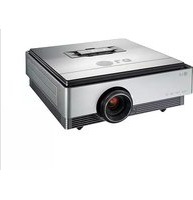
BX220 - Video projector LG - Free user manual and instructions
Find the device manual for free BX220 LG in PDF.


Pick your language and provide your email: we'll send you a specifically translated version.
| Type of product | Video projector |
| Brand | LG |
| Model | BX220 |
| Display technology | DLP |
| Native resolution | XGA (1024 x 768) |
| Brightness | 2,200 ANSI lumens |
| Contrast ratio | 20,000:1 |
| Projection ratio | 1.96 - 2.15:1 |
| Aspect ratio | 4:3 |
| Lamp type | OSRAM 200W |
| Lamp life (normal/economy) | 4,000 / 6,000 hours |
| Keystone correction | ±40° manual vertical |
| Inputs | HDMI, VGA (x2), Composite, RS-232C |
| Outputs | VGA out, 3.5mm audio |
| Dimensions (W x D x H) | 320 x 214 x 93 mm |
| Weight | 2.9 kg |
| Power consumption | 230W (standby <0.5W) |
| Noise level | 32 dB (normal), 26 dB (economy) |
| Maintenance and cleaning | Filter cleaning required every 1,000 hours |
| Safety features | Auto-off, overheat protection |
| Repairability and spare parts | Lamp and filter replaceable; parts available via authorized service |
| Warranty | 2 years limited |
| General information | Ceiling mountable, portable, 36-page user manual available for download |
Frequently Asked Questions - BX220 LG
How do I replace the lamp in the LG BX220 projector?
Turn off the projector and unplug it. Wait for the lamp to cool down, then remove the lamp cover screw, slide out the lamp module, and insert the new one. Ensure the lamp air filter is clean before installing. Reset the lamp timer via the menu.
Can I connect my laptop to the BX220?
Yes, use a VGA cable or HDMI to connect your laptop to the projector. Connect the cable to the HDMI or VGA input port, then select the corresponding source in the input menu.
What is the optimal projection distance?
With a projection ratio of 1.96-2.15:1, a 100-inch screen requires a distance of approximately 4.3-4.7 meters. Adjust the zoom and focus rings to fine-tune.
How do I clean the air filter?
Turn off the projector, unplug it, and wait for cooling. Remove the filter cover, take out the filter, and use a vacuum cleaner to remove dust. Do not wash with water. Replace the filter if damaged.
Can the projector be mounted on a ceiling?
Yes, the BX220 is compatible with a ceiling mount. Ensure you use a universally compatible mount for the 3 screws, and set Ceiling Mount option in the OSD menu to invert the image.
What is the warranty period?
The projector comes with a 2-year limited warranty covering parts and labor. Contact LG support or your dealer for service.
How do I update the firmware?
LG does not provide user-accessible firmware updates for this model. Contact LG service if you suspect a firmware issue, as an update may be available via a service center.
What input resolutions are supported?
The projector supports native 1024x768, and accepts signals up to 1080p via HDMI. VGA supports common formats like 640x480 to 1920x1080 depending on the source.
Why does the projector shut down automatically?
Activated Security or Auto-off functions can cause shutdown. Also, check if the lamp or filter needs replacement. The projector also shuts off if temperature exceeds safety limits.
Can I use the projector with a USB or SD card?
The BX220 does not have a USB or SD slot for media playback. It is a data projector intended for use with HDMI, VGA, and composite inputs.
User questions about BX220 LG
0 question about this device. Answer the ones you know or ask your own.
Ask a new question about this device
No questions yet. Be the first to ask one.
Download the instructions for your Video projector in PDF format for free! Find your manual BX220 - LG and take your electronic device back in hand. On this page are published all the documents necessary for the use of your device. BX220 by LG.
USER MANUAL BX220 LG
Manual assistant
Powered by Anthropic
Waiting for your message
Product information
Brand : LG
Model : BX220
Category : Video projector