RNX-N250PCE - Network card Rosewill - Free user manual and instructions
Find the device manual for free RNX-N250PCE Rosewill in PDF.


Pick your language and provide your email: we'll send you a specifically translated version.
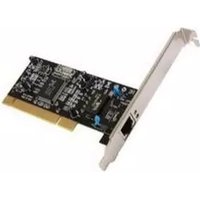
| Product Type | Wireless PCIe Network Card |
| Brand | Rosewill |
| Model | RNX-N250PCE |
| Interface | PCI Express x1 |
| Wireless Standard | IEEE 802.11b/g/n |
| Frequency Band | 2.4 GHz |
| Maximum Data Rate | 300 Mbps |
| Antenna Configuration | 2 x External 2 dBi antennas |
| Operating System Support | Windows 7/8/8.1/10, Linux |
| Wireless Security | WEP, WPA, WPA2 |
| Dimensions (L x W x H) | 120 mm x 60 mm x 20 mm |
| Weight | 100 g |
| Power Source | PCIe slot only, no external power needed |
| Package Contents | Adapter, 2 antennas, low-profile bracket, driver CD, manual |
| Primary Function | Adds high-speed Wi-Fi connectivity to desktop PCs |
| Advanced Features | MIMO technology, WPS button |
| Care and Cleaning | Wipe with a dry soft cloth; avoid liquids during cleaning |
| Safety Instructions | Install in a powered-off computer; handle with anti-static precautions |
| Repairability | Detachable antennas can be replaced; other components are not user-serviceable |
| General Information | Ideal for replacing built-in Wi-Fi or upgrading to 802.11n speeds |
Frequently Asked Questions - RNX-N250PCE Rosewill
How do I install the Rosewill RNX-N250PCE?
Turn off your computer, open the case, insert the card into an available PCIe slot, secure it, attach the antennas, close the case, boot and install drivers from CD or downloaded from Rosewill website.
Does the RNX-N250PCE support 5 GHz Wi-Fi?
No, it operates on the 2.4 GHz band only. It is compatible with 802.11b/g/n networks.
What operating systems are compatible?
It supports Windows 7, 8, 8.1, 10 and some Linux distributions. Check the manufacturer's website for specific driver availability.
How do I attach the antennas?
Screw each antenna onto the two RP-SMA connectors on the card bracket, ensuring they are tight but not over-tightened, then position them upright for best signal.
Why is my link speed limited to 150 Mbps instead of 300 Mbps?
The 300 Mbps rate requires 2 spatial streams with the router configured for 40 MHz channel width and channel bonding. Also, your router must support 802.11n with 2x2 MIMO. If in doubt, check router settings.
Can this adapter fit in a slim/low-profile computer case?
Yes, the package includes a low-profile bracket. Replace the full-height bracket with the low-profile one to fit compact cases.
How can I update the driver?
Download the latest driver from the Rosewill support page for the RNX-N250PCE. Uninstall the old driver in Device Manager, then run the new installer and restart.
Is WPA2 security supported?
Yes, it supports WEP, WPA, and WPA2 personal protocols. Use WPA2-AES for maximum security.
Does this card support Windows 10?
Yes, with the latest driver available from Rosewill. Ensure you install the correct 64-bit or 32-bit driver version.
What should I do if the Wi-Fi connection drops frequently?
Check antenna positioning, update drivers, change the wireless channel on your router, avoid interference from USB 3.0 devices, and ensure the card is firmly seated in the PCIe slot.
User questions about RNX-N250PCE Rosewill
0 question about this device. Answer the ones you know or ask your own.
Ask a new question about this device
No questions yet. Be the first to ask one.
Download the instructions for your Network card in PDF format for free! Find your manual RNX-N250PCE - Rosewill and take your electronic device back in hand. On this page are published all the documents necessary for the use of your device. RNX-N250PCE by Rosewill.
USER MANUAL RNX-N250PCE Rosewill

Manual assistant
Powered by Anthropic
Waiting for your message
Product information
Brand : Rosewill
Model : RNX-N250PCE
Category : Network card