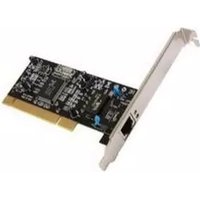
RC-410LX - Network card Rosewill - Free user manual and instructions
Find the device manual for free RC-410LX Rosewill in PDF.


| Product Type | Network Interface Card (NIC) |
| Model | RC-410LX |
| Brand | Rosewill |
| Interface | PCI Express (PCIe) x1 |
| Data Rate | 10/100/1000 Mbps (Gigabit Ethernet) |
| Connector Type | 1 x RJ45 |
| Compliance | IEEE 802.3, 802.3u, 802.3ab |
| LED Indicators | Link/Activity (Green/Amber) |
| Dimensions (L x W x H) | 12.0 cm x 6.0 cm x 1.5 cm |
| Weight | 50 g |
| Power Consumption | 2.5 W (max) |
| Operating Temperature | 0°C to 55°C (32°F to 131°F) |
| Storage Temperature | -10°C to 70°C (14°F to 158°F) |
| Operating Humidity | 10% to 90% (non-condensing) |
| Supported Operating Systems | Windows 10/8/7, Linux, macOS |
| Warranty | 1 Year Limited |
| Package Contents | NIC card, low-profile bracket, driver CD, user manual |
| Maintenance | Clean with a soft, dry cloth; avoid liquids |
| Safety | Use in a well-ventilated area; keep away from moisture |
| Repairability | Not user-serviceable; contact support for issues |
| Spare Parts | Replacement brackets available via Rosewill support |
Frequently Asked Questions - RC-410LX Rosewill
User questions about RC-410LX Rosewill
0 question about this device. Answer the ones you know or ask your own.
Ask a new question about this device
Download the instructions for your Network card in PDF format for free! Find your manual RC-410LX - Rosewill and take your electronic device back in hand. On this page are published all the documents necessary for the use of your device. RC-410LX by Rosewill.
USER MANUAL RC-410LX Rosewill
Gigabit PCI LAN Card RC400-LX
User Manual
Features and Benefits
● Integrated 10/100/1000 transceiver
● Supports PCI 2.2, 32 bit bus, 33/66MHz
● Fully compliant with IEEE 802.3 (10Base-T Ethernet), IEEE 802.3u (100Base-TX Fast Ethernet), IEEE 802.3z (1000Base-T Gigabit Ethernet)
● Supports Ethernet 10Mbps (half-duplex), Ethernet 20Mbps (full-duplex), Fast Ethernet 100Mbps (half-duplex), Fast Ethernet 200Mbps (full-duplex), Gigabit 1000Mbps (full-duplex) and Gigabit 2000Mbps (full-duplex)
● LEDs indicator for 1000Link/Activity(green) and 100Link/Activity(green)
● Crossover Detection & Auto-Correction
● Support Windows® 2000, XP/2003 32/64 bit, Vista 32/64 bit
Package Contents
● 1 x Gigabit Ethernet PCI Card
● 1 x User Manual
- 1 x Driver CD
System Requirements
- Windows® 2000, XP/2003 32/64 bit, Vista 32/64 bit
● Pentium or equivalent PC with an available PCI slot
● CAT5/CAT5E/CAT6 UTP/STP cable
Hardware Installation
Follow the instruction given below to install the Gigabit Ethernet PCI Card.
- Turn your computer off and remove the power plug from the plug socket.
- Remove the cover from the computer case.
- Remove the metal cover plate on the rear of a free PCI slot.
- Insert the card into one free PCI slot and screw it firmly on the bracket side.
- Place the cover back onto the computer.
- Insert the plug into plug socket.
Driver Installation
For Windows® 2000/XP/Server 2003
Once the Windows® 2000, XP and Server 2003 startup. Gigabit Ethernet PCI Card will be detected by system. Following is the procedures for installing Gigabit Ethernet PCI Card driver under Windows® XP Service Pack 2 operating system.
-
When Found New Hardware Wizard Window pop-up, please click "Cancel" button to cancel the driver installation for the device at this moment. The driver for this device will be installed in the next step.
-
Please insert the CD driver bound with Gigabit Ethernet PCI Card into your CD-ROM Drive.
-
At the Windows desktop click Start, then Run.
-
Type D:\ RC400-LX \Setup.exe, then click OK. (Change D: to match your CD-ROM drive letter)
-
Follow the on-screen instructions to complete the installation.
-
Restart Windows to complete the installation.
For Windows® Vista
In Windows® Vista, when the system is booted up it automatically detects the Gigabit Ethernet PCI Card and install the Gigabit Ethernet PCI Card with in-build drivers. Following is the procedures for upgrading Gigabit Ethernet PCI Card driver under Windows® Vista operating system.
- Please insert the CD driver bound with Gigabit Ethernet PCI Card into your CD-ROM Drive.
- At the Windows desktop click Start, then Run.
- Type D:\ RC400-LX \setup.exe, then click OK. (Change D:\ to match your CD-ROM drive letter)
- Follow the on-screen instructions to complete the instructions to complete the installation to complete the installation.
- Restart Windows to complete the installation.
Verify Driver Installation
Click on the “Device Manager” tab in System Properties, which you access from the Windows Control Panel. You should see a “Realtek RTL8169/8110 Family Gigabit Ethernet NIC” (Windows®)
2000/XP/Server 2003) or a “Realtek RTL8169/8110 Family PCI Gigabit Ethernet NIC (NDIS 6.0)” (Windows® Vista) installed under “Network adapters” item.
START > Control Panel > System > Device Manager

Network adapters

Realtek RTL8169/8110 Family Gigabit Ethernet NIC
Networking Settings
- Click "Network Connection" in Control Panel to set your network settings.
- Right-click the Local Area Connection used by the Gigabit Ethernet PCI Card, then select “Properties” from the pop-up menu.
- Double-click the “Internet Protocol (TCP/IP)” item to set network settings.
- Right-click the Local Area Connection used by the Gigabit Ethernet PCI Card, then select "Status" from the pop-up menu. You can affirm network status.
Troubleshooting
The computer can not detect the Gigabit Ethernet PCI Card
- Make sure that the Gigabit Ethernet PCI card is correctly plugged into the PCI slot; if not, turn off the computer and plug it again.
- If the Gigabit Ethernet PCI card is plugged in correctly, see if the golden connectors on the card are clean; if not, clean the connector surface.
- If still not, please change another PCI slot on your motherboard.
- Please upgrade your motherboard BIOS to the latest version. If it sill not work, contact your motherboard vendor asking the advanced supporting for BIOS updated.
- The board itself might be defective. You can try another motherboard testing Gigabit Ethernet PCI card working or not.
Computer failed to start after inserting Gigabit Ethernet PCI Card
Turn off the computer, remove the Gigabit Ethernet PCI card, and try to restart the computer. If the computer starts successfully, it means that
this card has not been inserted into the PCI slot correctly. Please insert the card firmly into the PCI slot or try another slot.
How to deal with an exclamation point on Ethernet Host controller
- Please shutdown your computer and move the card to another available slot then re-install Gigabit Ethernet PCI Card driver again.
- Please point on this device then right-check on the mouse.
- This exclamation point usually means there is a resource conflict between the Gigabit Ethernet PCI Card and another card in your system. Please move the card to another available slot. Restart your computer. Windows will then re-configure itself and re-assign resources. Check your device manager again. If the exclamation point is still there then repeat the process until it no longer appears.
I can not use Gigabit Ethernet transfer speed
- Please affirm your Ethernet environment supporting Gigabit structure.
- Please use CAT6 UTP/STP cable.
How to configure 10/100/1000Mbps Ethernet structure
Connect 10/100/1000Mbps Ethernet over unshielded twisted pair (UTP) cable. Gigabit Ethernet PCI card has the ability of automatic sensing and operating on either speed without manual reconfiguration.
Thank you for purchasing a quality Rosewill Product.
Please register your product at : www.rosewill.com for complete warranty information and future support for your product.

- Features and Benefits
- Package Contents
- System Requirements
- Hardware Installation
- Driver Installation
- For Windows® 2000/XP/Server 2003
- For Windows® Vista
- Verify Driver Installation
- Networking Settings
- Troubleshooting
- The computer can not detect the Gigabit Ethernet PCI Card
- Computer failed to start after inserting Gigabit Ethernet PCI Card
- How to deal with an exclamation point on Ethernet Host controller
- I can not use Gigabit Ethernet transfer speed
- How to configure 10/100/1000Mbps Ethernet structure
Brand : Rosewill
Model : RC-410LX
Category : Network card