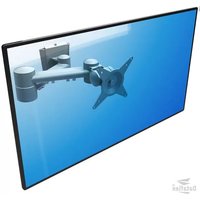
ViewMate 152 - Flat Screen Mount Dataflex - Free user manual and instructions
Find the device manual for free ViewMate 152 Dataflex in PDF.


Pick your language and provide your email: we'll send you a specifically translated version.
| Product Type | Flat Screen Mount |
| Brand | Dataflex |
| Model | ViewMate 152 |
| Compatible Screen Sizes | 15 to 27 inches |
| VESA Compatibility | 75x75 mm and 100x100 mm |
| Maximum Weight Capacity | Up to 8 kg (17.6 lbs) |
| Tilt Adjustment | Yes, -5° to +15° |
| Swivel Adjustment | Yes, ±90° |
| Rotation | Yes, portrait/landscape |
| Mounting Type | Desk clamp or through-desk mount |
| Material | Steel and high-grade plastic |
| Height Adjustment | Manual height adjustment |
| Cable Management | Integrated cable clips |
| Dimensions (W x H x D) | Approx. 200 x 200 x 100 mm (excluding arm) |
| Weight | Approx. 1.5 kg (3.3 lbs) |
| Power Supply | None required (manual operation) |
| Care and Cleaning | Wipe with a dry soft cloth; avoid solvents |
| Safety Features | Anti-slip pads and secure locking mechanism |
| Spare Parts and Repairability | Spare screws and washers available; detachable arm for easy repair |
| Warranty | 2-year limited warranty |
| Intended Use | Indoor use for offices and home environments |
| Installation | Easy DIY installation with included tools |
Frequently Asked Questions - ViewMate 152 Dataflex
What is the maximum screen size and weight that the Dataflex ViewMate 152 can support?
The ViewMate 152 supports screens from 15 to 27 inches and can hold up to 8 kg (17.6 lbs). Always verify your monitor's weight to avoid overloading the mount.
Which VESA patterns are compatible with this mount?
The mount fits standard 75x75 mm and 100x100 mm VESA mounting holes, which cover the vast majority of flat screens.
Can I adjust the viewing angle after installation?
Yes, the ViewMate 152 offers tilt adjustment from -5° to +15°, swivel of ±90°, and rotation to switch between landscape and portrait orientations.
How do I install the mount on my desk?
The mount can be attached using a desk clamp or a through-desk grommet. The included instruction manual provides step-by-step guidance, and all necessary hardware is supplied.
Does the mount have cable management features?
Yes, integrated cable clips help route and hide your monitor cables, keeping your workspace tidy and preventing tangling.
How should I clean and maintain the mount?
Use a dry, soft cloth to wipe the surfaces. Avoid abrasive cleaners or solvents that could damage the finish. Periodically check and tighten screws to ensure stability.
Is the mount safe for my monitor?
The mount is designed with anti-slip pads and a secure locking mechanism to prevent accidental drops. Ensure that the monitor is properly attached according to the instructions.
What materials are used in the construction?
The ViewMate 152 is made from hardened steel and high-grade plastic, offering durability and long-lasting performance.
Can I order spare parts if something gets lost?
Yes, spare parts such as screws, washers, and mounting brackets can be ordered through Dataflex customer support. The mount is designed for easy repair and replacement of components.
What is the warranty period for this product?
Dataflex provides a 2-year limited warranty covering manufacturing defects. Keep your receipt and register your product to activate the warranty.
User questions about ViewMate 152 Dataflex
0 question about this device. Answer the ones you know or ask your own.
Ask a new question about this device
No questions yet. Be the first to ask one.
Download the instructions for your Flat Screen Mount in PDF format for free! Find your manual ViewMate 152 - Dataflex and take your electronic device back in hand. On this page are published all the documents necessary for the use of your device. ViewMate 152 by Dataflex.
USER MANUAL ViewMate 152 Dataflex


Manual assistant
Powered by Anthropic
Waiting for your message
Product information
Brand : Dataflex
Model : ViewMate 152
Category : Flat Screen Mount