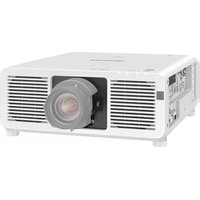
PT-DX610ESJ - Video projector PANASONIC - Free user manual and instructions
Find the device manual for free PT-DX610ESJ PANASONIC in PDF.


Pick your language and provide your email: we'll send you a specifically translated version.
| Product Type | Video projector |
| Brand | Panasonic |
| Model | PT-DX610ESJ |
| Display Technology | DLP (Digital Light Processing) |
| Native Resolution | 1024 x 768 pixels (XGA) |
| Brightness | 6000 ANSI lumens |
| Contrast Ratio | 2000:1 typical |
| Aspect Ratio | 4:3 native |
| Projection Lens | Motorized zoom, focus, and lens shift |
| Lamp Power | 330 W |
| Lamp Life | Up to 2000 h (Normal), 3000 h (Eco) |
| Power Consumption | 600 W (max) |
| Dimensions (W x D x H) | 530 x 429 x 177 mm (approx.) |
| Weight | 10.5 kg (approx.) |
| Video Inputs | HDMI, DVI-D, VGA (D-Sub), Component, S-Video, Composite |
| Audio Inputs | 3.5 mm stereo minijack, RCA (L/R) |
| Outputs | VGA monitor output, audio output |
| Control Interfaces | RS-232C, LAN (Ethernet), IR remote control |
| Network Features | Web browser control, PJLink compatibility |
| Security | Kensington lock slot, PIN code lock |
| Maintenance | Replaceable lamp and air filter; filter clean every 4000 h |
| Repairability | Modular design; lamp and filter user-replaceable, other service by qualified technicians |
| Included Accessories | Power cord, wireless remote control (with batteries), lens cap, CD-ROM manual |
Frequently Asked Questions - PT-DX610ESJ PANASONIC
How do I replace the lamp in the Panasonic PT-DX610ESJ projector?
Turn off the projector and unplug it. Wait at least 45 minutes for the lamp to cool. Loosen the lamp cover screw, slide the cover off, then unscrew the two lamp retaining screws. Gently pull the lamp out by its handle. Insert the new lamp, tighten the screws, replace the cover, and reset the lamp timer via the on-screen menu (Maintenance > Lamp reset).
What is the recommended procedure for cleaning the projector's air filter?
Clean the air filter every 4000 hours of use. Turn off the projector, unplug it, and locate the filter on the side or bottom. Remove it and gently vacuum or wash it with water if specified. Allow the filter to dry completely before reinstalling. Do not operate the projector without the filter in place.
Which input ports are available on this projector?
The Panasonic PT-DX610ESJ has a comprehensive set of inputs including HDMI, DVI-D, VGA (D-Sub), component video (via BNC or VGA adapter), S-Video, composite video, and stereo audio inputs (minijack and RCA).
Can I connect external speakers to the projector?
Yes, the projector has an audio output (3.5 mm stereo mini-jack) that can be connected to powered speakers or an audio amplifier. This output carries the audio signal from the selected input source.
Is it possible to control the projector over a network?
Yes, the PT-DX610ESJ is equipped with a LAN port and supports PJLink and web browser control. You can access the projector's IP address in your browser to adjust settings, monitor status, and schedule power on/off.
What is the optimal projection distance for a 100-inch screen?
With a standard zoom lens, a 100-inch (diagonal) 4:3 screen typically requires a throw distance of about 3.0 to 4.5 meters, depending on the zoom position. Refer to the lens specifications and use the zoom adjustment to fine-tune the image size.
Why does my projector overheat and shut down automatically?
Overheating is often caused by clogged air filters, blocked ventilation, or operating in a high ambient temperature. Ensure the intake and exhaust vents are unobstructed, clean the air filter, and allow at least 30 cm of clearance around the projector. If the issue persists, the internal temperature sensor may trigger shutdown.
How do I reset the lamp timer after replacing the lamp?
After installing a new lamp, power on the projector, go to the On-Screen Menu, navigate to Maintenance, select Lamp Reset, and choose Yes to confirm. This clears the previous lamp usage hours and restarts the tracking counter.
Does the Panasonic PT-DX610ESJ support 3D content?
This model is a professional installation projector and does not natively support 3D display. It is optimized for high-brightness 2D presentations, video walls, and event projection. For 3D, you would need an external processing system and a compatible active shutter solution, but it is not recommended.
Can I install the projector upside down for ceiling mounting?
Yes, the PT-DX610ESJ supports ceiling mounting using an optional ceiling mount bracket. You must enable the Ceiling Projection setting in the menu (Projection Method: Ceiling/Front) to flip the image vertically. Ensure the mount is rated for at least 15 kg and follow safety instructions.
User questions about PT-DX610ESJ PANASONIC
0 question about this device. Answer the ones you know or ask your own.
Ask a new question about this device
No questions yet. Be the first to ask one.
Download the instructions for your Video projector in PDF format for free! Find your manual PT-DX610ESJ - PANASONIC and take your electronic device back in hand. On this page are published all the documents necessary for the use of your device. PT-DX610ESJ by PANASONIC.
USER MANUAL PT-DX610ESJ PANASONIC
Manual assistant
Powered by Anthropic
Waiting for your message
Product information
Brand : PANASONIC
Model : PT-DX610ESJ
Category : Video projector