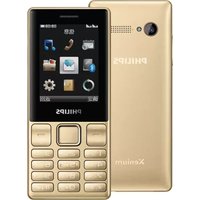
Xenium F511 - Smartphone PHILIPS - Free user manual and instructions
Find the device manual for free Xenium F511 PHILIPS in PDF.


Pick your language and provide your email: we'll send you a specifically translated version.
| Product Type | Smartphone |
| Brand | Philips |
| Model | Xenium F511 |
| Dimensions (H x W x D) | 145 x 72 x 10.5 mm |
| Weight | 170 g |
| Battery | Removable Li-Ion 4000 mAh |
| Display | 5.0-inch IPS LCD, 720 x 1280 pixels |
| Operating System | Android 6.0 Marshmallow |
| Processor | Quad-core 1.3 GHz Cortex-A7 |
| RAM | 1 GB |
| Internal Storage | 8 GB |
| Expandable Storage | microSD up to 32 GB |
| Rear Camera | 8 MP with LED flash |
| Front Camera | 2 MP |
| SIM | Dual SIM (Mini-SIM, dual standby) |
| Network | GSM / HSPA |
| Connectivity | Wi-Fi 802.11 b/g/n, Bluetooth 4.0, GPS |
| Ports | micro USB 2.0, 3.5 mm audio jack |
| Sensors | Accelerometer, proximity |
| Maintenance and Cleaning | Wipe with soft dry cloth; avoid moisture and harsh chemicals |
| Safety Precautions | Use only original charger; avoid extreme heat and cold |
| Spare Parts and Repairability | Removable battery and case; service at authorized Philips centers |
| General Information | CE certified; model number F511 |
Frequently Asked Questions - Xenium F511 PHILIPS
How do I insert the SIM and microSD cards?
Power off the phone, remove the back cover, insert SIM cards and microSD card in their slots, replace cover and power on. The SIM slots are labeled.
How can I maximize battery life?
Use power saving mode, reduce screen brightness, disable unnecessary connections like Wi-Fi and Bluetooth when not in use, and charge with the original charger.
How do I perform a factory reset?
Go to Settings > Backup & Reset > Factory Data Reset. Confirm the action. This erases all data, so back up important files beforehand.
Why is my phone running slowly?
Close background apps, clear cache, restart the phone, or free up storage space by deleting unused files or moving them to a microSD card.
How do I take a screenshot?
Press and hold the Power and Volume Down buttons simultaneously until the screen flashes. The screenshot is saved in the Gallery.
Does the phone support 4G?
No, the Xenium F511 supports GSM and HSPA (3G) networks only. It is not 4G-LTE capable.
Is the battery removable?
Yes, the 4000 mAh battery is removable. Switch off the phone before removing the back cover and battery.
How to transfer files to a computer?
Connect the phone to a computer via a micro USB cable. On the phone, select "File Transfer" mode from the notification bar to access internal storage.
What should I do if the phone freezes?
Press and hold the Power button for 10 seconds to force a restart. If the issue persists, remove and reinsert the battery to reboot.
Can I use two SIM cards simultaneously?
Yes, the dual SIM feature supports dual standby, allowing both cards to be active at the same time. You can manage calls and messages for each SIM.
User questions about Xenium F511 PHILIPS
0 question about this device. Answer the ones you know or ask your own.
Ask a new question about this device
No questions yet. Be the first to ask one.
Download the instructions for your Smartphone in PDF format for free! Find your manual Xenium F511 - PHILIPS and take your electronic device back in hand. On this page are published all the documents necessary for the use of your device. Xenium F511 by PHILIPS.
USER MANUAL Xenium F511 PHILIPS


Manual assistant
Powered by Anthropic
Waiting for your message
Product information
Brand : PHILIPS
Model : Xenium F511
Category : Smartphone