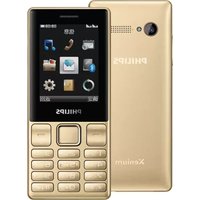
Xenium CT0199BLK - Smartphone PHILIPS - Free user manual and instructions
Find the device manual for free Xenium CT0199BLK PHILIPS in PDF.


Pick your language and provide your email: we'll send you a specifically translated version.
| Product Type | Smartphone |
| Brand | Philips |
| Model | Xenium CT0199BLK |
| Display Size | 2.4 inches |
| Display Type | TFT LCD |
| Resolution | 240 x 320 pixels |
| Operating System | Proprietary (Nucleus RTOS) |
| Battery Capacity | 1530 mAh |
| Standby Time | Up to 30 days |
| Talk Time | Up to 15 hours |
| RAM | 32 MB |
| Built-in Storage | 128 MB |
| Expandable Storage | microSD up to 32 GB |
| Camera | 0.3 MP (VGA) |
| Bluetooth | v2.1 + EDR |
| USB Port | micro USB 2.0 |
| Dimensions | 124 x 52 x 13 mm |
| Weight | 105 g |
| SIM Card | Dual SIM (Mini-SIM) |
| Charging Input | 5V DC, 500 mA |
| Battery Type | Li-ion rechargeable |
| Headphone Jack | 3.5 mm |
Frequently Asked Questions - Xenium CT0199BLK PHILIPS
How can I extend the battery life of my Philips Xenium CT0199BLK?
Reduce screen brightness, disable Bluetooth when not in use, close background apps, and use the Power Saving Mode available in settings.
Does the Philips Xenium CT0199BLK support 4G networks?
No, this model supports only GSM and GPRS/EDGE, which are 2G and 2.5G technologies.
What type of SIM card does the CT0199BLK use?
It uses a Mini-SIM (standard SIM) for both slots in the dual SIM configuration.
How do I insert a memory card?
Locate the microSD slot under the back cover. Gently insert a microSD card (up to 32 GB) with gold contacts facing down until it clicks.
Can I use WhatsApp on this phone?
No, WhatsApp is not supported because the operating system is proprietary and does not have an app store. Only basic pre-installed apps are available.
How do I reset the phone to factory settings?
Go to Settings > Security > Factory Reset, enter your phone lock code (default 0000), and confirm. This will erase all personal data.
What is the recommended charging time?
The battery fully charges in 2-3 hours using the provided charger. Avoid overcharging to maintain battery health.
Why is the phone not turning on?
Ensure the battery is charged. Press and hold the Power button for 10 seconds. If still off, try a different charger or battery.
How do I transfer contacts from my old phone?
Use Bluetooth to send contacts wirelessly, or save them to the SIM card and insert into the CT0199BLK to copy.
Is the phone water resistant?
No, the Philips Xenium CT0199BLK does not have water resistance. Keep it away from liquids and moisture.
User questions about Xenium CT0199BLK PHILIPS
0 question about this device. Answer the ones you know or ask your own.
Ask a new question about this device
No questions yet. Be the first to ask one.
Download the instructions for your Smartphone in PDF format for free! Find your manual Xenium CT0199BLK - PHILIPS and take your electronic device back in hand. On this page are published all the documents necessary for the use of your device. Xenium CT0199BLK by PHILIPS.
USER MANUAL Xenium CT0199BLK PHILIPS


Manual assistant
Powered by Anthropic
Waiting for your message
Product information
Brand : PHILIPS
Model : Xenium CT0199BLK
Category : Smartphone