
CTE170RG - Smartphone PHILIPS - Free user manual and instructions
Find the device manual for free CTE170RG PHILIPS in PDF.


| Product Type | DECT Cordless Phone |
| Brand | Philips |
| Model | CTE170RG |
| Dimensions (Base) | 120 x 100 x 80 mm |
| Dimensions (Handset) | 160 x 50 x 30 mm |
| Weight (Handset) | 120 g |
| Weight (Base) | 150 g |
| Power Supply | Base: AC 220-240V; Handset: 2x AAA NiMH rechargeable batteries |
| Standby Time | Up to 200 hours |
| Talk Time | Up to 10 hours |
| Display | Backlit LCD |
| Key Features | Caller ID, Call Waiting, Mute, Redial, Speakerphone, Handsfree, Volume Control, Ringer Tone Selection, Phonebook (up to 50 entries), Intercom, Call Transfer |
| Cleaning and Maintenance | Wipe with soft dry cloth; do not use liquid cleaners. |
| Safety Precautions | Use only approved batteries; do not expose to water; unplug during thunderstorms. |
| Spare Parts and Repairability | Batteries (AAA NiMH), charger, handset, base available. |
| Range | Up to 50 m indoors, 300 m outdoors |
Frequently Asked Questions - CTE170RG PHILIPS
User questions about CTE170RG PHILIPS
0 question about this device. Answer the ones you know or ask your own.
Ask a new question about this device
Download the instructions for your Smartphone in PDF format for free! Find your manual CTE170RG - PHILIPS and take your electronic device back in hand. On this page are published all the documents necessary for the use of your device. CTE170RG by PHILIPS.
USER MANUAL CTE170RG PHILIPS
Philips continuously strives to improve its products. Due to software upgrading, some contents in this user guide may be different from your product.Philips reserves the rights to revise this user guide or withdraw it at any time without prior notice. Please take your product as standard.
Main screen
Your phone's main screen consists of the following areas:

Keys
Learn about the main keys.
| Key Definition Function | |
| Dial Make or answer a call. Press to view local/BT calls. | |
| Confirm Confirm an option. Press up/down key to navigate. | |
| Hang-up/ End a call; Power/Exit Return to home screen; Hold to turn on/turn off the phone. | |
| - | Left soft key Select the options on the screen. |
| - | Right soft key Select the options on the screen. |
| Volume key Adjust the volume. | |
| Lock/Unlock Slide down to lock/unlock the home screen. | |
Icons & symbols
Learn about the icons and symbols on the screen.
Icons Definition Function

Silent
Your phone will not ring when receiving a call.
 | Vibration only | Your phone will vibrate when receiving a call. |
 | Battery | The bars indicate the battery level. |
 | SMS | You have a new message. |
 | Missed call | You have missed a call. |
 | GSM network | Your phone is connected to a GSM network. The more bars are shown the better reception is. |
 | Bluetooth | Bluetooth is activated. |
 | Headset | The headset is plugged into the phone. |
 | Alarm | The alarm clock is activated. |
 | Roaming | Displayed when your phone is registered to a network other than your own (especially when you're abroad). |
 | Key lock | The keypad has been locked. |
Getting started
Insert SIM card and Charge the battery
Learn about installing SIM card and charging the battery for the first use.
Insert SIM card
Remove the back cover.

natural_image
Illustration of a smartphone showing internal components and a blue circular arrow indicating rotation (no text or symbols)2 Take out the battery.

natural_image
Diagram of a smartphone showing the internal structure and battery panel (no text or symbols)3 Insert the SIM card.

natural_image
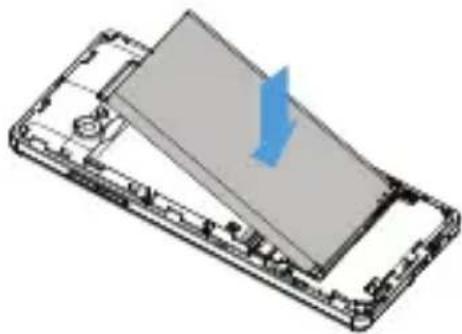
Isometric line drawing of a smartphone chassis with internal components (no text or symbols)4 Install the battery.
natural_image
3D diagram of a smartphone casing with an open panel and a blue arrow indicating direction (no text or symbols)5 Replace the back cover.

natural_image
3D diagram of an open smartphone showing internal components and a blue arrow indicating a specific portion (no text or symbols present)Charge the battery
A new battery is partially charged. The battery icon in the upper-right corner shows the battery level of charging status.

natural_image
Illustration of a smartphone with a USB cable inserted, showing the cable being inserted (no text or symbols present)
Tips:
• You can use the phone while it is charging.
- Keeping the charger plugged to the mobile phone when the battery is fully charged will not damage the battery. The only way to turn off the charger is to unplug it, so it is advisable to use an easily accessible power socket.
- If you do not intend to use your phone for several days, we recommend that you remove the battery.
• If a fully charged battery left unused, it will lost its charge over time.
- If a battery is being used for the first time on the battery has not been used for a prolonged period, it may take longer time to recharge.
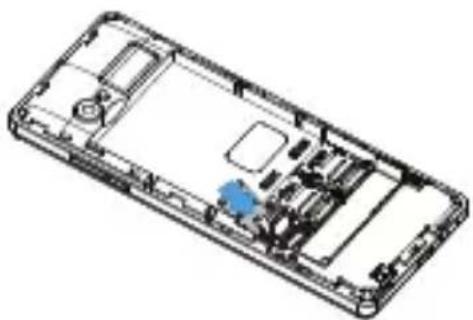
Insert a Micro SD card (Memory card)
natural_image
Isometric line drawing of a smartphone casing with internal components (no text or symbols)You can expand the memory of your phone by adding a micro-SD card.
Align your micro-SD card with the slot.
2 Put it in place.
Customize your phone
Customize your phone to match your preferences.
Set time & date
On the home screen, go to Menu>Settings>Phone settings>Time and date.
2 Select Set time/date: Select the desired digits.
SIM settings
Go to Menu>Settings>Dual SIM settings to set reply call/message or transfer data by SIM1/SIM2.

Note:
- The PIN code is preconfigured and communicated to you by your network operator or retailer.
- If you enter an incorrect PIN code three times in succession, your SIM card will be blocked. To unblock it, you must request the PUK code from your operator.
- If you enter an incorrect PUK code ten times in succession, the SIM card will be locked permanently. When this happens, please contact your network operator or retailer.
Dedicated keys
You can access the preset function directly by pressing dedicated keys.
Go to Settings>Phone settings>Dedicated keys.
2 Select the dedicated key and then select the function you want to access directly by pressing the dedicated key.
3 You can press the dedicated key to access the function.
Using your phone
Use basic call functions
Learn to make or answer a call and use basic call functions.
Make a call
Enter the phone number.
2 Press ☐ dial the number.
3 Press ☐ to hang up.

Tips:
- For international calls, long press "0" to enter the "+" sign for the international prefix.
Answer and end a call
Press ☐ to answer the call.
2 Press right soft key ☐ to select hands free mode during a call.
3 Press ☐ to hang up.

Tips:
• You can press the side volume key to adjust the volume.
Speed dial
On the home screen, you can call a number by long pressing a numeric key.
To assign a contact to a speed-dial key:
Go to Menu>phonebook>Local>Options>phonebook settings>Speed dials, set the status to On.
2 Select Set numbers to choose a numeric key and press - Edit to select a phone number from the contact list.
3 Press confirm key to save it.
Use blacklist
Learn about how to set the blacklist, you can reject the incoming calls or messages from those included in the blacklist.
Add a phone number to blacklist
Go to Menu>Phonebook>Local,select a contact you want to add to blacklist.
2 Press the left soft key and select Add to blacklist.
3 Select Yes to confirm.
Receive and send messages
You can use the Messaging menu to send text message, multimedia message.
Send a SMS message
Select Menu>Messaging>Write message>Text message.
2 Write your text message.
3 Press ☐Options>send to, select enter number directly or Add from Phonebook to select the recipient(s) from the contact list and press ☐Add to confirm.
4 Press confirm key to send the message.
Send a MMS message
Select Menu>Messages>Write message>MMS.
2 Edit contents, press -Options to select add picture/sound/video/subject and press confirm key to add multimedia contents
3 Press ☐Option>sent to, select enter number directly or Add from Phonebook to select the recipient(s) from the contact list and press ☐Add to confirm.
4 Press confirm key to send the message.

Note:
• Copyright protected pictures and sound cannot be sent by MMS.
Enter text
Your mobile phone supports a number of text entry methods, including English input, HI input, numeric input and symbol input.
Virtual keypad:
| Keys/Virtual keypad | Function |
 | Short press to select input method and language. |
 | Enter symbols and punctuations. |
| -Press right soft key to delete the previous symbol. | |
 | Press navigation key to select the symbol. |
 | Confirm the selection. |

Note:
- Depending on the language you select for your phone, the supported input methods may vary.
Manage your phonebook
Add a new contact
Method one:
On the home screen, enter a number, press ☐Options>Save to Phonebook>New contact, select a location (To SIM1/To SIM2/To Phone).
2 Edit the contact.
3 Press -Options>Save to finish saving.
Method two:
Go to Phonebook>Local.
2 Select Add new contact, select a location (To SIM1/To SIM2/To Phone) to add a new contact.
3 Edit the contact and press -Options>Save to finish saving.

Tips:
- For contacts stored on the phone, you can add detailed information, like home number, birthday.
Search for a contact
I Go to Phonebook.
2 Enter the first few letters of the name in the search bar.
3 Select the contact from the list.

Tips:
• You can also use the navigation keys to view the contacts.
Manage your contacts
Go to Phonebook, select a contact you want to edit, press -Options>Edit to edit the contact and press -Options>Save to save it.
Go to Phonebook, select a contact you want to delete, press -Options>Delete to delect the contact.
Organizer
Alarm
Learn about how to set and use an alarm. You can set up to five alarms.
Set an alarm
Go to Menu>Organizer>Alarm.
2 Press - Edit to edit the alarm.
3 Press - Save to save the settings.
Turn off an alarm
Go to Tools>Alarm.
2 Select the alarm you want to turn off.
3 Press - Edit and select Off to turn off the alarm.
Stop an alarm
When the alarm rings,
- Select Stop : The alarm stops.
- Select Snooze: The alarm will sound again after the set Snooze(Mins) interval.

Note:
- Alarms, reminders, programmed events are time zone independent.
Manage your calendar
You can add schedules on your calendar.
Create your schedule
Go to Organizer>Calendar, use the navigation key to select a date, and then press -Options>Add event.
2 Edit the schedule and press - Save to save it.
3 To change your schedule, select it and then press ☐Options>Edit to edit the task.
Check your schedule
Go to Organizer>Calendar, press -Options>View all to check your schedules.
Calculator
You can use Calculator to perform simple calculations.
Go to Organizer>Calculator,
2 Use the numeric keypad to enter numbers and use the navigation key to select operation symbols.
3 Press confirm key to view the result.
Voice Recorder
Learn about voice recorder function, please insert a SD card.
Record audio
Go to Multimedia>Sound recorder.
2 Press -Options>New record to start recording, press confirm key to pause/resume.
3 Press - Stop to stop recording and save the file.

Note:
- Please insert a SD card before using the sound recorder.
Play an audio file
Go to Multimedia>Sound recorder.
2 Press -Options>List, select the audio file you want to play and press confirm key to start playback.
3 Press - Back to stop, press to exit.
Bluetooth partner
Bluetooth management
Your phone can connect to a compatible Bluetooth device for exchanging data.
Connect to a Bluetooth device
Go to Bluetooth partner>Bluetooth management, select Power, press - On to turn on the Bluetooth function.
2 Select Bluetooth management>Search audio device, a list of available Bluetooth devices appears.
3 Select the device you wish to connect.
4 The pairing is made if your pairing request is accepted by the other part.
Receive files via Bluetooth
Go to Bluetooth partner>Bluetooth management>Visibility, make your phone visible to other Bluetooth devices.
2 Accept the request.
3 The files received are saved to My files>Memory card>Others.

Tips:
- If you do not use the Bluetooth feature for some time, you should deactivate it in order to conserve battery power.
BT dialer
Go to Bluetooth partner>BT dialer, select Search new device, a list of available Bluetooth devices appears.
2 Select the device you wish to connect, the pairing is made if your pairing request is accepted by the other part.
3 You can select BT dialer or make this phone as the bluetooth earphone of the paired phone.
Anti lost
The phone can enable the anti lost function after being paired with the other bluetooth device.
Go to Bluetooth partner>Anti lost, select ON.
2 Set the Alert type and sensitivity level.
3 The phone will warn you if the connected bluetooth device is apart from the phone for a certain distance.

Note:
- Anti lost function is just for your reference, it can not be deemed as the judgement of lost.
Remote capture
Please install "BT Notifier" apk in remote device first, then turn on the camera.
2 Go to Bluetooth partner>Remote capture, you can use this phone to control the remote device for capturing pictures.
Audio player
Save the supported audio files under the Audio folder on your memory card.
Play music
Go to Multimedia>Audio player, press -Options, select your desired song in the local list or BT music(if connected).
2 Using the following keys to control playback:
| Function Definition | |
| Start or Pause playing. | |
| Press Up navigation key to select previous track. | |
| Press Down navigation key to select next track. | |
| Press side volume key to adjust volume. | |
| - | Press right soft key to return to the previous menu. |
| Go to the home screen. | |
Video Player
Save the supported video files under the Video folder on your memory card.
Play videos
Go to Multimedia>Video player, press -Options, select your desired video in the list.
2 Press the confirm key to start playback.
3 Press - to stop, press to exit.
File management
Learn about how to use and manage your files and folders.
Use your files
Set a photo as wallpaper:
- Go to File manager>Phone or Memory card, select a photo.
- Press -Options>Use as>Wallpaper.
Manage your files
You can manage your files and folders, including creating new folders, deleting folder/file and so on.
Select a folder/file, press -Options.
2 Select the desired option and press confirm key to confirm.

Note:
- The insecurity audio, video files and pictures are not recommended to save to your phone.
FM radio
Lear about listening to radio programs by using a FM radio, please insert the earphone first.
Listen to a radio station
Go to Menu>Multimedia>FM radio, press -Options>Auto search>Auto search and save channels?, select Yes to start scan automatically and save the available channels.
2 Press the volume key to adjust volume, press navigation keys to adjust the frequency.
3 Press the confirm key to start or pause playing.
Manage your FM radio
Go to Menu>FM, press -Options to manage your FM:
• Channel list: View the channel list.
- Manual input: Input a channel and save it as preset channel.
- Auto search: Start scanning channels automatically and select Yes to save the available channels.
- Settings: Select turn on/off background play, loudspeaker.
Camera
Learn about camera function. Let you take photos as desired by using your phone.
Take a photo
Go to Menu>Multimedia>Camera.
2 Aim the lens at the subject, press the Up/Down navigation key to zoom in/ zoom out.
3 Press the confirm key to take a photo.
4 Press right soft key - Back to exit.

Note:
- All the photos taken are saved to My files>Phone or Memory card>Photos.
Options
Press - Options in camera mode:
Switch to video recorder: Switch to the video recorder.
Photos: Use navigation keys to select a photo, press -Options to rotate view picture, use as wallpaper, send picture as multimedia message/via bluetooth, view image information.
Camera settings: Set the LED highlight, Anti-flicker frequency, sence mode, white balance, delay timer.
Image settings: Set the image size, image quality.
Storage: Select the storage location (Phone or Memory card).
Restore default: Restore the camera settings to their default values.
Settings
Profiles
The profiles are defined for several scenes. They consist of the settings for ringtone, volume, and others. With preset profiles, you can easily adjust the settings for incoming calls and messages as desired.
Go to Settings>Profiles, press -Options>Activate to activate the profile.
2 Go to Customize to modify ringtone, volume and others. To activate Silent mode, long press 📄 on the home screen.
Dual SIM settings
Go to Menu>Settings>Dual SIM settings to set reply call/message or transfer data by SIM1/SIM2.
Phone settings
Function Definition
Time and date Set the clock of the phone.
Schedule power on/off Set time for the phone to be switched on/off automatically.
Language Select a language for your phone.
Pref.input method Set the preferred inputing method.
Display Set the wallpaper and whether to show date and time.
Shortcuts Set the shortcuts.
Dedicated key Select a navigation key as direct access to a menu.
Screen auto Set a keypad span for the keypad to be locked lock automatically.
Flight mode Select normal mode or flight mode.
Misc. settings Set the LCD backlight and key backlight.
Network settings
Function Definition
Network selection Select the network for your phone (service subscription dependent). Automatic search mode is recommended.
GPRS transfer Select the preferred GPRS transfer mode. pref.
Security settings
This menu allows you to use passwords to protect your phone. You can change the password(1122 by default).
Restore settings
Restore your phone settings to the default values. You need to enter your phone lock password(1122 by default).
Safety & Precaution
Precaution
Keep your phone away from small children

Keep your phone and all accessories out of the reach of small children. Small parts may cause choking or serious injury if swallowed.
Radio Waves

Your phone transmits/receives radio waves in the GSM frequency (900/1800MHz).
Check with the vehicle manufacturer that electronic equipment used in your vehicle will not be affected by radio energy.
Switch off your phone...

Turn off the phone when in an aircraft. The use of mobile phones in an aircraft may be dangerous for the operation of the aircraft, disrupt the mobile phones network and may be illegal.

In hospitals, clinics, other health care centers and anywhere else where you may be in the close vicinity of medical equipment.

In areas with a potentially explosive atmosphere (e.g. petrol stations and also areas where the air contains dust particles, such as metal powders). In a vehicle transporting flammable products vehicle powered by liquefied petroleum gas (LPG). In quarries or other areas where blasting rations are in progress.
Your mobile phone and your car

Avoid using your phone while driving and obey all regulations that restrict the use of mobile phones while driving. Use hands free accessories to increase your safety when possible. Ensure your phone and car kit do not block any air bags or other security devices fitted in your car.
Handle your phone carefully and sensibly

For the optimal and satisfactory operation of the phone you are recommended to use the phone in the normal operating position.
- Do not expose your phone to extreme temperatures.
- Do not immerse the phone in any liquid; if your phone is damp, switch it off, remove the battery and let them dry for 24hrs before using them again.
• To clean the phone, wipe it with a soft cloth. - In hot weather or after prolonged exposure to the sun (e.g., behind a window or a windscreen), the temperature of your phone's casing might increase. Be very careful in this case when picking up your phone and also avoid using it with an ambient temperature below 0^ C or over 50^ C.
Protect batteries from damage

You should only use Philips Authentic Accessories, as the use of any other accessories may damage your phone and may be dangerous, and will make all guarantees for your Philips phone and void. The use of an unspecified type of battery may also cause an explosion.
Make sure damaged parts are replaced immediately by a qualified technician and that they are replaced with genuine Philips replacement parts.
- Your phone is powered by a rechargeable battery.
• Use specified charger only. - Do not incinerate.
- Do not deform or open the battery.
- Do not allow metal objects (such as keys in your pocket) to short circuit the battery contacts.
- Avoid exposure to excessive heat ( >50^ C or 113^ F), moisture or caustic environments.
Environmental care

Remember to observe the local regulations regarding the disposal of the packaging materials, exhausted batteries and old phone and please promote their recycling. Philips has marked the
battery and packaging with standard symbols designed to promote the recycling and appropriate disposal of your eventual waste.
The labeled packaging material is recyclable.
A financial contribution has been made to the associated national packaging recovery and recycling system.
△:The plastic material is recyclable (also identifies the type of plastic).
Hearing Protection

When listening to music, adjust the volume to a moderate level.
Continuous exposure to high volume may impair your hearing.
Adapter
Adapter shall be installed near the equipment and shall be easily accessible.
WEEE Marking in the DFU: "Information to the Consumer"
Disposal of your old product
Your product is designed and manufactured with high quality materials and components, which can be recycled and reused.
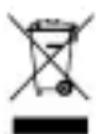
When this crossed-out wheeled bin symbol is attached to a product it means the product is covered by the European Directive 2002/96/EC
Please inform yourself about the local separate collection system for electrical and electronic products.
Please act according to your local rules and do not dispose of your old products with your normal household waste. The correct disposal of your old product will help prevent potential negative consequences for the environment and human health.
This device may contain commodities, technology or software subject to export laws and regulations from the US and other countries. Diversion contrary to law is prohibited.
Tips
Pacemakers
If you have a pacemaker:
- Always keep the phone more than 10 cm from your pacemaker when the phone is switched on, in order to avoid potential interference.
• Do not carry the phone in a breast pocket. - Use the ear opposite to the pacemaker to minimize the potential interference.
- Switch off your phone if you suspect that interference is taking place.
Hearing aids
If you are a user of a hearing aid, consult your physician and hearing aid manufacturer to learn whether your particular device is susceptible to cellular phone interference.
How to prolong the battery life of your phone
To have your mobile phone function properly, sufficient battery power is important. For the power-saving purpose, do the following, if applicable:
• Turn off the Bluetooth function of your phone.
- Set the backlight level and duration of your phone to a low value.
• Turn on the auto keypad lock, turn off the key sounds, tap vibration, or vibration alerts.
- Establish GPRS connection when needed. Otherwise, your phone will keep searching for GPRS connection, and drain your battery power.
- Turn off your phone if there is no coverage. Otherwise, the phone will keep searching for network, and drain your battery power.
Troubleshooting
The phone does not switch on
Remove/reinstall the battery. Then charge the phone until the battery icon stops scrolling. Unplug the charger and try to switch the mobile on.
The display shows BLOCKED when you switch on the phone
Somebody tried to use your phone but didn't know the PIN code nor the unblocking code (PUK).
Contact your service provider.
The display shows IMSI failure
This problem is related to your subscription. Contact your operator.
Your phone doesn't return to idle screen
Long press the hang-up key or switch off the phone, check that the SIM card and the battery are installed correctly and switch it on again.
The network symbol is not displayed
The network connection is lost. Either you are in a radio shadow (in a tunnel or between tall buildings) or you are outside the network coverage area. Try from another place, try to reconnect to the network (especially when abroad), check that the antenna is in place if your mobile has an external antenna, or contact your network operator for assistance/information.
The display doesn't respond (or the display responds slowly) to key presses
The display responds more slowly at very low temperatures. This is normal and does not affect the operation of the phone. Take the phone to a warmer place and try again. In other cases please contact your phone supplier.
Your battery seems to over heat
You might be using a charger that was not intended for use with your phone. Make sure you always use the Philips authentic accessory shipped with your phone.
Your phone doesn't display the phone numbers of incoming calls
This feature is network and subscription dependent. If the network doesn't send the caller's number, the phone will display Call 1 or Withheld instead. Contact your operator for detailed information on this subject.
You can't send text messages
Some networks don't allow message exchanges with other networks. First check that you have entered the number of your SMS centre, or contact your operator for detailed information on this subject.
You can't receive and/or store JPEG pictures
A picture may not be accepted by your mobile phone if it is too large, if its name is too long, or if it doesn't have the correct file format.
You feel that you have missed some calls
Check your call divert options.
When charging, the battery icon shows no bar and the outline is flashing
Only charge the battery in an environment where the temperature does not go below 0^ C ( 32^ F) or above 50^ C ( 113^ F).
In other cases please contact your phone supplier.
The display shows SIM failure
Check that the SIM card has been inserted correctly. If the problem persists, your SIM card may be damaged. Contact your operator.
When attempting to use a feature in the menu, the display shows NOT ALLOWED
Some features are network dependent. They are only available, therefore, if the network or your subscription supports them. Contact your operator for detailed information on this subject.
The display shows INSERT YOUR SIM CARD
Check that the SIM card has been inserted correctly. If the problem persists, your SIM card may be damaged. Contact your operator.
The autonomy of your phone seems lower than indicated on the user guide
The autonomy is linked to your settings (e.g., ringer volume, backlight duration) and the features you use. To increase the autonomy, and whenever possible, you must deactivate features you do not use.
Your phone doesn't work well in your car
A car contains many metallic parts that absorb electromagnetic waves which can affect the phone's performance. A car kit is available to provide you with an external antenna and enables you to make and receive phone calls without handling the handset.

Note:
- Check with the local authorities whether or not you are allowed to use the phone while driving.
Your phone is not charging
If the battery is completely flat, it might take several minutes of pre-charge (up to 5 minutes in some cases) before the charging icon is displayed on the screen.
The picture captured with the phone camera is not clear
Make sure that the camera lens on both sides is clean.
Trademark Declaration
T9®
T9 ^® is a registered trademark of Nuance Communications, Inc..
JAVA JAVA is a trademark of Sun Microsystems, Inc.
Bluetooth ^TM
Bluetooth ^™ is a trade-mark owned by telefonaktiebolaget L M Ericsson, Sweden and licensed to Philips.
Philips PHILIPS and PHILIPS' Shield Emblem are registered trademarks of Koninklijke
Philips N.V. manufactured by Shenzhen Sang Fei Consumer Communications Co., Ltd. Under license from Koninklijke Philips N.V..
Specific Absorption Rate Information
International standards
THIS MOBILE PHONE MEETS THE INTERNATIONAL RECOMMENDATIONS FOR EXPOSURE TO RADIO WAVES
Your mobile phone is a radio transmitter and receiver. It is designed and manufactured not to exceed the limits for exposure to radio frequency (RF) energy defined by the international standards. These recommendations have been established by the International Commission on Non-Ionizing Radiation Protection (ICNIRP) and, the Institute of Electrical and Electronics Engineers (IEEE) that forecast a substantial safety margin for assuring the protection of all persons, regardless of age and health.
The exposure recommendations for mobile phones use a measurement unit known as the Specific Absorption Rate (SAR). The SAR limit recommended by the ICNIRP for the mobile phones used by the general public is 2.0W/kg averaged over ten grams of tissue and, is 1,6W/kg averaged over one gram of tissue by IEEE Std 1528 for the head.
Tests for SAR have been conducted using recommended operating positions with the mobile phone transmitting at its highest certified power level in all tested frequency bands. Although the SAR is determined at the highest certified power level, the actual SAR levels of the mobile phone while operating are generally below the maximum SAR value. This is because the phone is designed to operate at multiple power levels so as to use only the power required to reach the network. In general, the closer you are to a base station antenna, the lower the power output.
While there may be differences between the SAR levels of various phones and at various positions, they all meet the international protection standards for exposure to radio waves.
The highest SAR value for this Philips Xenium EI70 model phone when tested for compliance against the standard was 1.774 W/kg for ICNIRP recommendation.
For limiting the radio waves exposure, it is recommended to reduce the mobile phone call duration or to use a headset. The purpose of those precautions is to take the mobile phone away from the head and the body.
Limited warranty
What Does This Limited Warranty Cover?
Manufacturer warrants to the original retail purchaser (“Consumer” or “You”) that this Philips cellular product and all accessories originally provided by manufacturer in the sales package (“Product”) are free from defects in materials, design and workmanship under normal use in accordance with the operating instructions and pursuant to the following terms and conditions. This limited warranty extends only to the Consumer for Products purchased and used in the original country of purchase. The limited warranty is valid only in manufacturer’s intended country of sales of the product.
- How Long is The Limited Warranty Period?
The limited warranty period for the Product extends for ONE (1) YEAR from the date of purchase of the Product, documented by valid proof of purchase. The limited warranty for original Philips rechargeable battery extends for six (6) months from the date of purchase.
- What Will Manufacturer Do if The Product is Not Free From Material Defects in Materials and Workmanship During The Limited Warranty Period?
During the limited warranty period, manufacturer or its authorized service representative will, at its option either repair or replace, without charge for parts or labour, a materially defective Product with new or refurbished parts or Product and return such repaired or replaced Product to the Consumer in working condition. Manufacturer will retain defective parts, modules or equipment.
Repaired or replaced Product will be covered by this limited warranty for the balance of the original limited warranty period or ninety (90) days from the date of repair or replacement whichever is longer. Repair or replacement of Product, at manufacturer's option is your exclusive remedy.
- What is Not Covered By This Limited Warranty?
This limited warranty does not cover:
a) Product that has been subjected to misuse, accident, shipping or other physical damage, improper installation, abnormal operation handling, neglect, inundation, fire, water or other liquid intrusion; or
b) Product that has been damaged due to repair, alteration, or modification by anyone not authorized by manufacturer; or
c) Product that has reception or operation problems caused by signal conditions, network reliability or cable or antenna systems; or
d) Product defects or problems caused by uses with non-Philips products or accessories; or
e) Product which warranty/quality stickers, product serial number or electronic serial number has been removed, altered or rendered illegible; or
f) Product purchased, used, serviced, or shipped for repair from outside the original country of purchase, or used for commercial or institutional purposes (including but not limited to Products used for rental purposes); or
g) Product returned without valid proof of purchase or which proof of purchase has been altered or is illegible.
h) Normal wear and tear or Force Majeure.
- How Do You Get Warranty Service?
a) Return the Product to an authorized service center of manufacturer. You may contact the local manufacturer office for the location of the nearest authorized service center.
b) The SIM card must be removed from the Product before it is given to manufacturer. Manufacturer assumes no liability for damaged or loss of the SIM card or the data contained therein.
c) If the Product failure is not covered by this limited warranty, or this limited warranty is inapplicable, void or invalid due to any terms and conditions stated herein, the Consumer will be charged for the cost of repair or replacement of the Product and all other related cost incurred in repairing or replacing the Product.
d) IMPORTANT - you are required to return the Product together with a valid proof of purchase which must identify the point of purchase, date of purchase, Product model and Product serial number clearly.
- Other Limitation: This Warranty is The Entire Agreement.
EXCEPT FOR THE EXPRESS WARRANTIES SET FORTH ABOVE AND THOSE IMPLIED BY LAW AND WHICH CANNOT BE EXCLUDED OR MODIFIED BY AGREEMENT, MANUFACTURER PROVIDES NO OTHER WARRANTY WHETHER EXPRESS OR IMPLIED (WHETHER BY STATUTE, UNDER THE OPERATION OF LAW OR OTHERWISE) AND SPECIALLY DISCLAIMS ANY WARRANTY OF SATISFACTORY QUALITY MERCHANTABILITY OR FITNESS FOR A PARTICULAR PURPOSE.
MANUFACTURER' TOTAL LIABILITY FOR DAMAGES RELATING TO OR ARISING OUT OF THE PURCHASE OR USE OF THE PRODUCT, REGARDLESS OF THE TYPE OR CAUSE OF SUCH DAMAGE OR THE FORM OR CHARACTERISATION OF THE CLAIM ASSERTED (E.G. CONTRACT), SHALL NOT EXCEED THE ORIGINAL PURCHASE PRICE PAID FOR THE PRODUCT.
HOWEVER IN NO EVENT SHALL MANUFACTURER BE LIABLE FOR ANY PUNITIVE, SPECIAL, INCIDENTAL, INDIRECT OR CONSEQUENTIAL DAMAGES (INCLUDING BUT NOT LIMITED TO THE LOSS OF USE, LOSS OF TIME, INCONVENIENCE, COMMERIAL LOSS, LOST PROFITS, LOST BUSINESS OPPORTUNITIES, COST OF SUBSTITUTION OF GOODS OR SERVICES, INVESTMENTS, DAMAGE TO GOODWILL OR REPUTATION, OR LOSS OF DATA AND CLAIMS BY THIRD PARTIES) RESULTING FROM PURCHASE OR USE OF THE PRODUCT, TO THE FULLEST EXTENT ALLOWED BY LAW, WHETHER OR NOT MANUFACTURER HAS BEEN ADVISED OF THE POSSIBILITY OF SUCH DAMAGES. THESE LIMITATIONS SHALL APPLY NOTWITHSTANDING THE FAILURE OF THE ESSENTIAL PURPOSE OF ANY LIMITED REMEDY.
This limited warranty represents the complete and exclusive agreement between the Consumer and Manufacturer with respect to this cellular Product and it supersedes all prior agreements between the parties, oral or written, and all other communications between the parties relating to the subject matter of this limited warranty. No carrier, retailer, agent, dealer, employee, thereof, or employee of manufacturer is authorized to make modifications to this limited warranty and you should not rely on any such representation.
This limited warranty does not affect the Consumer's statutory rights under applicable national laws in force.
Declaration of Conformity
We,
Shenzhen Sang Fei Consumer
Communications Co., Ltd.
II Science and Technology Road,
Shenzhen Hi-tech Industrial Park,
Nanshan District, Shenzhen 518057
P.R.China
declare under our sole responsibility that the product
Philips Xenium EI70
Philips GSM/GPRS 900/1800 MHz
TAC number: 86892202
to which this declaration relates, is in conformity with the following Standards:
SAFETY : EN 60950-1:2006/A11:2009/A1:2010+A12:2011+A2:2013, EN 50332-2:2003
HEALTH: EN 62209-1:2006, EN 62209-2:2010
EN 50566:2013/AC:2014, EN 62479:2010
EN 50360:2001/AI:2012
EMC: EN 301 489-1 v1.9.2, EN 301 489-7 v1.3.1, EN 301 489-17 v2.2.1
RF: EN 300 328 v1.9.1
EN 301 511 v9.0.2
We hereby declare that (all essential radio test suites have been carried out and that) the above named product is in conformity to all the essential requirements of Directive 1999/5/EC.
The Conformity assessment procedure referred to in Article 10 and detailed in Annex III or IV of Directive 1999/5/EC has been followed with the involvement of the following Notified Body(ies):
PHOENIX TESTLAB GmbH, Köningswinkel 10, 32825, Blomberg, Germany
Identification mark: 0700
March 1st,2016

Quality Manager
Tips & tricks
Optimizing your Philips Xenium battery performance
Here are some steps to help you optimize your Philips Xenium's battery performance.
How to optimize the standby and talk time of your phone?
- Always ensure that your phone profile is appropriately set to meet your actual usage. Profile setting significantly impacts the phone's battery performance. In general, Outdoor Mode is the most power-draining setting while Silent Mode consumes the least amount of power.
- If you're using a Xenium phone with a dual SIM feature, try to activate the 2 SIM cards only when absolutely necessary. If you are in a country with single coverage, deactivate the non-covered SIM to prolong battery usage.
- If you're not using applications like Bluetooth, WIFI, GPS and JAVA, turn them off. And be sure to lock your phone to prevent accidental pressing of the keys with the auto-lock feature.
- Adjust the intensity and duration of your display screen's backlight to low or medium level and for the shortest duration. In general, the lower the backlight level and the shorter the duration, the more power you will save.
- Avoid using or placing your phone near magnetic objects (eg. a radio or television) or on metal surfaces, which will impact the network connection and ultimately drain power from your battery.
How to extend your battery's life?
• Full charging and full running down of your battery will extend its life. Charge the battery once the low-battery warning comes on.
- Temperature will impact battery usage. Over time, heat will degrade your battery's performance. Keep your phone out of the sun or a hot car. If in low temperature, place your phone in a warmer place (eg. your pocket), as battery capacity decreases as the temperature drops.
- Always use authentic accessories as they enable your battery to perform at its peak. Non-authentic accessories (eg. chargers) can damage your battery and even your phone.


- Main screen
- Keys
- Icons & symbols
- Icons Definition Function
- Getting started
- Insert SIM card and Charge the battery
- Insert SIM card
- Charge the battery
- Tips:
- Insert a Micro SD card (Memory card)
- Customize your phone
- Set time & date
- SIM settings
- Note:
- Dedicated keys
- Using your phone
- Use basic call functions
- Make a call
- Answer and end a call
- Speed dial
- Use blacklist
- Add a phone number to blacklist
- Receive and send messages
- Send a SMS message
- Send a MMS message
- Enter text
- Virtual keypad:
- Manage your phonebook
- Add a new contact
- Method one:
- Method two:
- Search for a contact
- Manage your contacts
- Organizer
- Alarm
- Set an alarm
- Turn off an alarm
- Stop an alarm
- Manage your calendar
- Create your schedule
- Check your schedule
- Calculator
- Voice Recorder
- Record audio
- Play an audio file
- Bluetooth partner
- Bluetooth management
- Connect to a Bluetooth device
- Receive files via Bluetooth
- BT dialer
- Anti lost
- Remote capture
- Audio player
- Play music
- Video Player
- Play videos
- File management
- Use your files
- Manage your files
- FM radio
- Listen to a radio station
- Manage your FM radio
- Camera
- Take a photo
- Options
- Settings
- Profiles
- Dual SIM settings
- Phone settings
- Function Definition
- Network settings
- Security settings
- Restore settings
- Safety & Precaution
- Precaution
- Keep your phone away from small children
- Radio Waves
- Switch off your phone...
- Your mobile phone and your car
- Handle your phone carefully and sensibly
- Protect batteries from damage
- Environmental care
- Hearing Protection
- Adapter
- WEEE Marking in the DFU: "Information to the Consumer"
- Disposal of your old product
- Tips
- Pacemakers
- Hearing aids
- How to prolong the battery life of your phone
- Troubleshooting
- The phone does not switch on
- The display shows BLOCKED when you switch on the phone
- The display shows IMSI failure
- Your phone doesn't return to idle screen
- The network symbol is not displayed
- The display doesn't respond (or the display responds slowly) to key presses
- Your battery seems to over heat
- Your phone doesn't display the phone numbers of incoming calls
- You can't send text messages
- You can't receive and/or store JPEG pictures
- You feel that you have missed some calls
- When charging, the battery icon shows no bar and the outline is flashing
- The display shows SIM failure
- When attempting to use a feature in the menu, the display shows NOT ALLOWED
- The display shows INSERT YOUR SIM CARD
- The autonomy of your phone seems lower than indicated on the user guide
- Your phone doesn't work well in your car
- Your phone is not charging
- The picture captured with the phone camera is not clear
- Trademark Declaration
- Specific Absorption Rate Information
- International standards
- The highest SAR value for this Philips Xenium EI70 model phone when tested for compliance against the standard was 1.774 W/kg for ICNIRP recommendation.
- Limited warranty
- Declaration of Conformity
- Tips & tricks
- Optimizing your Philips Xenium battery performance
- How to optimize the standby and talk time of your phone?
- How to extend your battery's life?
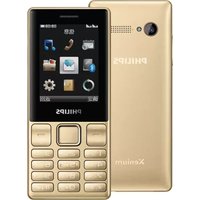
Brand : PHILIPS
Model : CTE170RG
Category : Smartphone