SL270 - Mobile Phone Bea-fon - Free user manual and instructions
Find the device manual for free SL270 Bea-fon in PDF.


Pick your language and provide your email: we'll send you a specifically translated version.
| Type of product | Mobile phone |
| Brand | Bea-fon |
| Model | SL270 |
| Display | 2.4-inch color screen |
| Keypad | Large, easy-press keys |
| Emergency function | Dedicated SOS button on the back |
| Connectivity | GSM/2G networks |
| Battery | Lithium-ion, 1000 mAh capacity |
| Talk time | Up to 4 hours |
| Standby time | Up to 200 hours |
| Memory card slot | microSD up to 32 GB |
| Camera | Rear VGA camera |
| Radio | Built-in FM radio |
| Torch | LED flashlight |
| Phonebook | Contact list with quick dial |
| Messaging | SMS/MMS supported |
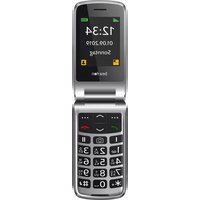
| Dimensions | Compact flip-phone style |
| Weight | Approximately 100 g |
| Charging port | Micro USB |
| Care and cleaning | Wipe with a soft, dry cloth |
| Safety | Use only approved chargers and batteries |
| Repairability | Battery and SIM easily accessible |
Frequently Asked Questions - SL270 Bea-fon
How do I insert the SIM card and battery?
Turn off the phone, remove the back cover, then slide the SIM card into the designated slot and insert the battery with the gold contacts aligned.
How do I set up the SOS button?
Go to the SOS menu, enable the function, and assign up to 5 contacts. When the SOS button is pressed, the phone will send an alert to those contacts and start a call.
How do I charge the phone?
Connect the included Micro USB cable to the charging port and plug it into a wall adapter. A battery icon will appear on the screen when charging.
How do I use the FM radio?
Connect the earphones to the audio jack (they act as the antenna), then open the FM radio app. Use the keypad to tune and save your favorite stations.
How do I save a new contact?
Open the Contacts menu, select 'Add new', enter the name and number, then press Save. You can assign a quick dial key for easy access.
How do I increase the volume during a call?
Use the volume keys on the side of the phone to raise or lower the earpiece volume during a call. You can also adjust the ringer and speaker volume in the sound settings.
Is the phone hearing aid compatible?
Yes, the Bea-fon SL270 is hearing aid compatible with a rating of M3/T3, making it suitable for use with most hearing aids.
How do I transfer photos to a computer?
You can remove the microSD card and use a card reader, or connect the phone to a computer via the USB cable and select 'Mass Storage' mode to access the files.
What should I do if the battery drains too quickly?
Check your signal strength, close unused applications, and avoid using features like the flashlight for extended periods. If the issue persists, the battery may need replacement.
Where can I find the full user manual?
You can download the complete user manual in PDF format for free from the notice-facile.com product page, or use the 'Download' button on this site.
User questions about SL270 Bea-fon
0 question about this device. Answer the ones you know or ask your own.
Ask a new question about this device
No questions yet. Be the first to ask one.
Download the instructions for your Mobile Phone in PDF format for free! Find your manual SL270 - Bea-fon and take your electronic device back in hand. On this page are published all the documents necessary for the use of your device. SL270 by Bea-fon.
USER MANUAL SL270 Bea-fon


Manual assistant
Powered by Anthropic
Waiting for your message
Product information
Brand : Bea-fon
Model : SL270
Category : Mobile Phone