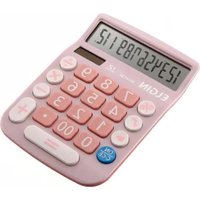
MV 4127 - Calculator Elgin - Free user manual and instructions
Find the device manual for free MV 4127 Elgin in PDF.


Pick your language and provide your email: we'll send you a specifically translated version.
| Type of product | Calculator |
| Brand | Elgin |
| Model | MV 4127 |
| Display | 10-digit LCD |
| Dimensions (W x H x D) | 150 x 80 x 10 mm |
| Weight | 100 g |
| Power source | 1 x LR44 battery |
| Battery life | Up to 12 months |
| Basic functions | Addition, subtraction, multiplication, division |
| Additional functions | Percent, square root, sign change |
| Memory | 1-key memory (M+, M-, MR, MC) |
| Number of keys | 45 |
| Key type | Rubber keys with tactile response |
| Auto power off | Yes, after 8 minutes |
| Cleaning | Wipe with a dry soft cloth |
| Operating temperature | 0°C to 40°C |
| Storage temperature | -10°C to 60°C |
| Included accessories | None (battery included) |
| Replacement parts | LR44 battery (available at most electronics stores) |
| Repair policy | Refer to the user manual for battery replacement; no other user-serviceable parts |
| Color | Black |
| Warranty | 1-year limited warranty (check with seller) |
Frequently Asked Questions - MV 4127 Elgin
How do I replace the battery?
To replace the battery, turn the calculator off, slide the battery cover off the back, remove the old LR44 battery, and insert a new one with the positive (+) side facing up. Replace the cover and press the ON key.
How do I clear the memory?
Press the MC key to clear the memory. The memory indicator will disappear from the display.
What does the "M+" key do?
The M+ key adds the displayed number to the number stored in memory. Use it to accumulate totals.
How do I perform a percentage calculation?
To calculate 20% of 150, press 150, then ×, then 20, then %. The result, 30, will be displayed.
Why is the display faded?
If the display is faded, the battery may be low. Replace the LR44 battery with a fresh one. Also, check the contrast setting if available.
How do I reset the calculator?
To reset the calculator, press the AC key or remove and reinsert the battery. This clears all entries and memory.
Can I use this calculator in exams?
Yes, this is a standard basic calculator, suitable for most exams that allow non-programmable calculators. Check with your institution for specific rules.
How do I clean the calculator?
Use a soft, dry cloth to wipe the exterior. Do not use solvents or water. Keep liquids away from the device.
How long does the battery last?
Under normal use, the included LR44 battery lasts up to 12 months. Heavy use may reduce battery life.
Does the calculator turn off automatically?
Yes, the calculator has an auto power-off feature that activates after 8 minutes of inactivity to save battery life.
User questions about MV 4127 Elgin
0 question about this device. Answer the ones you know or ask your own.
Ask a new question about this device
No questions yet. Be the first to ask one.
Download the instructions for your Calculator in PDF format for free! Find your manual MV 4127 - Elgin and take your electronic device back in hand. On this page are published all the documents necessary for the use of your device. MV 4127 by Elgin.
USER MANUAL MV 4127 Elgin
Manual assistant
Powered by Anthropic
Waiting for your message
Product information
Brand : Elgin
Model : MV 4127
Category : Calculator