MA 5111 - Calculator Elgin - Free user manual and instructions
Find the device manual for free MA 5111 Elgin in PDF.


Pick your language and provide your email: we'll send you a specifically translated version.
| Brand | Elgin |
| Model | MA 5111 |
| Product Type | Calculator |
| Dimensions (approx.) | 15.0 x 8.0 x 1.5 cm |
| Weight (approx.) | 150 g |
| Power Supply | 1 x LR44 (or equivalent) battery |
| Display | 8-digit LCD |
| Basic Functions | Addition, subtraction, multiplication, division |
| Additional Functions | Square root, percentage, memory (M+, M-, MR, MC) |
| Keyboard | Plastic keys with tactile feedback |
| Auto Power Off | Yes, after approx. 7 minutes of inactivity |
| Operating Temperature | 0°C to 40°C |
| Housing Material | ABS plastic |
| Cleaning | Wipe with a soft, dry cloth; do not use solvents |
| Safety Precautions | Keep away from water and extreme temperatures |
| Repairability | Not user-serviceable; no replaceable parts except battery |
Frequently Asked Questions - MA 5111 Elgin
How do I change the battery in my Elgin MA 5111?
To change the battery, slide the battery cover on the back of the calculator. Remove the old battery and insert a new LR44 or equivalent, ensuring the correct polarity. Replace the cover.
Why is my calculator not turning on?
First, check if the battery is properly installed and has charge. If the battery is dead, replace it. Also, ensure the ON button is pressed firmly. If it still does not turn on, the device may require repair.
How do I reset the calculator?
There is no dedicated reset button. To reset, remove the battery for about 30 seconds, then reinsert it. This clears any temporary errors.
What does 'E' mean on the display?
The letter E indicates an error, such as overflow or division by zero. Press the ON/C button to clear the error and reset the calculation.
Can I use the calculator for fraction calculations?
The Elgin MA 5111 is a basic calculator and does not support fraction calculations. It performs decimal arithmetic only.
How do I use the memory functions?
Use M+ to add the displayed number to memory, M- to subtract, MR to recall, and MC to clear memory. The memory indicator appears when a value is stored.
What type of battery does this calculator use?
It uses a single LR44 (also known as AG13 or 357) button cell battery. These are widely available.
How should I clean my calculator?
Turn off the calculator and wipe the exterior with a soft, dry cloth. Do not use any liquids or cleaners, as they may damage the device.
Is the calculator covered by a warranty?
Warranty information is typically provided at the point of sale. Check your purchase documentation or contact Elgin support for specific warranty terms.
Where can I find the full user manual?
The user manual can be downloaded for free from notice-facile.com in PDF format. Search for 'Elgin MA 5111 manual' on the site.
User questions about MA 5111 Elgin
0 question about this device. Answer the ones you know or ask your own.
Ask a new question about this device
No questions yet. Be the first to ask one.
Download the instructions for your Calculator in PDF format for free! Find your manual MA 5111 - Elgin and take your electronic device back in hand. On this page are published all the documents necessary for the use of your device. MA 5111 by Elgin.
USER MANUAL MA 5111 Elgin
natural_image
Line drawing of a mechanical device with a cylindrical component inserted into a housing (no text or symbols)natural_image
Line drawing of a handheld electronic device with a cylindrical lens (no text or symbols)natural_image
Illustration of hands using a handheld electronic device with a scroll wheel (no text or symbols visible)natural_image
Hand using a handheld calculator to press or install electronic components (no visible text or symbols)natural_image
Hand using a handheld electronic device to adjust or install a component (no visible text or symbols)natural_image
Illustration of hands using a handheld device to interact with a device (no text or symbols visible)- Feche a tampa da impressora (Fig.4).
5.1 Teclas
↑
Avanço de papel
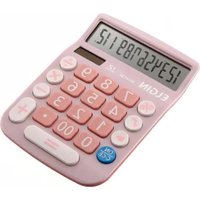
Table of contents
Click a title to access it
Manual assistant
Powered by Anthropic
Waiting for your message
Product information
Brand : Elgin
Model : MA 5111
Category : Calculator