CC56 - Calculator Elgin - Free user manual and instructions
Find the device manual for free CC56 Elgin in PDF.


| Product Type | Basic Calculator |
| Brand | Elgin |
| Model | CC56 |
| Display | 12-digit LCD |
| Power Source | Solar cell with backup battery (LR54) |
| Dimensions (W x D x H) | 150 x 100 x 30 mm |
| Weight | 150 g |
| Basic Operations | Addition, Subtraction, Multiplication, Division |
| Special Functions | Percentage, Square Root, Memory (M+/M-/MR/MC) |
| Keyboard | Plastic keys with tactile feedback |
| Auto Power Off | Yes, after approximately 7 minutes of inactivity |
| Operating Temperature | 0°C to 40°C (32°F to 104°F) |
| Storage Temperature | -20°C to 60°C (-4°F to 140°F) |
| Cleaning Instructions | Wipe with a soft, dry cloth. Do not use solvents. |
| Battery Replacement | Only by qualified personnel; use specified battery type |
| Safety Precautions | Keep away from moisture, extreme temperatures, and direct sunlight. Do not disassemble. |
| Environmental Compliance | RoHS, WEEE |
| Warranty | 1 year limited warranty |
Frequently Asked Questions - CC56 Elgin
User questions about CC56 Elgin
0 question about this device. Answer the ones you know or ask your own.
Ask a new question about this device
Download the instructions for your Calculator in PDF format for free! Find your manual CC56 - Elgin and take your electronic device back in hand. On this page are published all the documents necessary for the use of your device. CC56 by Elgin.
USER MANUAL CC56 Elgin
E: HFX mode: Numbers hexadecimal class "F"
2nd F. Y. Calcula a Xth raiz de Y
图:Hexadecimal
17- Raiz quadrada/cúbica e hexadecimal
(m)
ELGIN
19- Abre Paréntesis / Troca
□: Usado para abrir parentesis
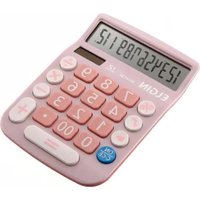
Brand : Elgin
Model : CC56
Category : Calculator