HR-C1162 - Desktop computer HAIER - Free user manual and instructions
Find the device manual for free HR-C1162 HAIER in PDF.


Pick your language and provide your email: we'll send you a specifically translated version.
| Brand | Haier |
| Model | HR-C1162 |
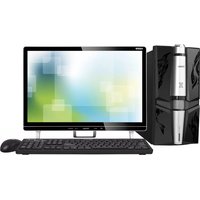
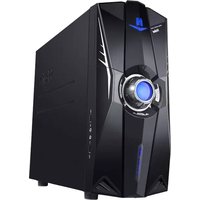
| Product Type | Desktop Computer |
| Form Factor | Tower |
| Dimensions (W x D x H) | 180 x 420 x 380 mm |
| Weight | 8.5 kg |
| Processor | Intel Core i5 (11th Gen) 2.4 GHz |
| RAM | 8 GB DDR4 |
| Storage | 256 GB SSD + 1 TB HDD |
| Optical Drive | DVD-RW |
| Graphics | Integrated Intel UHD Graphics |
| Operating System | Windows 10 Home (64-bit) |
| Power Supply | 300 W |
| Connectivity | USB 3.0 x 4, USB 2.0 x 2, HDMI, VGA, Ethernet RJ-45 |
| Wireless | Wi-Fi 802.11ac, Bluetooth 4.2 |
| Audio | 3.5 mm headphone/microphone jacks |
| Expansion Slots | PCIe x16, PCIe x1 |
| Memory Card Reader | SD/MMC |
| Warranty | 1 year limited |
| Energy Rating | ENERGY STAR certified |
Frequently Asked Questions - HR-C1162 HAIER
How do I set up the Haier HR-C1162 for the first time?
Connect the power cable, monitor, keyboard, and mouse. Press the power button. Follow on-screen instructions to install Windows and drivers.
Can I upgrade the RAM on the HR-C1162?
Yes, the system supports up to 32 GB DDR4 RAM. Open the side panel, locate the DIMM slots, and insert new modules.
What should I do if the computer won't turn on?
Check the power cable connection and ensure the power supply switch is on. Try a different outlet. If still no power, contact support.
How do I connect to Wi-Fi?
Click the network icon on the taskbar, select your Wi-Fi network, enter the password, and connect.
Does the HR-C1162 support dual monitors?
Yes, it has both HDMI and VGA ports. Connect one monitor to each port and configure display settings in Windows.
How do I clean the interior of the desktop?
Turn off and unplug the computer. Use compressed air to blow out dust from vents, fan, and components. Avoid touching internal parts.
Can I install a dedicated graphics card?
Yes, the PCIe x16 slot supports a dedicated GPU. Ensure your power supply has sufficient wattage and available connectors.
Why is my computer running slowly?
Close unused programs, check for malware, free up disk space, and consider upgrading RAM or switching to an SSD if not already installed.
How to perform a factory reset?
Go to Settings > Update & Security > Recovery > Reset this PC. Choose to keep or remove files, then follow prompts.
Is the HR-C1162 suitable for gaming?
It is suitable for casual and older games with integrated graphics. For modern AAA titles, a dedicated graphics card is recommended.
User questions about HR-C1162 HAIER
0 question about this device. Answer the ones you know or ask your own.
Ask a new question about this device
No questions yet. Be the first to ask one.
Download the instructions for your Desktop computer in PDF format for free! Find your manual HR-C1162 - HAIER and take your electronic device back in hand. On this page are published all the documents necessary for the use of your device. HR-C1162 by HAIER.
USER MANUAL HR-C1162 HAIER

Manual assistant
Powered by Anthropic
Waiting for your message
Product information
Brand : HAIER
Model : HR-C1162
Category : Desktop computer