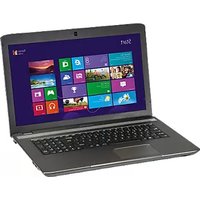
Akoya E4271TG - Laptop MEDION - Free user manual and instructions
Find the device manual for free Akoya E4271TG MEDION in PDF.


Pick your language and provide your email: we'll send you a specifically translated version.
| Product Type | Laptop |
| Brand | Medion |
| Model | Akoya E4271TG |
| Processor | Intel Core i5-6200U (2.3 GHz, up to 2.8 GHz) |
| Memory (RAM) | 8 GB DDR4 |
| Storage | 256 GB SSD |
| Display | 14.0-inch HD (1366 x 768) LED |
| Graphics | Intel HD Graphics 520 |
| Operating System | Windows 10 Home (64-bit) |
| Dimensions (W x D x H) | 34.5 x 24.5 x 2.5 cm |
| Weight | Approx. 2.1 kg |
| Power Supply | 65 W AC adapter |
| Battery | Li-ion 3-cell, 36 Wh |
| Battery Life | Up to 5 hours (typical usage) |
| Connectivity | Wi-Fi 802.11ac, Bluetooth 4.0, Gigabit Ethernet |
| Ports | 2 x USB 3.0, 1 x USB 2.0, HDMI, VGA, headphone/mic combo, SD card reader |
| Camera | HD webcam (0.3 MP) |
| Keyboard | Full-size keyboard with numeric keypad |
| Touchpad | Multi-touch touchpad |
| Security | Kensington lock slot, password protection |
| Maintenance | Clean with a soft, dry cloth. Do not use liquid cleaners. |
| Spare Parts | Available through Medion service centers. Check warranty. |
| Repairability | RAM and storage upgradeable. Battery replaceable by technician. |
Frequently Asked Questions - Akoya E4271TG MEDION
How can I improve battery life on my Medion Akoya E4271TG?
Reduce screen brightness, disable Wi-Fi/Bluetooth when not in use, close background applications, and use power saver mode. Consider replacing the battery if it no longer holds charge.
Can I upgrade the RAM on the Akoya E4271TG?
Yes, the laptop has one accessible SODIMM slot supporting up to 16 GB DDR4. Ensure compatibility with the existing RAM.
How to access the BIOS setup?
Turn off the laptop, then press F2 repeatedly while powering on until the BIOS menu appears.
The laptop runs slowly – what should I do?
Check for malware, disable startup programs, free up disk space, and consider upgrading to an SSD if not already present. Also ensure drivers are up to date.
Does the Medion Akoya E4271TG have a backlit keyboard?
No, this model does not feature a backlit keyboard.
How to perform a factory reset?
Go to Settings > Update & Security > Recovery > Reset this PC. Choose 'Remove everything' for a full reset. Backup data first.
Can I connect an external monitor?
Yes, via the HDMI or VGA port. Use an appropriate cable and select the display mode using Fn + F4 (or similar key).
The touchpad is not working – how to enable it?
Press Fn + F9 (or look for a touchpad icon on function keys) to toggle. Also check in Settings > Devices > Touchpad.
How to replace the battery?
The battery is internal. Remove the bottom cover (screws), disconnect the battery cable, and replace with a compatible model. Seek professional help if unsure.
Where can I download drivers for the Akoya E4271TG?
Visit the Medion support website, enter your model, and download drivers for Windows. Alternatively, use Windows Update for basic drivers.
User questions about Akoya E4271TG MEDION
0 question about this device. Answer the ones you know or ask your own.
Ask a new question about this device
No questions yet. Be the first to ask one.
Download the instructions for your Laptop in PDF format for free! Find your manual Akoya E4271TG - MEDION and take your electronic device back in hand. On this page are published all the documents necessary for the use of your device. Akoya E4271TG by MEDION.
USER MANUAL Akoya E4271TG MEDION
Manual assistant
Powered by Anthropic
Waiting for your message
Product information
Brand : MEDION
Model : Akoya E4271TG
Category : Laptop