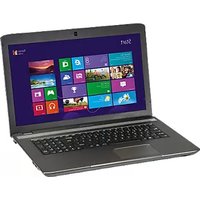
Akoya MD 96640 - Laptop MEDION - Free user manual and instructions
Find the device manual for free Akoya MD 96640 MEDION in PDF.


Pick your language and provide your email: we'll send you a specifically translated version.
| Product Type | Laptop |
| Brand | Medion |
| Model | Akoya MD 96640 |
| Display Size | 15.6 inches |
| Processor | Intel Core i5 (10th Gen or similar) |
| RAM | 8GB DDR4 |
| Storage | 256GB SSD |
| Graphics | Integrated Intel UHD Graphics |
| Operating System | Windows 10 Home |
| Dimensions | 376 x 256 x 22 mm |
| Weight | 2.1 kg |
| Battery | Li-ion, 3-cell, 42 Wh |
| Power Supply | 45W AC adapter |
| Connectivity | USB 3.0, USB-C, HDMI, Wi-Fi 802.11ac, Bluetooth 4.2 |
| Audio | Stereo speakers, headphone/mic combo jack |
| Webcam | HD webcam with microphone |
| Input Devices | Full-size keyboard, multi-touch touchpad |
| Safety Features | Kensington lock slot |
| Maintenance | Clean with soft dry cloth; avoid liquids |
| Spare Parts and Repairability | Battery and RAM upgradeable; contact Medion support for parts |
Frequently Asked Questions - Akoya MD 96640 MEDION
What is the battery life of the Medion Akoya MD 96640?
Typical battery life is around 4-5 hours under normal usage, depending on screen brightness and applications.
Can I upgrade the RAM on this laptop?
Yes, the RAM is upgradeable. It has one SODIMM slot supporting up to 16GB DDR4.
How do I reset the Medion Akoya MD 96640 to factory settings?
Go to Settings > Update & Security > Recovery and select 'Reset this PC'. Choose to keep your files or remove everything.
What screen resolution does this laptop have?
The display has a resolution of 1920 x 1080 (Full HD).
Does the keyboard have a backlight?
No, the keyboard on the Medion Akoya MD 96640 does not have a backlight.
Why is the fan on my laptop so loud?
Loud fan noise can result from dust buildup or high CPU usage. Clean the vents and ensure proper airflow.
How do I connect to Wi-Fi?
Click the network icon in the taskbar, select your Wi-Fi network, and enter the password.
My touchpad is not working. What should I do?
Press the Fn + F7 key combination (or similar) to enable the touchpad. Also check the touchpad settings in Windows.
How many USB ports does the laptop have?
It has 3 USB ports: two USB 3.0 Type-A and one USB 3.0 Type-C.
How do I update drivers for the Medion Akoya MD 96640?
Download the latest drivers from the Medion support website or use Windows Update.
User questions about Akoya MD 96640 MEDION
0 question about this device. Answer the ones you know or ask your own.
Ask a new question about this device
No questions yet. Be the first to ask one.
Download the instructions for your Laptop in PDF format for free! Find your manual Akoya MD 96640 - MEDION and take your electronic device back in hand. On this page are published all the documents necessary for the use of your device. Akoya MD 96640 by MEDION.
USER MANUAL Akoya MD 96640 MEDION
Manual assistant
Powered by Anthropic
Waiting for your message
Product information
Brand : MEDION
Model : Akoya MD 96640
Category : Laptop