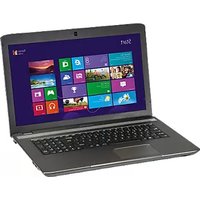
Akoya MD 96697 - Laptop MEDION - Free user manual and instructions
Find the device manual for free Akoya MD 96697 MEDION in PDF.


Pick your language and provide your email: we'll send you a specifically translated version.
| Product Type | Laptop |
| Brand | Medion |
| Model | Akoya MD 96697 |
| Display Size | 15.6 inches |
| Processor | Intel Core i5 (11th Gen) |
| RAM | 8 GB DDR4 |
| Storage | 256 GB SSD |
| Operating System | Windows 10 Home |
| Graphics | Integrated Intel UHD Graphics |
| Dimensions (W x D x H) | 380 x 260 x 25 mm (approx.) |
| Weight | 2.2 kg |
| Power Supply | 65 W AC adapter |
| Battery | Li-ion, 3 cells, 45 Wh |
| Connectivity | Wi-Fi 5, Bluetooth 5.0, USB 3.0, HDMI, Ethernet |
| Audio | Stereo speakers, microphone |
| Main Functions | Office applications, internet browsing, multimedia playback |
| Care & Cleaning | Wipe with a soft, dry cloth; avoid liquids |
| Safety Precautions | Do not expose to moisture; use only provided charger |
| Spare Parts & Repairability | Battery, charger, keyboard, screen available; user-replaceable RAM and SSD |
| General Information | Multimedia laptop with full-size keyboard and touchpad |
Frequently Asked Questions - Akoya MD 96697 MEDION
How do I reset my Medion Akoya MD 96697 to factory settings?
Press the power button and repeatedly tap F11 during boot to access the recovery environment. Select 'Troubleshoot' > 'Reset this PC' and follow the on-screen instructions.
Can I upgrade the RAM on this laptop?
Yes, the Medion Akoya MD 96697 has two SO-DIMM slots that support up to 32 GB DDR4 RAM. Remove the bottom panel to access the slots.
How do I clean the laptop screen and keyboard?
Use a soft, lint-free cloth slightly dampened with water or a screen cleaner. For the keyboard, turn the laptop upside down and gently tap to remove debris, then wipe with a dry cloth.
What is the battery life of the Medion Akoya MD 96697?
The battery life is approximately 5-6 hours under normal usage conditions (web browsing, light office work). Actual battery life may vary.
Does the laptop have a warranty and how do I claim it?
Yes, it comes with a 2-year warranty. Contact Medion customer support or visit their website to file a claim. Keep your proof of purchase.
How do I connect to Wi-Fi?
Click the network icon in the system tray, select your Wi-Fi network, enter the password, and click 'Connect'. You can also enable Wi-Fi via the function key (e.g., Fn+F2).
Can I replace the battery myself?
Yes, the battery is user-replaceable. Unscrew the bottom panel, disconnect the old battery, and connect the new one. Ensure the laptop is powered off and unplugged.
The laptop is running slow. What should I do?
Check for background processes using Task Manager, free up disk space, disable startup programs, and ensure your system is updated. Consider adding more RAM or upgrading to an SSD.
How do I perform a hard reset if the laptop freezes?
Press and hold the power button for about 10 seconds until the laptop shuts down. Wait a few seconds, then press the power button again to restart.
Where can I download the user manual or drivers?
Visit the Medion support website and search for 'Akoya MD 96697'. Manuals and drivers are available for download in PDF format.
User questions about Akoya MD 96697 MEDION
0 question about this device. Answer the ones you know or ask your own.
Ask a new question about this device
No questions yet. Be the first to ask one.
Download the instructions for your Laptop in PDF format for free! Find your manual Akoya MD 96697 - MEDION and take your electronic device back in hand. On this page are published all the documents necessary for the use of your device. Akoya MD 96697 by MEDION.
USER MANUAL Akoya MD 96697 MEDION
Manual assistant
Powered by Anthropic
Waiting for your message
Product information
Brand : MEDION
Model : Akoya MD 96697
Category : Laptop