Bolero Hexa M236000 Glass Time A - Oven CECOTEC - Free user manual and instructions
Find the device manual for free Bolero Hexa M236000 Glass Time A CECOTEC in PDF.


| Product type | Combined microwave oven with grill function |
| Brand | Cecotec |
| Model | Bolero Hexa M236000 Glass Time A |
| Capacity | 23 liters |
| Microwave power | 900 W |
| Grill power | 1200 W |
| Dimensions (W × H × D) | 50 × 30 × 40 cm |
| Net weight | 15 kg |
| Power supply | 230 V ~ 50 Hz |
| Main functions | Microwave cooking, grill, combination, defrosting, quick heating |
| Control type | Electronic with digital display and timer |
| Turntable | Yes, glass |
| Interior light | Yes |
| Material | Stainless steel and glass |
| Care and cleaning | Clean with a damp cloth and mild detergent; avoid abrasives |
| Safety | Child lock, automatic stop at end of program |
| Spare parts and repairability | Available from Cecotec customer service; repairability index not disclosed |
| General information | 184-page user manual available for download |
Frequently Asked Questions - Bolero Hexa M236000 Glass Time A CECOTEC
User questions about Bolero Hexa M236000 Glass Time A CECOTEC
0 question about this device. Answer the ones you know or ask your own.
Ask a new question about this device
Download the instructions for your Oven in PDF format for free! Find your manual Bolero Hexa M236000 Glass Time A - CECOTEC and take your electronic device back in hand. On this page are published all the documents necessary for the use of your device. Bolero Hexa M236000 Glass Time A by CECOTEC.
USER MANUAL Bolero Hexa M236000 Glass Time A CECOTEC


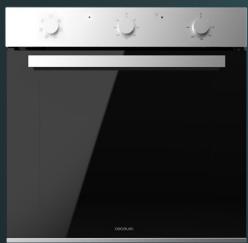
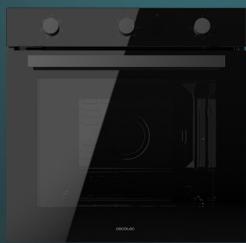

bolero
Safety instructions 7
-
Parts and components 50
-
Before use 50
-
Installation 51
-
Operation 53
-
Cleaning and maintenance 57
-
Troubleshooting 59
-
Technical specifications 61
-
Disposal of old electrical and electronic appliances 62
-
Technical support and warranty 62
-
Copyright 63
SOMMAIRE
Read these instructions thoroughly before using the appliance. Keep this instruction manual for future reference or new users.
- This appliance can be used by children aged 8 years and above and people with reduced physical, sensory, or mental capabilities or lack of experience and knowledge if they have been given supervision or instruction concerning use of the appliance in a safe way and understand the hazards involved. Children must not play with the appliance. Cleaning and user maintenance should not be carried out by unsupervised children.
- This appliance is designed for domestic use only and is not intended for bars, restaurants, farmhouses, hotels, motels, and offices.
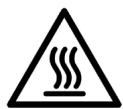
This symbol means “caution, hot surface.” The temperature of the accessible surfaces may be high when the appliance is in operation. - The appliance heats up during use. Avoid touching the heating elements inside.
- WARNING: all accessible parts of the appliance and the appliance itself may heat up during use. Do not touch the heating elements. Children under 8 years of age should be kept away from the appliance unless continuously supervised.
- Do not use abrasive cleaners or sharp metal scrapers to clean the oven door glass, as it may scratch the surface and cause subsequent glass breakage.
- Never clean the appliance with steam cleaners.
- WARNING: make sure that the appliance is unplugged from the mains before replacing the light bulb to avoid any risk of electric shock.
This symbol means “caution, hot surface.” The temperature of the accessible surfaces may be high when the appliance is in operation. - The appliance heats up during use. Avoid touching the heating elements inside.
- WARNING: all accessible parts of the appliance and the appliance itself may heat up during use. Do not touch the heating elements. Children under 8 years of age should be kept away from the appliance unless continuously supervised.
- Do not use abrasive cleaners or sharp metal scrapers to clean the oven door glass, as it may scratch the surface and cause subsequent glass breakage.
- Never clean the appliance with steam cleaners.
- Do not install the appliance behind a decorative panel to avoid overheating.
- Incorrect repairs can be dangerous. Refer only to authorised technical personnel for repairs and replacement of damaged power cables. If the appliance is defective, unplug it from the power supply or switch off your home circuit breaker. Contact the official Cecotec Technical Support Service.
- The appliance is not intended to be operated by means of an external timer or a separate remote-control system.
- Open the appliance door carefully. Keep children away from the appliance.
- If the door glass is damaged, it could crack. Do not use glass scrapers, cleaning agents, or abrasive detergents to clean the appliance door.
- The appliance hinges move when opening and closing the door: be careful not to get caught. Keep hands away from hinges.
- If you store flammable items inside the oven, they may catch fire. Never store flammable items inside the oven. Never open the door of the appliance if there is smoke inside. Unplug the appliance from the mains or switch off the circuit breaker of your home.
- The control panel and control elements use fixed magnets. These can affect electronic implants, such as pacemakers or insulin pumps. Users with electronic implants must stay at least at 10 cm from the control panel.
- Do not allow aluminium foil to come into contact with the glass door. This could cause permanent discolouration of the glass door.
-
Do not use silicone frying pans, nor lids with silicone covers or silicone accessories. This could damage the oven sensor.
-
Moisture inside the oven for a long period of time could cause corrosion. Allow the appliance to dry after every use. Do not store wet food inside the oven while it is closed for long periods of time. Do not store food in the oven.
- When baking cakes with particularly juicy fruit, do not overfill the baking tray. If fruit juice drips from the baking tray, it could cause permanent stains. Use a deep tray if possible.
- If the gaskets are dirty, the appliance door will not close properly during operation. This could damage the front part of the adjacent appliances and furniture. Make sure that the gaskets are always clean.
- Do not sit on the appliance door or place or hang objects on it. Do not place tableware or accessories on the appliance door.
- Do not transport or hold the appliance by the door handle. The door handle cannot withstand the weight of the appliance and could break.
- If you use residual heat when the oven is off to keep food warm, you can create a high moisture content inside the oven. This could lead to condensation and corrosion damage in the appliance, as well as damage to your kitchen.
INSTRUCTIONS DE SÉCURITÉ
The graphics in this manual are schematic representations and may not exactly match the device.
2. BEFORE USE
- This appliance is packaged in a way as to protect it during transport. Take the appliance out of its box and remove all packaging materials. You can keep the original box and other packaging elements in a safe place. This will help you prevent damage to the appliance when transporting it in the future. In case the original packaging is disposed of, make sure all packaging materials are recycled accordingly.
- Make sure all parts and components are included and in good conditions. If there is any piece missing or in bad conditions, contact the official Cecotec Technical Support Service immediately.
Box content
- Multifunctional oven
- Instruction manual
- Tray
- Rack
ENGLISH
3. INSTALLATION
Before installation
- The appliance must be installed in a built-in cabinet. A safety distance must be maintained between the appliance and the kitchen walls.
- In figure 3, you can see the dimensions (mm) required for the installation.
- Surfaces, synthetic laminates, and adhesives used must be heat resistant (100 °C minimum) and adjacent furniture must be resistant to at least 70 °C.
- Kitchen cabinets must be level and fixed. A space of 5 mm must be left between the oven and other appliances.
- If there is a drawer under the oven, a shelf must be installed between the oven and the drawer.
- The door and/or handle must not be used to lift or move the appliance.
- For installation, the appliance must be connected in accordance with all local gas and/or electrical regulations.
- Transport must be carried out by at least two people.
- Use the slots or grips on both sides of the oven to carry the oven.
Mains connection
- This appliance must be connected to an earthed socket.
- Cecotec is not liable for any damage caused by the use of the appliance without an earth connection. If the installation is not carried out professionally, there is a risk of electric shock. The appliance must only be connected to the mains by an authorised qualified person. If this is not the case, the warranty will be voided.
- If the power cable is damaged, there is a risk of electric shock, short circuit, and fire. The power cable must not be pinched, bent or trapped and must not come into contact with hot parts of the appliance. If the power cable is damaged, it must be replaced by a qualified electrician.
- The mains supply must correspond to the information on the rating plate of the appliance. The power cable must correspond to the specifications and power consumption.
Risk of electric shock
Before carrying out the electrical installation, make sure that the appliance is switched off and disconnected from the mains.
Installation
- Insert the oven through the hole in which it is to be placed, align it, and fix it in place.
- Secure with 2 screws and washers as shown in figure 4.
Check
- Connect the appliance to the mains and switch it on.
BOLERO HEXA M236000


ENGLISH
2. Check that the oven works.
Electrical connections
Ovens equipped with a three-pole power cable are designed to operate on alternating current. The cable for the grounding of the device is yellow green.
Mounting the power cable
Opening the terminal box. (Fig. 5):
- Using a screwdriver, prise the bolt on the side tabs of the terminal box cover.
- Unscrew the screw and open the cover.
- To install the cable, proceed as follows:
- Remove the cable clamp screw and the three contact screws.
- Fix the wires under the screw heads using the following colour scheme:
- Blue - Neutral (N)
o Brown phase connector (L)
o Yellow-Green (Ground)
- Secure the power cable with the cable clamp and close the terminal box cover.
Open the terminal box
- With a screwdriver, tighten the screw on the side tabs of the terminal box cover.
- Unscrew the screws on the side tabs of the cover and remove the latter.
Connecting the power cable to the mains
- Install a standard plug (not included) corresponding to the load indicated on the rating plate. When connecting the cable directly to the mains, install an omnipolar circuit breaker with a minimum contact opening of 3 mm between the device and the mains. The omnipolar circuit breaker must be sized according to the load and comply with the applicable regulations (the earth wire must not be interrupted by the circuit breaker).
- The power supply cable must be routed so that it does not reach a temperature above 50 °C above room temperature and must be protected by insulation with an appropriate rating.
- Before connecting, check the following:
- The electrical safety of this appliance can only be guaranteed if the oven is correctly and effectively earthed in accordance with electrical safety regulations. Always make sure that the ground connection is effective; if in doubt, call a qualified technician to check the system. Cecotec declines all liability for damage resulting from a system that has not been grounded.
- Before connecting the appliance to the mains, check that the specifications indicated on the rating plate (on the appliance and/or on the packaging) correspond to those of the mains supply at home.
- Check that the electrical capacity of the installation and the sockets can withstand the
ENGLISH
maximum power of the appliance. If in doubt, contact a qualified technician.
- If the socket and plug of the appliance are not compatible, ask a qualified technician to replace the socket with a suitable model.
- The latter, in particular, will also have to ensure that the cross-section of the socket cables is adequate for the power used by the appliance. The use of adapters, multiple sockets and/or extension leads is not recommended. If their use cannot be avoided, remember to use only single or multiple adapters and extension leads that comply with current safety regulations. In these cases, never exceed the maximum current capacity indicated on the single adapter or extension lead and the maximum power indicated on the multiple adapter. The plug and socket shall be easily accessible.
4. OPERATION
Accessories
The provided accessories are suitable for preparing any type of food.
A. Tray: use this accessory for moist cakes, pies, frozen food, and large roasts. It can also be used to collect dripping fat when grilling directly on the rack.
B. Rack: use this accessory for roasting and for placing food to be baked.
There are optional accessories, with which you can enhance some of your favourite dishes, or simply cook in a more practical way.
Accessories cleaning
Before using the accessories for the first time, clean them thoroughly with hot water, soap, and a soft cloth.
Inserting the accessories
- The oven has 5 different levels on which you can place the accessories. Insert them as far as they will go so that they do not touch the door panel. Fig. 6.
- Make sure to insert the accessories correctly when using the oven.
- Accessories can be removed approximately up to halfway without tipping. This allows for easy food removal.
Note: accessories may deform when heated. When they have cooled down, they will return to their original shape. This does not affect its operation.
Control panel
Mode knob
- Use this knob to choose the desired mode.
- This appliance features 6 modes:
BOLERO HEXA M236000


ENGLISH
| [880Y] | Off | |
 | Defrost | The fan operates without heat to reduce the defrosting time. This will depend on the room temperature and the type and quantity of food. |
| [2TYZ] | Convection | In this mode, the heat from the oven is transferred from the top heating element to the bottom heating element, and the fan helps it circulate throughout the oven, for even baking. |
 | Bottom heat | Setting the knob to this position will switch on only the bottom heating element. This mode is suitable for sterilising and preserving jars. |
 | Conventional | Setting the knob to this position will switch on both heating elements (top and bottom). This mode is suitable for grilling and baking on one level. |
| [0WCO] | Grill | This mode uses the top heating element together with the fan, which helps to circulate the heat. It is suitable when you want food to brown quickly and preserve its juices. |
| [0Z5W] | ECO | In this mode, the outer part of the top heating element and the bottom heating element are used to control the temperature, thus reducing energy consumption. This function is suitable for baking large foods, as the oven temperature rises progressively, allowing the heat to fully penetrate the food. |
Time knob
- If you want the oven to operate continuously, without selecting a specific operating time, set the knob to the ON position.
- Otherwise, set the knob to the desired time value (0-120 min). The oven will switch off when the selected time has elapsed.
Temperature knob
- This knob allows you to select the desired temperature. The temperature can be adjusted between 50 and 250 °C.
- Turn the knob clockwise.
Before using the oven for the first time
To eliminate the smell of new, heat the oven when it is empty:
- Make sure that no packaging remains inside the oven.
ENGLISH
- Use the mode knob to select the conventional mode.
- Set the temperature knob to 250^ C.
- After one hour, turn off the oven. To do this, turn the mode knob to the off position.
Tips
- Use dark-coloured or enamel-coated cookware, as heat transmission will be better.
- Preheat the oven before cooking food.
- Do not open the oven door frequently during cooking.
- Try to cook more than one dish in the oven at the same time. You can cook by placing two cooking containers on the rack.
- Cook more than one dish, one after the other. The oven will still be hot.
- You can save energy by switching off the oven a few minutes before the cooking time. Do not open the oven door.
- Defrost frozen dishes before cooking.
- Use suitable metal trays or aluminium containers with non-stick coating or heat-resistant silicone moulds.
- Let the meat rest in the oven for about 10 minutes after the cooking time. This way, the juices will be better distributed throughout the roast, and will not run out when the meat is cut.
- If you are cooking fish, set it to medium or low.
- It has been baking on several levels. The food in the upper tray will be darker than the food in the lower tray. Just because you put several trays in the oven does not mean that they will all be ready at the same time.
- Condensation forms when baking moist cakes. Cooking can lead to the formation of steam, which escapes over the door. Steam can settle and form water droplets on the control panel or on adjacent furniture elements. This is normal.
- Use the oven only for cooking food.
- Before cooking, be sure to remove all unnecessary accessories from the oven.
- Place the baking trays in the centre of the oven and leave space between them when using more than one to allow air to circulate.
- Do not place the trays on the oven base or cover them with aluminium foil. This would lead to thermal build-up. Cooking and roasting times will not match, and the enamel may be damaged.
- Be careful when opening the door to avoid contact with hot parts and steam.
- You must select a temperature and cooking mode suitable for the food to be cooked. You should also make sure that you place the food in an appropriately sized dish and use the oven tray where appropriate.
Tips for using the Grill mode
- This mode is ideal for cooking meat, fish, and poultry, as these foods will be browned but not dry. Flat pieces, meat skewers and sausages are particularly suitable for grilling with
BOLERO HEXA M236000


ENGLISH
the Grill function, as are vegetables with a high water content, such as tomatoes and onions.
- If you are going to use the Grill function, preheat the oven for 4 minutes before putting in the food. When the oven is in operation, always close the door.
- As far as possible, the pieces of food to be grilled should be of the same thickness. This will allow them to brown evenly and remain tender and juicy.
- Add a little liquid if the meat is lean. Cover the base of the dish with about 1/2 cm of liquid.
- Place the food to be grilled directly on the rack. If grilling a single piece, place it in the centre of the rack. Also, place the drip tray on level 1 to collect the fat.
- When grilling, do not insert the tray on levels 4 or 5, as this could deform it.
- The heating element switches on and off continuously. It is normal. The setting of the function determines how often this will occur.
- When the roast is ready, turn off the oven and leave to rest for a further 10 minutes. This allows a better distribution of the meat juices.
- Steam comes out of the roast. This is normal as most of the steam escapes through the steam outlet. Steam can settle and form condensation on the knobs or on adjacent furniture elements.
Tips for using the steam-assisted cooking
- To activate this function, add 150 ml of purified water to the bottom of the oven cavity and select 200 °C temperature, and the bottom heat mode. The recommended cooking time is approximately 20 minutes.
Note:
- Be sure to remove excess water from the oven cavity when the cooking process is complete.
- Make sure that the interior is completely cool before removing excess water. Otherwise, you could get burned.
- It is recommended not to add more than 500 ml of purified water.
- You can adjust the amount of water and the temperature according to the needs of the food to be prepared.
- After using the steam-assisted cooking or the steam cleaning functions, dry the inside of the oven, the rack and the side guides with a soft cloth.
Tips for using the steam-assisted cleaning
- Use this function to remove food remains from inside the oven. It is only suitable for cleaning light soiling. It is not efficient for ingrained dirt and stubborn stains caused by cooking. This function can only be used when the oven is cold.
Cleaning process
- Remove all accessories from the oven.
- Prepare a solution of water (85%), white vinegar (10%), and dish detergent (5%) and spray generously on the door, side walls, and rear wall of the oven cavity.
- Pour 40 ml of water into the base of the oven cavity.
ENGLISH
- Close the door. Select the bottom heat mode and set the oven to 120^ C.
- Switch off the oven after 15 minutes.
- Allow it to cool down and then wipe the surface with a damp cloth.
- Dry the inside with a cloth or kitchen paper.
WARNING:
Before doing so, make sure that the oven is completely cool. Otherwise, you could get burned.
5. CLEANING AND MAINTENANCE
- The oven must be cleaned after each use. When cleaning the oven, the light must be switched on so that the surfaces can be seen better.
- The inside of the oven should only be washed with lukewarm water and a little liquid soap.
- After cleaning the inside of the oven, wipe it dry with a cloth.
- Never clean the oven surfaces with steam cleaners.
- The inside of the oven should only be cleaned with warm soapy water, using a sponge or soft cloth. Abrasive cleaners must not be used.
- Any stains that may appear on the bottom of the oven will have been caused by splashes of food or spilled food. These splashes occur during the cooking process. They may be due to food being cooked at too high a temperature or placed in a container that is too small.
- The exterior parts of the oven should only be cleaned with warm soapy water, using a sponge or soft cloth. Abrasive cleaners must not be used.
- If you use any type of oven cleaner, make sure that it is suitable for ovens.
- Damage caused to the appliance by a cleaning agent will not be repaired free of charge, even if the appliance is within the warranty period.
- Do not use cleaning products containing abrasive materials for cleaning and maintenance of the glass front panel.
Oven cleaning
- No oven cleaner or other special cleaning agents are required to clean the oven. It is recommended to clean the oven with a damp cloth while it is hot.
- To clean the side walls and the oven door, you can remove the side rails. To do this, press the bottom of the guides and pull them sideways at the same time. Then, push upwards and pull upwards until they are level. Finally, remove them.
- To reinstall the side guides after cleaning them, follow the reverse order.
Assembling and disassembling the oven door
- To clean the door, remove it. Each door hinge is fitted with a locking rod. When the door is closed, the door locks into place. To remove the door, you will need to open the locking rod.
- When the hinge is not locked, the door may suddenly close with great force. Therefore,
BOLERO HEXA M236000
ENGLISH
make sure that the locking rod is closed at all times. It should only be open when the door is removed.
Disassembling the door
- Open the door completely.
- Lift both sides of the locking rod as shown in Figure 7.
- Close the door as far as it will go.
- Hold the door on both sides and then close it again.
- Move it up and down and pull it out.
Positioning the door
- Follow the reverse order of disassembly of the door. When fitting the door, make sure that both hinges fit correctly.
- When opening the door, lower the locking rod as shown in Figure 8.
If the door accidentally falls down or the hinges suddenly close, do not reach into the hinges. Contact the official Cecotec Technical Support Service.
Disassembling and installing the door panel
Disassembling
- Remove the oven door as instructed and place it on a piece of cloth.
- Press the button on the inside door glass bracket with both hands. The bracket will be released automatically. Fig. 9
- Remove the inner and centre panes.
Note
- If the glass has some scratches, it may crack.
- Do not use a glass spatula or abrasive cleaning agents for cleaning.
Installation
- Insert the inner pane into the slot.
- Both the right and left sides must be aligned with the slot. When they are, push the glass into place.
- Position the oven door as shown.
Replacing the oven light bulb
If the oven light bulb fails, it must be replaced. Risk of electric shock!
- Switch off the circuit breaker in the fuse box.
- Place a kitchen towel in the oven when it is cold to prevent it from spoiling.
- Unscrew the glass cover by turning it counterclockwise.
- Replace the bulb with one of the same type.


ENGLISH
- Screw the glass cover back on.
- Remove the tea towel and switch on the circuit breaker.
Periodic inspections
In addition to keeping the oven clean, you should:
- Conduct regular inspections. After the warranty period has expired, the oven must be inspected by a service centre at least once every two years.
- Repair any operational faults.
Warning
All repairs must be carried out by qualified personnel.
6. TROUBLESHOOTING
- The oven may malfunction during operation. Please check the list before contacting the official Cecotec Technical Support Service. You may be able to repair some faults yourself.
Normal operation
- When using the oven for the first time, it may release a peculiar smell and smoke for a few hours. Therefore, we recommend that you run it for one hour with nothing inside. After this time, allow it to cool and clean it.
- When the oven is in operation, you may hear some crackling, this is due to the metal bottom of the oven.
- If the food to be heated has some moisture in it, the heat emission orifice may give off steam during operation.
- The fan will start to run 15 minutes after the oven is switched on. Even if the oven is off, the fan will continue to run for 35 minutes.
Troubleshooting
| Problem | Possible cause | Possible solution |
| The oven does not work | There has been a power cut. | Check the light in your kitchen or the operation of another appliance. |
| Circuit breaker failure. | Check if the circuit breaker is working. | |
| Forgot to select the desired mode. | Select a mode. |
BOLERO HEXA M236000


ENGLISH
| The light does not switch on | The light bulb is faulty. | Replace the light bulb. |
| There is no power supply. | Check if the oven is powered by electricity. | |
| The device suddenly stops working | There has been a power cut. | Check the light in your kitchen or the operation of another appliance. |
| Thermostat failure. | Check if the fan is working. If this is the case, replace the thermostat with a new one by contacting the official Cecotec Technical Support Service. | |
| The oven does not heat | You have not selected the temperature. | Adjust the temperature. |
| The time knob is in the 0 position. | Set the time knob. | |
| No power supply. | Check the power supply box. | |
| The heating element is damaged. | Replace the heating element with a new one, to do so contact the official Cecotec Technical Support Service. | |
| Water leaks out of the door when using the oven | Door seal is damaged. | Replace the door seal, to do so contact the official Cecotec Technical Support Service. |
| The hinge is not strong enough. | Replace the hinge, to do so contact the official Cecotec Technical Support Service. | |
| The oven stops working, but the motor does not | The oven has been running for a long period of time, so it needs time to cool down. | Place your hand on the air outlet. If you notice that the air comes out hot, it is not a problem. |
| Thermostat failure. | If you notice that the air comes out at room temperature, replace the thermostat, contact the official Cecotec Technical Support Service. |
If the problem has not been solved:
- Remove the oven from the mains (switch off or disconnect the fuse).
- Contact the official Cecotec Technical Support Service. Do not try to repair the appliance on your own.
ENGLISH
7. TECHNICAL SPECIFICATIONS
Product reference: 04725 / 04726 / 04727 / 04728 / 04729 / 04730
Product: Bolero Hexa M236000 Inox Time A / Bolero Hexa M236000 Line Time A / Bolero Hexa
M236000 Dark Inox Time A / Bolero Hexa M236000 Mirror Time A / Bolero Hexa M236000
Glass Black Time A / Bolero Hexa M236000 Glass White Time A
Voltage: 220 - 240 V\~
Rated frequency: 50 - 60 Hz
Rated power: 2800 W
| Symbol | Value | Unit | |
| Model reference | 04725 / 04726 / 04727 / 04728 / 04729 / 04730 | ||
| Type of oven | Built-in electric oven | ||
| Mass of the appliance | M | 32.88 | Kg |
| Number of cavities | 1 | ||
| Heat source per cavity (electricity or gas) | Electricity | - | - |
| Volume per cavity | V | 70 | l |
| Energy consumption (electricity) required to heat a standardised load in a cavity of an electric heated oven during a cycle in conventional mode per cavity (electric final energy) | EC_electric cavity | 0.79 | kWh/cycle |
| Energy consumption required to heat a standardised load in a cavity of an electric heated oven during a cycle in fan-forced mode per cavity (electric final energy) | EC_electric cavity | 0.82 | kWh/cycle |
| Energy consumption required to heat a standardised load in a gas-fired cavity of an oven during a cycle in conventional mode per cavity (gas final energy) | EC_gas cavity | N/AN/A | MJ/cycle kWh/cycle (1) |
BOLERO HEXA M236000
ENGLISH
| Energy consumption required to heat a standardised load in a gas-fired cavity of an oven during a cycle in fan-forced mode per cavity (gas final energy) | EC_gas cavity | N/AN/A | MJ/cyclekWh/cycle |
| Energy Efficiency Index per cavity | EEI_cavity | 94.0 | - |
| Energy Efficiency Class | A | ||
| Standby mode | 0 | W | |
| (1) 1 kWh/cycle = 3.6 MJ/cycle. |
Technical specifications may change without prior notification to improve product quality. Made in China | Designed in Spain
8. DISPOSAL OF OLD ELECTRICAL AND ELECTRONIC APPLIANCES

This symbol indicates that, according to the applicable regulations, the product and/or batteries must be disposed of separately from household waste. When this product reaches the end of its shelf life, you should dispose of the cells/batteries/accumulators and take them to a collection point designated by the local authorities.
Consumers must contact their local authorities or retailer for information concerning the correct disposal of old appliances and/or their batteries.
Compliance with the above guidelines will help protecting the environment.
9. TECHNICAL SUPPORT AND WARRANTY
Cecotec shall be liable to the end user or consumer for any lack of conformity that exists at the time of delivery of the product under the terms, conditions, and deadlines established by the applicable regulations.
It is recommended that repairs be carried out by qualified personnel.
If at any moment you detect any problem with your product or have any doubt, do not hesitate to contact the official Cecotec Technical Support Service at +34 96 321 07 28.
ENGLISH
10. COPYRIGHT
The intellectual property rights over the texts in this manual belong to CECOTEC INNOVACIONES, S.L. All rights reserved. The contents of this publication may not, in whole or in part, be reproduced, stored in a retrieval system, transmitted, or distributed by any means (electronic, mechanical, photocopying, recording or similar) without the prior authorization of CECOTEC INNOVACIONES, S.L.
BOLERO HEXA M236000
FRANÇAIS
1. PIÈCES ET COMPOSANTS
Image 1
6. PROBLEEMOPLOSSING
| Standby modu | 0 | W | |
| (1) 1 kWh/döngü = 3,6 MJ/döngü. |

Fig./Img./Abb./Afb./Rys.1
1
|
0

2

3

4
5
|
°C
Fig./Img./Abb./Afb./Rys. 2
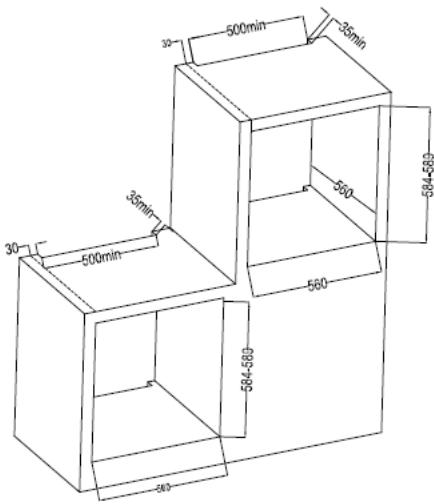
Fig./Img./Abb./Afb./Rys.4
BOLERO HEXA M236000
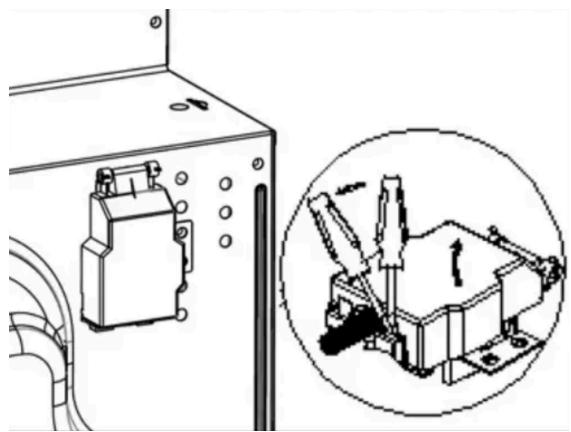
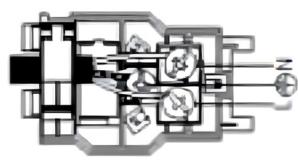
Fig./Img./Abb./Afb./Rys.5
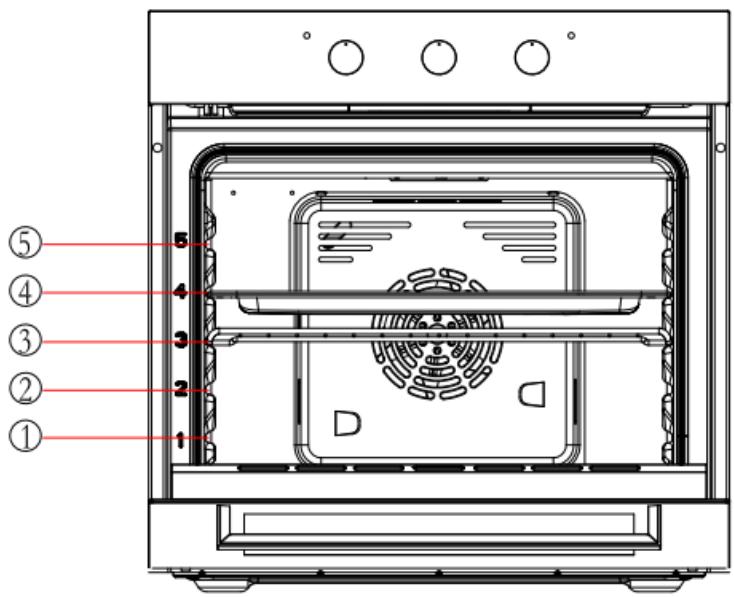
Fig./Img./Abb./Afb./Rys.6

Fig./Img./Abb./Afb./Rys.7

Fig./Img./Abb./Afb./Rys.8
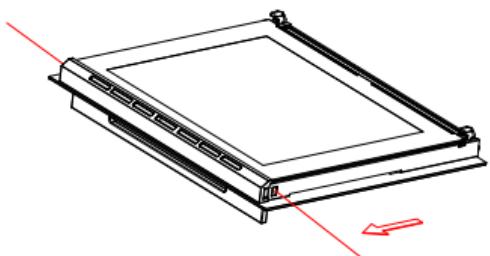
Fig./Img./Abb./Afb./Rys.9
BOLERO HEXA M236000
www.cecotec.es
- SOMMAIRE
- INSTRUCTIONS DE SÉCURITÉ
- BEFORE USE
- Box content
- INSTALLATION
- Before installation
- Mains connection
- Risk of electric shock
- Installation
- Check
- ENGLISH
- Check that the oven works.
- Electrical connections
- Mounting the power cable
- Open the terminal box
- Connecting the power cable to the mains
- OPERATION
- Accessories
- Accessories cleaning
- Inserting the accessories
- Control panel
- Mode knob
- Time knob
- Temperature knob
- Before using the oven for the first time
- Tips
- Tips for using the Grill mode
- Tips for using the steam-assisted cooking
- Tips for using the steam-assisted cleaning
- Cleaning process
- WARNING:
- CLEANING AND MAINTENANCE
- Oven cleaning
- Assembling and disassembling the oven door
- Disassembling the door
- Positioning the door
- Disassembling and installing the door panel
- Disassembling
- Note
- Replacing the oven light bulb
- Periodic inspections
- TROUBLESHOOTING
- Normal operation
- TECHNICAL SPECIFICATIONS
- DISPOSAL OF OLD ELECTRICAL AND ELECTRONIC APPLIANCES
- TECHNICAL SUPPORT AND WARRANTY
- COPYRIGHT
- FRANÇAIS
- PIÈCES ET COMPOSANTS
- Image 1
- PROBLEEMOPLOSSING
Brand : CECOTEC
Model : Bolero Hexa M236000 Glass Time A
Category : Oven