GK450 - Keyboard AOC - Free user manual and instructions
Find the device manual for free GK450 AOC in PDF.


Pick your language and provide your email: we'll send you a specifically translated version.
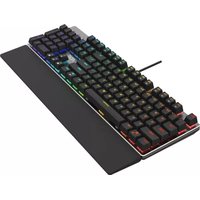
| Product Type | Wired Mechanical Gaming Keyboard |
| Dimensions (W x D x H) | 445 mm x 135 mm x 40 mm |
| Weight | 1.08 kg |
| Connectivity | USB 2.0 (Type-A to Type-C, detachable) |
| Cable Length | 1.8 m braided |
| Key Switch Type | Mechanical (Blue or Red, depending on variant) |
| Key Rollover | N-key rollover over USB |
| Backlighting | Per-key RGB, software customizable |
| Multimedia Keys | Dedicated buttons for volume, media playback |
| Onboard Memory | Yes, for profile storage |
| Wrist Rest | Detachable, magnetic or snap-on |
| Compatibility | Windows 7/8/10/11, macOS (limited) |
| Polling Rate | 1000 Hz |
| Material | Plastic case with metal top plate |
| Certifications | CE, FCC, RoHS |
| Power Supply | USB bus-powered (5V, 500 mA) |
| Cleaning Instructions | Unplug keyboard; use compressed air and a damp cloth; avoid liquids |
| Safety Precautions | Do not expose to moisture; avoid excessive force on keys |
| Spare Parts Availability | Keycaps (compatible with Cherry MX stems), cable available from AOC support |
| Repairability | Switches can be replaced with soldering; PCB accessible after unscrewing |
| Warranty | 2 years (check local terms) |
Frequently Asked Questions - GK450 AOC
How do I connect the AOC GK450 keyboard to my computer?
Connect the detachable USB-C cable to the keyboard and the USB-A end to a working USB port on your computer. The keyboard will be recognized automatically. For full software features, download the AOC GK450 software from the AOC official website.
What type of mechanical switches does the GK450 use?
The AOC GK450 is available with either blue (clicky, tactile) or red (linear, smooth) mechanical switches, depending on the variant. Both are compatible with standard Cherry MX cross-shaped keycaps.
How can I customize the RGB lighting on the GK450?
You can customize the per-key RGB lighting using the AOC GK450 software. It offers various effects (static, breathing, wave, etc.) and color selection. Onboard memory saves your profile even when the software isn't running.
Is the AOC GK450 keyboard compatible with macOS?
The GK450 works with macOS for basic typing functions, but some multimedia keys and the customization software are designed for Windows. Mac users may experience limited functionality without Windows Boot Camp.
Can I replace the keycaps on the GK450?
Yes, the GK450 uses standard Cherry MX cross-shaped stems, so most aftermarket keycaps (OEM or Cherry profile) are compatible. Be careful when removing keycaps to avoid damaging the switches.
How do I clean the GK450 keyboard?
Unplug the keyboard first. Use compressed air to remove debris between keys. For the surface, lightly dampen a lint-free cloth with water or isopropyl alcohol (70%) and wipe gently. Never pour liquid directly onto the keyboard.
What is N-key rollover and does the GK450 support it?
N-key rollover (NKRO) means every key press is registered simultaneously without ghosting. The GK450 supports NKRO over USB, ensuring accurate input even during fast gaming sequences.
How do I reset the AOC GK450 to factory settings?
Press and hold the Function (Fn) key and the Escape (Esc) key for about 5 seconds until the keyboard backlight flashes. This restores default settings and clears onboard profiles.
Does the GK450 have a wrist rest?
Yes, the AOC GK450 includes a detachable wrist rest. It attaches via magnetic or snap-on mechanisms, providing ergonomic support during extended use. It can be removed if not needed.
What should I do if some keys stop working?
First check the USB connection and try a different port. If keys remain unresponsive, use compressed air to clean under the keycaps. If the issue persists, contact AOC customer support; do not attempt to open the keyboard yourself as it may void the warranty.
User questions about GK450 AOC
0 question about this device. Answer the ones you know or ask your own.
Ask a new question about this device
No questions yet. Be the first to ask one.
Download the instructions for your Keyboard in PDF format for free! Find your manual GK450 - AOC and take your electronic device back in hand. On this page are published all the documents necessary for the use of your device. GK450 by AOC.
USER MANUAL GK450 AOC

Manual assistant
Powered by Anthropic
Waiting for your message
Product information
Brand : AOC
Model : GK450
Category : Keyboard