GK480 - Keyboard AOC - Free user manual and instructions
Find the device manual for free GK480 AOC in PDF.


Pick your language and provide your email: we'll send you a specifically translated version.
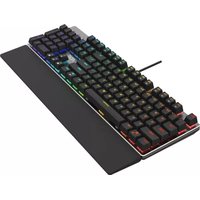
| Product Type | Mechanical Gaming Keyboard |
| Model | GK480 |
| Brand | AOC |
| Dimensions (W x D x H) | 440 x 130 x 35 mm (17.3 x 5.1 x 1.4 in) |
| Weight | 1.0 kg (2.2 lbs) |
| Connection Type | Wired USB 2.0 |
| Cable Length | 1.8 m (5.9 ft) |
| Key Switch Type | Mechanical (Blue/Red, depending on variant) |
| Backlight | RGB per-key lighting with multiple effects |
| Number of Keys | 104 (full-size with numeric keypad) |
| Key Life Span | 50 million keystrokes |
| Polling Rate | 1000 Hz |
| Anti-Ghosting | Full N-key rollover |
| Material | Plastic casing, metal backplate |
| Operating Systems Supported | Windows 10/11, macOS, Linux |
| Software | AOC G-Tools (for customization) |
| Power Source | USB bus-powered |
| Cleaning & Maintenance | Use a soft, dry cloth; avoid liquids; keycaps removable for deep cleaning |
| Safety Certifications | CE, FCC, RoHS |
| Included Accessories | User manual, keycap puller (may vary by region) |
| Warranty | 2 years (depending on region) |
Frequently Asked Questions - GK480 AOC
How do I clean my AOC GK480 keyboard?
Turn off and unplug the keyboard. Use a soft, dry cloth to wipe the surface. For deeper cleaning, remove keycaps with the included keycap puller and clean with compressed air or a mild alcohol solution. Avoid getting liquids into the switches.
Can I customize the RGB backlight on the GK480?
Yes, you can customize the backlight using the AOC G-Tools software. It offers per-key color assignment, effects like breathing, wave, and static, and brightness adjustment. You can also use onboard shortcuts (FN + keys) for quick effects.
Is the AOC GK480 compatible with macOS?
Yes, the GK480 works with macOS (plug and play). However, the G-Tools software is only available for Windows. Mac users may use basic functions without software customization.
What switches are available for the GK480?
The AOC GK480 comes with mechanical switches, typically AOC Blue (clicky) or Red (linear) switches. Check your specific model variant for exact switch type.
How do I reset the keyboard to factory settings?
Press and hold FN + ESC for 3 seconds until the backlight flashes. This resets all custom settings to factory defaults.
The keyboard is not lighting up. What should I do?
First, ensure the USB cable is fully connected to a working USB port. Try a different port. If using a USB hub, connect directly to the computer. Restart the computer. If the issue persists, the keyboard may require replacement.
Can I replace the keycaps on the GK480?
Yes, the keyboard has a standard keycap stem (Cherry MX compatible). You can replace keycaps with custom ones. Use the included keycap puller to remove them carefully.
Does the GK480 have wrist rest?
No, the GK480 does not include a wrist rest. However, you can use any separate wrist rest. The keyboard has a low-profile design.
How long is the warranty on the AOC GK480?
The warranty period is typically 2 years from the date of purchase, depending on your region and local regulations. Check with AOC support for exact terms.
Is the GK480 waterproof?
No, the keyboard is not waterproof. It has splash-resistant features (some models). Avoid spilling liquids. If spills occur, disconnect immediately and dry thoroughly.
User questions about GK480 AOC
0 question about this device. Answer the ones you know or ask your own.
Ask a new question about this device
No questions yet. Be the first to ask one.
Download the instructions for your Keyboard in PDF format for free! Find your manual GK480 - AOC and take your electronic device back in hand. On this page are published all the documents necessary for the use of your device. GK480 by AOC.
USER MANUAL GK480 AOC

Manual assistant
Powered by Anthropic
Waiting for your message
Product information
Brand : AOC
Model : GK480
Category : Keyboard