C303B - Radio GPX - Free user manual and instructions
Find the device manual for free C303B GPX in PDF.


Pick your language and provide your email: we'll send you a specifically translated version.
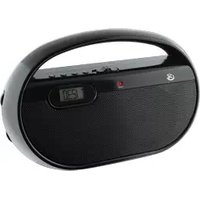
| Product Type | Portable Radio |
| Brand | GPX |
| Model | C303B |
| Power Source | AC 120V 60Hz or 4 x AA batteries (not included) |
| Power Consumption | 5W (AC operation) |
| Dimensions (Approx.) | 6.5 x 4.2 x 2.1 inches |
| Weight (Approx.) | 1.1 lbs |
| Radio Bands | AM/FM |
| Tuning Type | Analog knob |
| Speaker Size | 3 inches |
| Headphone Jack | 3.5mm stereo |
| Volume Control | Rotary knob |
| Antenna | Built-in ferrite for AM, telescopic for FM |
| Color | Black or gray (typical) |
| Display | Analog frequency dial |
| Battery Life | Approx. 20 hours with alkaline batteries |
| Cleaning Instructions | Wipe with a soft, dry cloth. Do not use liquids or abrasive cleaners. |
| Safety Warnings | Keep away from water and moisture. Do not open the device. Use only specified power sources. |
| Spare Parts Availability | Contact GPX customer service for replacement parts. |
| Repairability | Service by qualified personnel only. No user-serviceable parts inside. |
| Compliance | FCC Part 15 |
| Included in Box | Radio, user manual, AC adapter (may not be included in all packages) |
Frequently Asked Questions - C303B GPX
How do I turn on the radio?
Turn the volume knob clockwise to power on the radio. Adjust volume to desired level.
How do I switch between AM and FM?
Use the band selector switch on the side or front of the radio to choose AM or FM.
Why is there no sound?
Check that the radio is turned on and volume is turned up. Ensure batteries are installed correctly or AC adapter is connected. If using headphones, make sure they are fully plugged in.
How do I improve radio reception?
For FM, fully extend the telescopic antenna. For AM, rotate the radio to find the best position. Avoid interference from electronic devices.
Can I use rechargeable batteries?
Yes, you can use AA rechargeable batteries. Note that battery life may vary. Do not attempt to charge non-rechargeable batteries.
How do I clean the radio?
Unplug the radio and remove batteries. Wipe the exterior with a soft, dry cloth. Do not use water or cleaning chemicals.
What does the headphone jack do?
Plug in 3.5mm headphones for private listening. The built-in speaker will be muted when headphones are connected.
How do I set the clock?
This model does not have a clock function. It is a basic analog radio.
The radio makes a buzzing sound. What should I do?
Buzzing may be caused by electrical interference. Try moving the radio away from other electronics or using battery power instead of AC.
Where can I find the user manual?
The manual is included in the box. You can also download a free PDF from the GPX website or from notice-facile.com.
User questions about C303B GPX
0 question about this device. Answer the ones you know or ask your own.
Ask a new question about this device
No questions yet. Be the first to ask one.
Download the instructions for your Radio in PDF format for free! Find your manual C303B - GPX and take your electronic device back in hand. On this page are published all the documents necessary for the use of your device. C303B by GPX.
USER MANUAL C303B GPX

Manual assistant
Powered by Anthropic
Waiting for your message
Product information
Brand : GPX
Model : C303B
Category : Radio