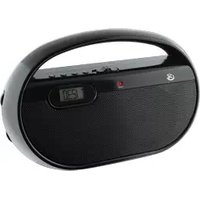
SA302P - Radio GPX - Free user manual and instructions
Find the device manual for free SA302P GPX in PDF.


| Product Type | Portable AM/FM Radio |
| Brand | GPX |
| Model | SA302P |
| Dimensions (approx) | 4.5 x 2.8 x 1.2 inches |
| Weight (approx) | 0.5 lbs |
| Power Source | 3 x AA batteries (not included) or AC adapter (optional) |
| Tuning Bands | AM (520-1710 kHz) and FM (88-108 MHz) |
| Display | Analog dial with frequency indicators |
| Speaker | Built-in, 2.5-inch, 0.5W |
| Headphone Jack | 3.5mm for private listening |
| Volume Control | Rotary knob |
| Tuning Control | Rotary knob for AM/FM selection |
| Power Indicator | LED light when on |
| Antenna | Built-in ferrite bar for AM; telescopic whip for FM |
| Battery Life | Approximately 30 hours with alkaline batteries |
| Construction | Plastic casing with textured grip |
| Color Options | Black |
| Operating Temperature | 32°F to 104°F (0°C to 40°C) |
| Care and Cleaning | Wipe with dry cloth; avoid moisture and solvents |
| Safety | Keep away from water, heat sources, and children under 3 years |
| Included Accessories | User manual |
Frequently Asked Questions - SA302P GPX
User questions about SA302P GPX
0 question about this device. Answer the ones you know or ask your own.
Ask a new question about this device
Download the instructions for your Radio in PDF format for free! Find your manual SA302P - GPX and take your electronic device back in hand. On this page are published all the documents necessary for the use of your device. SA302P by GPX.
USER MANUAL SA302P GPX
WARNING: Changes or modifications to this unit not expressly approved by the party responsible for compliance could void the user's authority to operate the equipment.
NOTE: This equipment has been tested and found to comply with the limits for a Class B digital device, pursuant to Part 15 of the FCC Rules. These limits are designed to provide reasonable protection against harmful interference in a residential installation. This equipment generates, uses, and can radiate radio frequency energy and, if not installed and used in accordance with the instructions, may cause harmful interference to radio communications. However, there is no guarantee that interference will not occur in a particular installation. If this equipment does cause harmful interference to radio or television reception, which can be determined by turning the equipment off and on, the user is encouraged to try to correct the interference by one or more of the following measures:
• Reorient or relocate the receiving antenna.
- Increase the separation between the equipment and receiver.
- Connect the equipment into an outlet on a circuit different from that to which the receiver is connected.
- Consult the dealer or an experienced radio/TV technician for help.
Power
DC battery power: requires 2 AA batteries (not included)

Volume
Press to adjust the volume.

natural_image
Technical line drawing of a mechanical component with internal grid pattern and handle (no text or symbols)Power
Adjust to turn the unit on or off.
Power
Indicator
MP3 Audio
Connector

natural_image
Pure diagram of a mechanical or electrical component with concentric rings and a central rectangular block, no text or symbols present.Playing Music
Using the Audio Connector
- Connect the attached MP3 Audio Connector to the audio output on an MP3 player or other audio device.
Note: The cable is a fixed length, do not attempt to pull it forcefully.
- Use the native controls on the connected MP3 player or other audio source to play your audio through the unit.
Company Information
International Support
To download this User's Guide in English, Spanish, or French, or to get answers to frequently asked questions, visit the support section at www.gpx.com.
Copyright © 2012 Digital Products International (DPI, Inc.) | All other trademarks appearing herein are the property of their respective owners. Specifications are subject to change without notice
Contact Information
Email Support: prodinfo@dpiinc.com
Email Parts: partsinfo@dpiinc.com
Phone Support: 1-888-999-4215
Website: www.gpx.com
Warranty
For Warranty Information and the most up-to-date version of this User's Guide, go to www.gpx.com.

protect for today • sustain for tomorrow

natural_image
Close-up of a black and white electronic device with a circular patch, no visible text or symbols.SA302B
Portable Speaker Case
For the most up-to-date version of this
User's Guide, go to www.gpx.com

Brand : GPX
Model : SA302P
Category : Radio