Ursus S170i Kid's - Tablet DEXP - Free user manual and instructions
Find the device manual for free Ursus S170i Kid's DEXP in PDF.


Pick your language and provide your email: we'll send you a specifically translated version.
| Type | Kids Tablet |
| Model | Ursus S170i Kid's |
| Brand | DEXP |
| Display Size | 7 inches |
| Display Resolution | 1024 x 600 pixels |
| Display Type | IPS LCD |
| Operating System | Android 10 Go Edition |
| Processor | Quad-core 1.3 GHz |
| RAM | 1 GB |
| Internal Storage | 16 GB |
| Expandable Storage | microSD up to 32 GB |
| Rear Camera | 2 MP |
| Front Camera | 0.3 MP |
| Battery Capacity | 2500 mAh Li-ion |
| Dimensions | 190 x 120 x 10 mm |
| Weight | 300 g |
| Connectivity | Wi-Fi 802.11 b/g/n, Bluetooth 4.0 |
| Ports | Micro-USB, 3.5mm headphone jack |
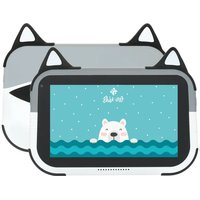
| Special Features | Kid-proof bumper case, parental controls, pre-loaded educational apps |
Frequently Asked Questions - Ursus S170i Kid's DEXP
How do I set up parental controls?
Go to Settings > Parental Controls and create a PIN. You can then restrict apps, set screen time limits, and filter content.
Can I expand the storage?
Yes, the tablet supports microSD cards up to 32 GB. Insert the card into the slot located on the side.
What is the battery life?
The 2500 mAh battery provides up to 4-5 hours of mixed usage. Charging time is about 3 hours.
How do I connect to Wi-Fi?
Swipe down from the top, tap the Wi-Fi icon, select your network, and enter the password.
Is there a headphone jack?
Yes, the tablet has a standard 3.5mm headphone jack.
Can I install apps from the Google Play Store?
Yes, the tablet runs Android 10 Go and supports the Google Play Store. You can download kid-friendly apps.
How do I clean the tablet?
Turn off the tablet. Use a soft, slightly damp cloth. Avoid harsh chemicals. Do not submerge in water.
What is included in the box?
The box contains the tablet, USB charging cable, power adapter, quick start guide, and warranty card.
How do I take a screenshot?
Press and hold the Power button and Volume Down button simultaneously for 2 seconds.
Why is my tablet not turning on?
Charge the tablet for at least 30 minutes. If still not on, press and hold the Power button for 10 seconds to force restart.
User questions about Ursus S170i Kid's DEXP
0 question about this device. Answer the ones you know or ask your own.
Ask a new question about this device
No questions yet. Be the first to ask one.
Download the instructions for your Tablet in PDF format for free! Find your manual Ursus S170i Kid's - DEXP and take your electronic device back in hand. On this page are published all the documents necessary for the use of your device. Ursus S170i Kid's by DEXP.
USER MANUAL Ursus S170i Kid's DEXP
Manual assistant
Powered by Anthropic
Waiting for your message
Product information
Brand : DEXP
Model : Ursus S170i Kid's
Category : Tablet