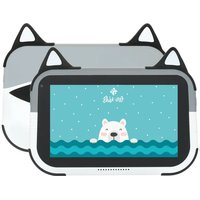
Ursus S770 Kid's - Tablet DEXP - Free user manual and instructions
Find the device manual for free Ursus S770 Kid's DEXP in PDF.


Pick your language and provide your email: we'll send you a specifically translated version.
| Product Type | Kids Tablet |
| Brand | DEXP |
| Model | Ursus S770 Kid's |
| Display Size | 7 inches |
| Display Resolution | 1024 x 600 pixels |
| Processor | Quad-core 1.3 GHz |
| RAM | 1 GB |
| Internal Storage | 8 GB |
| Expandable Storage | microSD up to 32 GB |
| Operating System | Android 10 (Go edition) |
| Battery Capacity | 3000 mAh |
| Charging | 5V / 2A via micro USB |
| Weight | 300 g |
| Dimensions (W x H x D) | 190 x 110 x 10 mm |
| Cameras | Front 0.3 MP, Rear 2 MP |
| Connectivity | Wi-Fi 802.11 b/g/n, Bluetooth 4.0 |
| Audio | Built-in speaker, 3.5 mm headphone jack |
| Special Features | Kid-friendly bumper case, parental controls, pre-loaded educational apps |
| Safety | Not for children under 3 years; small parts risk |
| Cleaning | Wipe with a soft, dry cloth |
| Spare Parts / Repairability | Not user-replaceable; contact authorized service center |
Frequently Asked Questions - Ursus S770 Kid's DEXP
How do I set up the Ursus S770 Kid's for the first time?
Press and hold the power button to turn on the tablet. Follow the on-screen setup wizard to select language, connect to Wi-Fi, and configure parental controls. You can also create a child profile during setup.
How can I install additional apps for my child?
Open the Google Play Store from the parent profile (if parental controls are enabled, you may need to enter your PIN). Search for kid-friendly apps and install them. The apps will then appear in the child's profile if allowed.
What should I do if the tablet does not charge?
Check the micro USB cable and charger for damage. Try a different 5V/2A charger. Ensure the charging port is clean. If the issue persists, contact DEXP support.
How do I set up parental controls?
Go to Settings > Parental Controls. You can set a PIN, restrict content based on age rating, limit screen time, and manage app permissions. Use the Kids Mode app for additional restrictions.
Can I expand the storage?
Yes, the tablet supports microSD cards up to 32 GB. Insert the card into the slot on the side of the device. Go to Settings > Storage to format and use it for apps or media.
How do I perform a factory reset?
Backup important data first. Go to Settings > System > Reset options > Erase all data (factory reset). Alternatively, turn off the tablet, then press and hold Volume Up + Power button until recovery menu appears. Use volume keys to navigate and power to select 'Wipe data/factory reset'.
Why is the screen not responding?
Try cleaning the screen with a soft, dry cloth. Remove any screen protector if present. If unresponsive, press and hold the power button for 10 seconds to force restart. If problem persists, contact support.
How do I clean the tablet?
Turn off the device and disconnect cables. Wipe the screen and body with a soft, lint-free cloth slightly dampened with water. Do not use abrasive cleaners or spray liquids directly.
Is the tablet waterproof?
No, the Ursus S770 Kid's is not waterproof. Keep it away from liquids and moisture. The kid-friendly case offers some protection against drops but not water.
What do I do if the tablet freezes or runs slowly?
Close unused apps by tapping the recent apps button and swiping them away. Restart the tablet. If slow, go to Settings > Storage and clear cached data. For persistent issues, perform a factory reset after backing up.
User questions about Ursus S770 Kid's DEXP
0 question about this device. Answer the ones you know or ask your own.
Ask a new question about this device
No questions yet. Be the first to ask one.
Download the instructions for your Tablet in PDF format for free! Find your manual Ursus S770 Kid's - DEXP and take your electronic device back in hand. On this page are published all the documents necessary for the use of your device. Ursus S770 Kid's by DEXP.
USER MANUAL Ursus S770 Kid's DEXP
natural_image
Cute cartoon bear peeking out of water with bubbles (no text or symbols)Планшетный ПК
DEXP Ursus S770
natural_image
Illustration of a turquoise sky with scattered white dots above and wavy blue waves below (no text or symbols)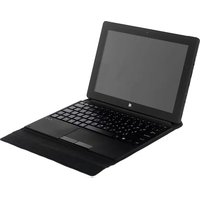
Table of contents
Click a title to access it
Manual assistant
Powered by Anthropic
Waiting for your message
Product information
Brand : DEXP
Model : Ursus S770 Kid's
Category : Tablet