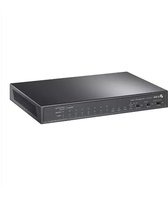
Omada Pro S5500-48GP4XF - Switch TP-LINK - Free user manual and instructions
Find the device manual for free Omada Pro S5500-48GP4XF TP-LINK in PDF.


Pick your language and provide your email: we'll send you a specifically translated version.
| Product Type | Managed Gigabit PoE+ Switch |
| Ports | 48 x 10/100/1000 PoE+ ports, 4 x 10G SFP+ slots |
| PoE Budget | 740W (IEEE 802.3af/at/bt) |
| Switching Capacity | 240 Gbps |
| Forwarding Rate | 107.1 Mpps |
| Dimensions (W x D x H) | 440 x 330 x 44 mm (1U rack-mountable) |
| Weight | 5.5 kg |
| Power Supply | Internal 100-240V AC, 50/60Hz |
| Power Consumption | Max 800W (including PoE) |
| Layer Support | Layer 2+ with static routing (L3) |
| Management | Web, CLI, SNMP, Omada SDN controller |
| VLAN | Up to 4K VLANs |
| QoS | 8 priority queues, rate limiting |
| Security | 802.1X, ACL, DHCP snooping |
| Cooling | 2 x built-in fans (smart fan control) |
| Operating Temperature | 0°C to 45°C |
| Storage Temperature | -40°C to 70°C |
| Humidity | 5% to 95% non-condensing |
| Mounting | 19-inch rack mount (brackets included) |
| Included Accessories | Power cord, rack mount kit, console cable, CD |
| Warranty | 5 years (limited) |
| Maintenance | Clean with dry cloth; do not use liquids or solvents |
| Safety | Keep ventilation clear; do not overload power; use grounded outlet |
| Spare Parts / Repairability | Power supply module not user-replaceable; contact TP-Link support for service |
| General Information | Part of Omada Pro series; ideal for enterprise networks |
Frequently Asked Questions - Omada Pro S5500-48GP4XF TP-LINK
How to reset the TP-Link Omada Pro S5500-48GP4XF to factory defaults?
Press and hold the Reset button on the front panel for about 10 seconds until all LEDs flash. The switch will reboot with factory settings.
What is the maximum PoE budget of this switch?
The switch provides a total PoE budget of 740W across all 48 ports, supporting IEEE 802.3af/at and 802.3bt (PoE++) on certain ports.
Can I use the switch without the Omada controller?
Yes, the switch can be managed independently via web interface or CLI. However, using the Omada SDN controller enables advanced features like centralized management and mesh.
How to connect the SFP+ ports for 10G uplink?
Insert a compatible 10G SFP+ module (e.g., TL-SM5310-T) into the SFP+ slots. Ensure the module is secure and use fiber or copper cable as appropriate. The ports auto-negotiate speed.
What kind of VLAN features are supported?
This switch supports 802.1Q VLAN tagging with up to 4K VLANs. It also supports MAC-based, IP-subnet-based, and protocol-based VLANs for flexible segmentation.
How to enable PoE on a port?
PoE is enabled by default. You can disable or configure PoE per port via the web interface under PoE Configuration. The switch automatically detects powered devices.
Is the switch loud?
The switch has smart fan control that adjusts fan speed based on temperature. Under normal load, it is relatively quiet, but may become audible during high PoE usage or high ambient temperature.
Can I stack multiple S5500-48GP4XF switches?
This model does not support physical stacking. However, you can manage multiple switches via Omada SDN controller for unified management and link aggregation.
How to upgrade the firmware?
Download the latest firmware from TP-Link's support site. Access the web interface, go to System > Firmware Upgrade, select the file, and click Upgrade. Do not power off during the process.
What is the warranty period and how to get support?
TP-Link offers a 5-year limited warranty for this product. For support, contact TP-Link customer service or visit their support website with the model and serial number.
User questions about Omada Pro S5500-48GP4XF TP-LINK
0 question about this device. Answer the ones you know or ask your own.
Ask a new question about this device
No questions yet. Be the first to ask one.
Download the instructions for your Switch in PDF format for free! Find your manual Omada Pro S5500-48GP4XF - TP-LINK and take your electronic device back in hand. On this page are published all the documents necessary for the use of your device. Omada Pro S5500-48GP4XF by TP-LINK.
USER MANUAL Omada Pro S5500-48GP4XF TP-LINK


Manual assistant
Powered by Anthropic
Waiting for your message
Product information
Brand : TP-LINK
Model : Omada Pro S5500-48GP4XF
Category : Switch