
TL-SG1006PP - Switch TP-LINK - Free user manual and instructions
Find the device manual for free TL-SG1006PP TP-LINK in PDF.


| Product Type | 6-Port Gigabit Desktop PoE+ Switch |
| Ports | 6 x 10/100/1000 Mbps RJ45 (PoE ports: 1-4) |
| PoE Standard | IEEE 802.3af/at/bt (PoE+ up to 30W per port) |
| PoE Power Budget | 64W total |
| Switching Capacity | 12 Gbps |
| Transfer Method | Store-and-Forward |
| MAC Address Learning | Auto-learning, auto-aging |
| Extend Mode | Supports PoE transmission up to 250m at 10 Mbps (ports 1-4) |
| PoE Auto Recovery | Detects and reboots stalled PDs |
| Power Supply | External adapter: 53.5VDC / 1.31A |
| Mounting | Desktop or wall-mountable (hole distance 94mm) |
| Operating Temperature | 0°C to 40°C (32°F to 104°F) |
| Storage Temperature | -40°C to 70°C (-40°F to 158°F) |
| Humidity | 10% to 90% non-condensing (operating), 5% to 90% (storage) |
| Safety | Keep away from water, fire, humidity; do not disassemble; use only recommended adapter |
| Standards | IEEE 802.3i, 802.3u, 802.3ab, 802.3x, 802.3af, 802.3at, 802.3bt, 802.1p |
| Dimensions (approx.) | 171 x 98 x 27 mm (without adapter) |
| Weight (approx.) | 0.68 kg (including adapter) |
| Wall Mountable | Yes, with provided screws |
| EU Declaration of Conformity | Compliant with 2014/30/EU, 2014/35/EU, 2011/65/EU, (EU)2015/863 |
Frequently Asked Questions - TL-SG1006PP TP-LINK
User questions about TL-SG1006PP TP-LINK
0 question about this device. Answer the ones you know or ask your own.
Ask a new question about this device
Download the instructions for your Switch in PDF format for free! Find your manual TL-SG1006PP - TP-LINK and take your electronic device back in hand. On this page are published all the documents necessary for the use of your device. TL-SG1006PP by TP-LINK.
USER MANUAL TL-SG1006PP TP-LINK
5/6/16-Port Gigabit Desktop PoE Switch
LED Explanation
Power

On: Power on Off: Power off
Link/Act and PoE Status
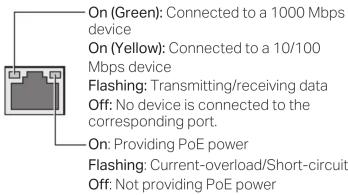
PoE MAX

TL-SG1005LP
PoE Max On: 33 W ≤ Total power supply < 40 W
Flashing: Total power supply ≥ 40 W
Off: Total power supply < 33 W
TL-SG1005P
On: 58 W ≤ Total power supply < 65 W
Flashing: Total power supply ≥ 65 W
Off: Total power supply < 58W
TL-SG1006PP
On: 57 W ≤ Total power supply < 64 W
Flashing: Total power supply ≥ 64 W
Off: Total power supply < 57W
TL-SG116P
On: Total power supply ≥ 113 W
Flashing: Total power supply ≥ 113 W and
lasts for more than 2 minutes
Off: Total power supply < 113W
Switches Explanation
Note: The numbers in brackets indicate the ports where the feature takes effect. For example, when Extend(1-4) is toggled to On, the Extend mode will be enabled for ports 1-4.
Priority (for TL-SG116P)
Off: All the ports transmit data with the same priority.
On: The corresponding ports transmit data with a higher priority than other ports. When congestion
occurs, packets which are transmitted by the ports with a higher priority occupy the whole bandwidth.
Extend (for TL-SG1005LP/TL-SG1005P/TL-SG1006PP/TL-SG116P)
Off: The corresponding ports run at 10/100/1000 Mbps and support PoE power supply up to 100 m away.
On: The corresponding ports run at 10 Mbps and support PoE power supply up to 250 m away.
Note: For simplicity, we will take TL-SG1005P for example throughout this Guide.
Isolation (for TL-SG116P)
Off: Ports can transmit data with each other.
On: The corresponding ports cannot transmit data with other downlink ports. They can transmit data only with the uplink ports (ports 15-16 of TL-SG116P).
Recovery (for TL-SG1005LP/TL-SG1005P/TL-SG1006PP/TL-SG116P)
Off: The PoE Auto Recovery function is disabled.
On: The switch will constantly detect the working status of a PoE powered device (PD). When the switch finds that the PD works abnormally, the switch will reboot it.
Connection
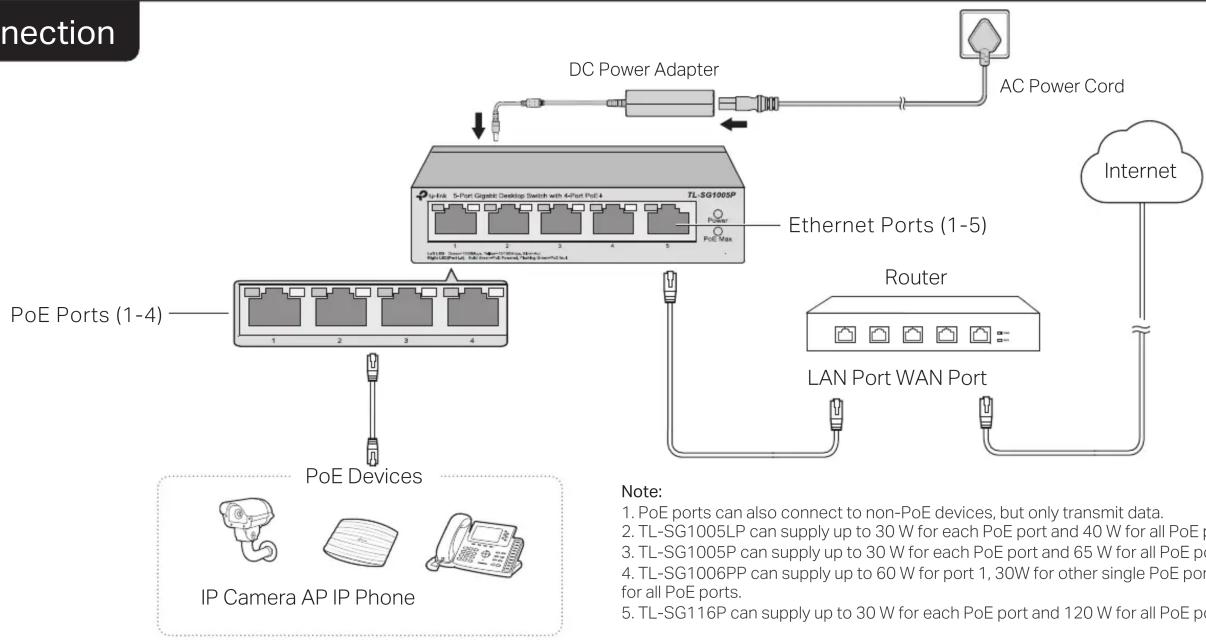
flowchart
graph TD
    A["PoE Ports (1-4)"] --> B["PoE Devices"]
    B --> C["IP Camera AP IP Phone"]
    C --> D["TL-SG1005P"]
    D --> E["Ethernet Ports (1-5)"]
    E --> F["Router"]
    F --> G["LAN Port WAN Port"]
    G --> H["Internet"]
    H --> I["AC Power Cord"]
    I --> J["DC Power Adapter"]
    J --> K["Connection"]
    style A fill:#f9f,stroke:#333
    style B fill:#ccf,stroke:#333
    style C fill:#cfc,stroke:#333
    style D fill:#fcc,stroke:#333
    style E fill:#cff,stroke:#333
    style F fill:#ffc,stroke:#333
    style G fill:#cfc,stroke:#333
    style H fill:#fcc,stroke:#333
    style I fill:#fff,stroke:#333
Specifications
General Specifications
| Standard | IEEE802.3i, IEEE802.3u, IEEE802.3ab, IEEE802.3x,IEEE802.3af, IEEE802.3at, IEEE802.3bt (for TL-SG1006PP only), IEEE802.1p |
| Interface | For TL-SG1005LP/TL-SG1005P:5 10/100/1000 Mbps RJ45 PortsAuto-Negotiation MDI/MDIXPoE Ports: Port 1-Port 4For TL-SG1006PP:6 10/100/1000 Mbps RJ45 PortsAuto-Negotiation MDI/MDIXPoE Ports: Port 1-Port 4For TL-SG116P:16 10/100/1000 Mbps RJ45 PortsAuto-Negotiation MDI/MDIXPoE Ports: Port 1-Port 16 |
| Network Media (Cable) | 10BASE-T: UTP category 3, 4, 5 cable (maximum 100 m);EIA/TIA-568 100Ω STP (maximum 100 m)100BASE-TX: UTP category 5, 5e cable (maximum 100 m);EIA/TIA-568 100Ω STP (maximum 100 m)1000BASE-T: UTP category 5e cable or above (maximum 100 m);EIA/TIA-568 100Ω STP (maximum 100 m) |
| Switching Capacity | 10 Gbps (TL-SG1005LP/TL-SG1005P)/12Gbps (TL-SG1006PP)/32 Gbps (TL-SG116P) |
| Transfer Method | Store-and-Forward |
| MAC Address Learning | Automatically learning, automatically aging |
| Power Supply | External Power AdapterInput: 100-240 VAC, 50/60 HzOutput:53.5 VDC /0.81 A (TL-SG1005LP)53.5 VDC /1.31 A (TL-SG1005P/TL-SG1006PP)53.5 VDC /2.43 A (TL-SG116P) |
| Wall Mountable | Yes |
| Distance BetweenMounting Holes | 39 mm (TL-SG1005LP/TL-SG1005P)/94mm (TL-SG1006PP)/200 mm (TL-SG116P) |
Environmental and Physical Specifications
| Operating Temperature | 0 °C to 40 °C (32 °F to 104 °F) |
| Storage Temperature | -40 °C to 70 °C (-40 °F to 158 °F) |
| Operating Humidity | 10% to 90%RH non-condensing |
| Storage Humidity | 5% to 90%RH non-condensing |
EU declaration of conformity
TP-Link hereby declares that the device is in compliance with the essential requirements and other relevant provisions of directives 2014/30/EU, 2014/35/EU, 2011/65/EU and (EU)2015/863.
The original EU declaration of conformity may be found at https://www.tp-link.com/en/support/ce/
UK declaration of conformity
TP-Link hereby declares that the device is in compliance with the essential requirements and other relevant provisions of the Electromagnetic Compatibility Regulations 2016 and Electrical Equipment (Safety) Regulations 2016.
The original UK declaration of conformity may be found at https://www.tp-link.com/support/ukca
Frequently Asked Questions (FAQ)
Q1. Why is the Power LED not lit?
The Power LED should be lit when the power system is working normally. If the Power LED is not lit, please try the following:
A1: Make sure the AC power cord is connected to the switch with power source properly.
A2: Make sure the voltage of the power supply meets the requirements of the input voltage of the switch.
A3: Make sure the power source is on.
Q2. Why is the Link/Act LED not lit while a device is connected to the corresponding port?
It is recommended that you check the following items:
A1: Make sure that the cable connectors are firmly plugged into the switch and the device.
A2: Make sure the connected device is turned on and works normally.
A3: The cable must be less than 100 meters long (328 feet). If Extend Mode is enabled, it should be less than 250 meters (820 feet).
Q3. Why are PoE ports not supplying power for PoE devices?
When the total power consumption of connected PoE devices exceeds the maximum, the PoE port with a smaller port number has higher priority. The system will cut off power to the ports with larger port numbers to ensure supplying to other ports.
Take TL-SG1005P as an example. If port 1, 2 and 4 are consuming 15.4 W respectively, and an additional PoE device with 19 W is connected to port 3, the system will cut off the power of port 4 to compensate for the overload.
Q4. What should I notice before using the PoE Auto Recovery feature?
A1: Before upgrading a connected PoE powered device (PD), disable PoE Auto Recovery to avoid the PD's damage.
A2: When a PD does not send data packets to the switch for a long period in certain scenarios (e.g. an IPC in sleep mode), disable PoE Auto Recovery to avoid the PD repeatedly rebooting.

To ask questions, find answers, and communicate with TP-Link users or engineers, please visit https://community.tp-link.com to join TP-Link Community.

For technical support and other information, please visit https://www.tp-link.com/support, or simply scan the QR code.

Safety Information
- Keep the device away from water, fire, humidity or hot environments.
- Do not attempt to disassemble, repair, or modify the device. If you need service, please contact us.
- Place the device with its bottom surface downward.
- Do not use damaged charger or USB cable to charge the device.
- Do not use any other chargers than those recommended.
- Adapter shall be installed near the equipment and shall be easily accessible.
- The plug on the power supply cord is used as the disconnect device, the socket-outlet shall be easily accessible.
- The socket-outlet shall be installed near the equipment and shall be easily accessible.
EAC UK CA



- LED Explanation
- Link/Act and PoE Status
- Switches Explanation
- Priority (for TL-SG116P)
- Extend (for TL-SG1005LP/TL-SG1005P/TL-SG1006PP/TL-SG116P)
- Isolation (for TL-SG116P)
- Recovery (for TL-SG1005LP/TL-SG1005P/TL-SG1006PP/TL-SG116P)
- Specifications
- EU declaration of conformity
- UK declaration of conformity
- Frequently Asked Questions (FAQ)
- Q1. Why is the Power LED not lit?
- Q2. Why is the Link/Act LED not lit while a device is connected to the corresponding port?
- Q3. Why are PoE ports not supplying power for PoE devices?
- Q4. What should I notice before using the PoE Auto Recovery feature?
- Safety Information
Brand : TP-LINK
Model : TL-SG1006PP
Category : Switch