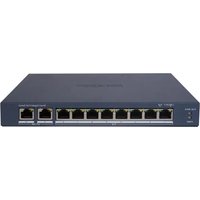
DS-3E0508D-O - Network switch Hikvision - Free user manual and instructions
Find the device manual for free DS-3E0508D-O Hikvision in PDF.


Pick your language and provide your email: we'll send you a specifically translated version.
| Product Type | Unmanaged Gigabit PoE Switch |
| Ports | 8 x 10/100/1000 Mbps RJ45 PoE+ |
| PoE Budget | 120W total |
| Switching Capacity | 16 Gbps |
| MAC Address Table | 8K entries |
| Dimensions (W x D x H) | 210 x 120 x 44 mm |
| Weight | 1.2 kg |
| Power Supply | Internal, AC 100-240V, 50/60Hz |
| Power Consumption | ≤ 130W (with PoE) |
| Operating Temperature | 0°C to 40°C |
| Humidity | 10% to 90% non-condensing |
| Mounting | Desktop / Wall-mountable |
| LED Indicators | Power, Link/Activity, PoE |
| Standards | IEEE 802.3, 802.3u, 802.3ab, 802.3x, 802.3af/at |
| Fanless Design | Yes, silent operation |
| Maintenance | Clean with dry cloth; avoid liquids |
| Safety | CE, FCC, UL listed |
| Spare Parts & Repairability | No user-serviceable parts; contact Hikvision support |
| General Information | Plug-and-play, no configuration needed |
Frequently Asked Questions - DS-3E0508D-O Hikvision
What is the PoE budget of the DS-3E0508D-O?
The total PoE budget is 120W, with up to 30W per port (PoE+).
Can I use this switch for IP cameras?
Yes, it supports 8 PoE+ ports ideal for powering IP cameras, VoIP phones, and wireless APs.
Does it require any configuration?
No, it is an unmanaged switch that works plug-and-play with no setup required.
What is the switching capacity?
The switching capacity is 16 Gbps, providing non-blocking throughput.
Is it fanless?
Yes, the switch is fanless and operates silently, making it suitable for office or home environments.
Can I mount it on a wall?
Yes, it supports wall mounting with the included brackets.
What LED indicators are present?
There are LEDs for Power, Link/Activity, and PoE status per port.
Does it support jumbo frames?
Yes, it supports jumbo frames up to 9K bytes for efficient data transfer.
What is the maximum cable length?
The maximum cable length is 100 meters for each RJ45 port.
How do I reset the switch?
Simply power cycle the switch to reset it. There is no reset button.
User questions about DS-3E0508D-O Hikvision
0 question about this device. Answer the ones you know or ask your own.
Ask a new question about this device
No questions yet. Be the first to ask one.
Download the instructions for your Network switch in PDF format for free! Find your manual DS-3E0508D-O - Hikvision and take your electronic device back in hand. On this page are published all the documents necessary for the use of your device. DS-3E0508D-O by Hikvision.
USER MANUAL DS-3E0508D-O Hikvision

Manual assistant
Powered by Anthropic
Waiting for your message
Product information
Brand : Hikvision
Model : DS-3E0508D-O
Category : Network switch