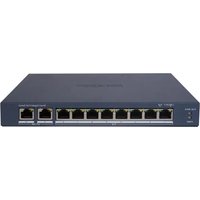
DS-3E0105D-O - Network switch Hikvision - Free user manual and instructions
Find the device manual for free DS-3E0105D-O Hikvision in PDF.


Pick your language and provide your email: we'll send you a specifically translated version.
| Product Type | Unmanaged Network Switch |
| Brand | Hikvision |
| Model | DS-3E0105D-O |
| Number of Ports | 5 |
| Port Type | RJ-45 10/100Base-T(X) |
| Data Rate | 10/100 Mbps (Fast Ethernet) |
| Switching Capacity | 1 Gbps |
| MAC Address Table | 2K entries |
| Standards Compliance | IEEE 802.3, 802.3u, 802.3x |
| Operating Temperature | 0°C to 40°C (32°F to 104°F) |
| Storage Temperature | -40°C to 85°C (-40°F to 185°F) |
| Humidity | 5% to 95% (non-condensing) |
| Power Supply | External power adapter, 5V DC, 0.5A |
| Power Consumption | ≤ 2.5W |
| Dimensions (W×D×H) | 100 mm × 70 mm × 25 mm |
| Weight | 0.2 kg (0.44 lb) |
| Housing Material | Plastic |
| Mounting | Desktop |
| LED Indicators | Power, Link/Activity per port |
| Cleaning | Wipe with a soft, dry cloth; do not use liquids |
| Safety Precautions | Avoid water exposure; operate in well-ventilated area; disconnect power before cleaning |
| Disposal | Recycle per local regulations for electronic waste |
| Warranty | Refer to official Hikvision warranty policy |
Frequently Asked Questions - DS-3E0105D-O Hikvision
How do I set up the DS-3E0105D-O switch?
Connect the power adapter to the switch and plug it into an outlet. Then, connect your devices (e.g., computers, IP cameras) to any of the 5 RJ-45 ports using Ethernet cables. The switch automatically configures itself; no software setup is needed.
What do the LED indicators mean?
The Power LED lights up when the switch is receiving power. Each port has a Link/Activity LED: solid green indicates a valid connection, and blinking green indicates traffic activity.
Can I use this switch with a router?
Yes, you can connect the switch to any router using an Ethernet cable. The switch will expand the number of wired connections available from your router.
Does this switch support PoE (Power over Ethernet)?
No, the DS-3E0105D-O is a non-PoE switch. It does not supply power over Ethernet cables. For devices that require PoE, use a separate PoE injector or a PoE switch.
How do I power off the switch safely?
Simply unplug the power adapter from the electrical outlet. There is no power button. Ensure you disconnect any connected devices first if needed.
What should I do if a port doesn't link?
First, check the Ethernet cable and try a different cable. Ensure the connected device is powered on and its network port is working. Try plugging into a different port on the switch. If still no link, the port may be defective.
What type of Ethernet cable is recommended?
Use standard Cat5e or Cat6 unshielded twisted pair (UTP) cables for optimal performance up to 100 meters.
Do I need to configure the switch before use?
No, this is an unmanaged switch. It works out of the box with plug-and-play operation. There is no web interface or configuration required.
Can I mount the switch on a wall?
The switch is designed for desktop use only. It does not have mounting brackets for wall installation. Place it on a flat, stable surface.
How do I reset the switch to factory settings?
This unmanaged switch has no reset button or configurable settings. Simply power cycling (unplugging and re-plugging) the switch will restore it to normal operation.
User questions about DS-3E0105D-O Hikvision
0 question about this device. Answer the ones you know or ask your own.
Ask a new question about this device
No questions yet. Be the first to ask one.
Download the instructions for your Network switch in PDF format for free! Find your manual DS-3E0105D-O - Hikvision and take your electronic device back in hand. On this page are published all the documents necessary for the use of your device. DS-3E0105D-O by Hikvision.
USER MANUAL DS-3E0105D-O Hikvision

Manual assistant
Powered by Anthropic
Waiting for your message
Product information
Brand : Hikvision
Model : DS-3E0105D-O
Category : Network switch