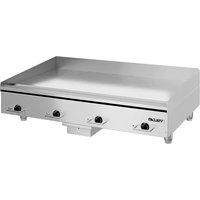
VACB36 - Hob Vulcan - Free user manual and instructions
Find the device manual for free VACB36 Vulcan in PDF.


Pick your language and provide your email: we'll send you a specifically translated version.
| Product type | Cooktop |
| Brand | Vulcan |
| Model | VACB36 |
| Number of burners | 4 |
| Cooking type | Ceramic glass |
| Dimensions (W x D x H) | 58 x 51 x 5 cm |
| Net weight | 8.5 kg |
| Power supply | 230 V / 50 Hz |
| Total power | 7200 W |
| Control type | Touch controls |
| Automatic shut-off function | Yes |
| Child lock | Yes |
| Residual heat indicator | Yes |
| Surface material | Ceramic glass |
| Recommended cleaning | Soft cloth and specific ceramic glass cleaner |
| Repairability index | 7.5 / 10 |
| Spare parts available | Yes (plates, resistors, buttons) |
| Warranty | 2 years |
Frequently Asked Questions - VACB36 Vulcan
How to install the Vulcan VACB36 cooktop?
Installation must be carried out by a qualified professional. Observe safety distances from walls and adjacent furniture. Plug the appliance into a socket suitable for the total power (7200 W).
What types of pots to use?
Use flat-bottomed pots, preferably stainless steel, enameled, or cast iron. Avoid rough bottoms to avoid scratching the ceramic glass.
How to clean the ceramic glass cooktop?
Wait for the cooktop to cool down, then use a soft cloth or non-abrasive sponge with a special ceramic glass cleaner. Never use scouring powder.
Why does the residual heat indicator stay on?
This indicator shows that the cooking zone is still hot after use. Do not touch this zone while the indicator is on. It turns off automatically when the temperature becomes safe.
How to activate the child lock?
Press the lock key (usually a padlock icon) for 3 seconds. A light indicator confirms activation. To deactivate, repeat the operation.
What to do if a cooking zone does not heat?
Check that the pot is properly centered and suitable for the zone. If the problem persists, turn off the appliance for 1 minute then turn on again. If still not working, contact customer service.
The cooktop makes noise: is it normal?
A slight hum during use is normal, due to the operation of the heating elements. If the noise becomes loud or unusual, turn off the appliance and consult a professional.
How to replace a spare part?
Spare parts such as resistors or buttons are available. For safety reasons, have parts replaced by an approved technician. Consult the manual for references.
What is the warranty of the Vulcan VACB36 cooktop?
The manufacturer's warranty is 2 years from the date of purchase. It covers manufacturing defects under normal use conditions.
Where to find the serial number of the appliance?
The serial number is on a label under the cooktop or in the user manual. It is required for any after-sales service request.
User questions about VACB36 Vulcan
0 question about this device. Answer the ones you know or ask your own.
Ask a new question about this device
No questions yet. Be the first to ask one.
Download the instructions for your Hob in PDF format for free! Find your manual VACB36 - Vulcan and take your electronic device back in hand. On this page are published all the documents necessary for the use of your device. VACB36 by Vulcan.
USER MANUAL VACB36 Vulcan
Manual assistant
Powered by Anthropic
Waiting for your message
Product information
Brand : Vulcan
Model : VACB36
Category : Hob