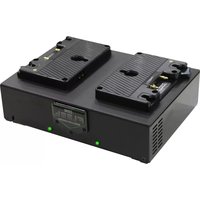
GPM-X2 - Battery charger Core SWX - Free user manual and instructions
Find the device manual for free GPM-X2 Core SWX in PDF.


Pick your language and provide your email: we'll send you a specifically translated version.
| Product Type | Battery Charger |
| Brand | Core SWX |
| Model | GPM-X2 |
| Compatible Battery Mount | Gold Mount / V-Mount |
| Input Voltage (AC) | 100-240V AC, 50/60Hz |
| Input Voltage (DC) | 14-18V DC |
| Output Voltage | 16.8V DC |
| Output Current (Max) | 2.0A |
| Charging Channels | 2 independent channels |
| Dimensions (W x H x D) | 6.0 x 3.5 x 1.5 inches (152 x 89 x 38 mm) |
| Weight | 0.6 lb (272 g) |
| Protection Features | Overcharge, short circuit, reverse polarity |
| LED Indicators | Charging (red) / Complete (green) |
| Cooling Method | Passive convection |
| Operating Temperature | 32°F to 104°F (0°C to 40°C) |
| Storage Temperature | 14°F to 122°F (-10°C to 50°C) |
| Included Accessories | AC power cord, DC car adapter, user manual |
| Maintenance | Wipe with dry cloth; keep vents clear |
| Spare Parts Available | Fuse (internal), AC cord (optional) |
| Certifications | CE, RoHS |
Frequently Asked Questions - GPM-X2 Core SWX
How do I charge a battery with the GPM-X2?
Slide the battery onto the charger plate until it locks. Connect the power source (AC or DC). The LED will turn red during charging and green when complete.
Which batteries are compatible?
The GPM-X2 is compatible with Gold Mount and V-Mount batteries rated at 14.4V or 16.8V.
Can I charge two batteries at the same time?
Yes, the GPM-X2 features two independent channels, allowing simultaneous charging of two batteries.
What do the LED indicators mean?
Red LED indicates charging is in progress. Green LED indicates the battery is fully charged. If the LED is off, there is no power or the battery is not connected.
How long does it take to charge a battery?
Charging time depends on battery capacity. A typical 14.4V/150Wh battery takes approximately 4-5 hours with the 2A output.
Is the GPM-X2 safe for unattended charging?
Yes, it has overcharge protection, short circuit protection, and reverse polarity protection. However, always follow the safety guidelines in the manual.
How do I clean the charger?
Unplug the charger before cleaning. Use a dry, soft cloth to wipe the exterior. Avoid using liquids or solvents.
What should I do if the charger stops working?
Check the power cord and fuse first. If the internal fuse is blown, replace it with a same rating fuse (e.g., 2A). If the issue persists, contact Core SWX support.
Can I use the charger in a car?
Yes, the included DC car adapter allows operation from a 12V or 24V vehicle power outlet.
Does the charger have a warranty?
The GPM-X2 comes with a 1-year limited warranty against manufacturing defects. Check the included warranty card for details.
User questions about GPM-X2 Core SWX
0 question about this device. Answer the ones you know or ask your own.
Ask a new question about this device
No questions yet. Be the first to ask one.
Download the instructions for your Battery charger in PDF format for free! Find your manual GPM-X2 - Core SWX and take your electronic device back in hand. On this page are published all the documents necessary for the use of your device. GPM-X2 by Core SWX.
USER MANUAL GPM-X2 Core SWX


Manual assistant
Powered by Anthropic
Waiting for your message
Product information
Brand : Core SWX
Model : GPM-X2
Category : Battery charger