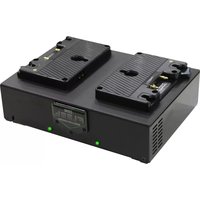
Fleet D2 - Battery charger Core SWX - Free user manual and instructions
Find the device manual for free Fleet D2 Core SWX in PDF.


| Product Type | Battery Charger |
| Brand | Core SWX |
| Model | Fleet D2 (Dual Charger) |
| Dimensions (H x L x W) | 4.25" x 9.25" x 9.25" (108mm x 235mm x 235mm) |
| Weight | 3.7 lbs (1.68 kg) |
| Input Voltage | 90-240 VAC, 50/60 Hz |
| Quick Charge Current | 3.0A per channel |
| Discharge Current | 2.0A |
| DC Output (XLR) | 90W, 16VDC |
| Operating Temperature | 0°C to 40°C (32°F to 104°F) |
| Battery Management | Complete battery management system with LCD display |
| Charging Positions | 2 (Dual model) |
| Battery Compatibility | Cross-compatible with RED, Anton/Bauer, IDX, and most Li-Ion battery packs |
| Test Mode | Performs full charge-discharge-charge cycle to assess battery health |
| SafeFly Mode | Charges or discharges packs to 30% for safe air transport |
| Power Supply Mode | Provides 90W DC power from AC mains, with UPS function |
| Firmware Upgrade | Via Micro USB port |
| Battery Prioritizing | Highlights pack with lowest cycle count among fully charged packs |
| Safety Features | Replaceable fuse, ground required, ventilation slots |
| Warranty | 3 years parts and labor |
| Included Accessories | AC power cord, instruction manual |
| Maintenance | Clean with dry cloth; keep vents unobstructed |
| Repairability | No user-serviceable parts; contact Core SWX for service |
Frequently Asked Questions - Fleet D2 Core SWX
User questions about Fleet D2 Core SWX
0 question about this device. Answer the ones you know or ask your own.
Ask a new question about this device
Download the instructions for your Battery charger in PDF format for free! Find your manual Fleet D2 - Core SWX and take your electronic device back in hand. On this page are published all the documents necessary for the use of your device. Fleet D2 by Core SWX.
USER MANUAL Fleet D2 Core SWX
Providing the power to create.

natural_image
Black electronic device with four battery modules and a digital display, no visible text or symbols on the device itself.Fleet Micro Series Advanced Battery Charging System Dual and Quad Instructional Manual
Introduction:
Thank you for your choice in purchasing a Core SWX Fleet Micro Charger. The charger is designed to provide you a safe and reliable charging platform for your battery packs. This product is at the pinnacle of technological advancements, offering the features and performance of several different products, making it the most advanced charging product in the industry.
Please read this manual to help understand and capitalize on the features of this charger.
Features:
- Complete battery management system for your battery packs
- On-board LCD to monitor the battery packs' smart battery data
• TEST mode to determine battery health and recharge performance - Micro USB for Firmware upgrades and communication to a PC battery management application (future release)
- SafeFly mode charges the connected packs to up to 30% or discharge to under 30% to meet safe Li-Ion battery shipment requirements
- Cross-compatible battery charging for RED®, Anton/Bauer®, IDX® and most Li-Ion battery packs*
• 90w DC 4-pin XLR power supply to power most cameras. - Battery Power Supply mode, parallels all the on-board battery packs to provide continuous power via XLR output
*contact Core SWX for confirmation of battery pack compatibility.
Operation:
- Insert included AC power cord to the rear of the unit and flip adjacent switch to ON(-)
- LCD will illuminate, initially displaying Title Screen and Firmware version. Immediately thereafter displaying FOUR empty charge positions
- Connect a battery pack to any of the charge positions. The charger addresses all packs independently and simultaneously, so it doesn't matter which bay a battery pack is connected to.
- Corresponding bay LED will flash RED to Green, until battery pack connected is fully analyzed. Once fully analyzed, and communicating with the charger, the charger will begin to charge.
LED Indication Guide:
| Battery State | LED Indication | Battery State | LED Indication |
| No Battery Connected | No LED Indication | Discharge Done | Flash Green |
| Evaluate Battery | Flash RED/GRN | Re Charge | Solid RED |
| Re Charge Completed | Solid GRN | ||
| Charging | Solid RED | ||
| Charging Done | Solid GRN | ||
| SafeFly | Flash RED | ||
| Discharging(Test Mode or SafeFly Mode) | Flash RED | SafeFly Done | Flash Green |
Multifunction Display:
The LCD on the front of the Fleet Micro charger provides charge function status, selected battery data and reactionary feedback when pressing the onboard membrane button console.
Multifunction Display Phases:
Launch: Displaying Title Screen and Firmware version
CORE SWX FLEET MICRO CHARGER FIRMWARE XX.XX WWW.CORESWX.COM
Home Screen(no battery packs connected)
---1--- ---2---
---3--- ---4---
Home Screen(battery packs connected)
GOL090 MAN0985 92% CHARGE
---3--- 14.9V DISCHARGE
If the battery pack is deemed "Smart"(communicates with the charger based on various installed protocols), the top line will display battery name. If the pack is not communicating smart battery data, then the charger will display battery voltage. The lower line displays charging status.
Display Battery Pack Data Screen when pressing Select/OK Button on Membrane Switch Console
GUIDE
Battery Name % Charged Voltage
S/N Date of Manuf. Temp
Actual Capacity Cycles
Design Capacity
EXAMPLE
HCPRIMES 58% 15.8V
5/N 685 OCT16 24C
ACTUAL 13.IAH 20CYCLES
DESIGN 13.2AH
Pressing the Select/OK Button when on the Home Screen toggles through the Battery pack data of each battery pack, in the order from Position 1 to Position 4, each time the Select/OK Button is pressed. Should the pack not be "smart," or not communicating data (only displaying voltage on Home Screen), the battery pack will be skipped over.
**This charger is cross-compatible amongst many brands of battery packs. Battery Name data is dependent on the battery pack manufacturer populating the battery name data field of the battery pack's storage. In the event it is not populated, the battery pack's name may not display, or may display inaccurately. The charger will only display the data supplied by the battery pack.
Battery Prioritizing:
As battery packs become fully charged, the Fleet Micro charger does a comparison of the packs to determine which pack has the least amount of battery cycles. This feature allows the operator to immediately know which pack to select from the charger, to keep the battery pack inventory in equal usage.
This is illustrated with brackets highlighting the <
GOLD90
NAN0985
<
CHARGE
HCPRIMES
14.9V
FULL
DISCHARGE
Test Mode:
Fleet Micro chargers have a Test mode function which performs full charge-discharge-full charge routine, which will identify the capacity of the battery and indicate any performance issues, such as low battery voltage indicating a shorted cell or a cell imbalance condition.
Test times will vary based on battery condition and watt hour rating. For example, a 98wh pack will require 6-7 hours to complete the diagnostic test.
To initiate Test Mode, press the TEST Button on the Membrane Console when on the Battery Pack Data Screen of the desired pack you want to run a test on.
INITIATE TEST MODE FOR HCPRIMES PACK?
PRESS OK
To confirm, press the Select/OK Button to start TEST mode on the selected pack.
**You will have 5 seconds to press Select/OK to confirm Test mode. Should the TEST button be pressed inadvertently, the LCD will revert back to the Home Screen after the 5 second prompt.
SafeFly Mode:
Fleet Micro chargers have a SAFEFLY mode function which will either charge or discharge all connected packs or a selected pack, based on the battery packs state-of-charge(SOC), to 30% SOC. This 30% SOC level is to meet regulatory requirements for safe Lithium Ion battery pack air transport.
Times will vary based on battery condition and watt hour rating. For example, a fully charged 98wh pack will require 2 hours to discharge to 30% SAFEFLY status.
To initiate SAFEFLY Mode for ONE pack, press the SAFEFLY Button on the Membrane Console when on the Battery Pack Data Screen of the desired pack you want to put in SAFEFLY status.
HCPRIMES 58% 15.8V S/N 68S OCT16 24C ACTUAL 13.1AH 20CYCLES DESIGN 13.2AH

INITIATE SAFEFLY MODE FOR HCPRIMES PACK?
PRESS OK
To confirm, press the Select/OK Button to start SAFEFLY mode on the selected pack.
**You will have 5 seconds to press Select/OK to confirm SAFEFLY mode. Should the SAFEFLY button be pressed inadvertently, the LCD will revert back to the Home Screen after the 5 second prompt.
To initiate SAFEFLY Mode for ALL packs, press the SAFEFLY Button on the Membrane Console when on the Home Screen.
GOL090 92%
NANO985 CHARGE
---3---
14.9V
DISCHARGE

INITIATE SAFEFLY MODE FOR ALL BATTERY PACKSP
PRESS OK
To confirm, press the Select/OK Button to start SAFEFLY mode on the selected pack.
**You will have 5 seconds to press Select/OK to confirm SAFEFLY mode. Should the SAFEFLY button be pressed inadvertently, the LCD will revert back to the Home Screen after the 5 second prompt.
DC Power Supply Function:
Fleet Micro chargers have an integrated 90w DC power supply built into the charger to power most equipment from AC mains.
To initiate Power Supply Mode, on the rear of the charger, next to the panel 4pin XLR, there is a toggle switch, that should be switched to the POWER SUPPLY position.
This will immediately discontinue any charge, discharge, TEST, or SAFEFLY function, and will provide 90w(16VDC) DC power to the XLR.
POWER SUPPLY MODE
ACTIVATED
ON-BORRO BATTERY POWER
AVAILABLE XXX WH
The LCD will reflect the Power Supply mode as well as provide a Total WH available aggregate of the battery packs connected to the charger. When battery packs are connected during Power Supply Mode, it serves as a UPS (uninterrupted power supply) function. Should AC power be interrupted, the Power Supply Function will immediately, and without loss of power, switch to the on-board battery power.
POWER SUPPLY MODE
ON-BORRO BATTERY POWER
AVAILABLE XXX WH
APPROX RUNTIME 3HRS 45M
When no AC is present, but battery packs are connected, the LCD will also reflect available Runtime based on the draw/current load of the equipment connected.
Specifications:
Fleet Micro Q(Quad Charger):
Dimensions: H: 4.25" L: 12.17" W: 9.25"
Weight: 5.3lbs.
Fleet Micro D(Dual Charger) Dimensions:
Dimensions: H: 4.25" L: 9.25" W: 9.25"
Weight: 3.7lbs.
Electrical Data:
Input Voltage: 90\~240VAC, 50/60Hz
Quick Charge Current: 3.0A per channel
Discharge Current: 2.0A
DC output: 90w, 16VDC
Operational Temperature Range:
-0^ to +40^ ( -32^ to +104^ )
Notes on Use:
- WARNING! Risk of electric shock. Do not remove cover, no user serviceable parts inside the product. Disassembling the product may void the warranty.
- WARNING! Risk of electric shock. Always check cables for signs of damage. Damaged cables can cause personal injury and/or damage the equipment.
- While operating the charger do not place any objects in front of ventilation slots or fan on the rear of the charger.
- WARNING! It is the responsibility of the local organization to ensure that the product is periodically checked for electrical safety in accordance with local regulations.
- WARNING! An increase in temperature is normal during operation. During discharge operation, the area on the top of the charger, to the rear may get very hot. This is marked by a warning. Be mindful of touching this area during operation.
- CAUTION! This product must be connected to a power supply of the same voltage (V) and current (A) as indicated on the product. Refer to the technical specifications for the product.
- CAUTION! AC Mains plug or appliance coupler is to be used as a power disconnect device; make sure it is readily accessible.
• CAUTION! The product must be grounded during operation
There is a fuse within the AC receptacle which can be replaced only with the same type and rating.
Warranty:
This product is warranted to the Original Purchaser against all defects in material and or workmanship for the period herein.
The warranty period shall be, 3 years for parts and labor, unless otherwise noted. Core SWX agrees to pay equal return freight costs to return the product the same method it was received. In the event of an issue, purchaser agrees to the below RMA procedure.
Procedure:
- Go to http://www.coreswx.com/repairsreturns and fill out the online form
- Print the RMA number confirmation, and ship the product needing service to Core SWX, LLC. along with RMA number confirmation, and copy of bill of sale.
- All shipments must be done either through UPS or FEDEX, and insured if necessary
- Core SWX, LLC. is not responsible for any lost shipments.
Core SWX reserves the right to repair or replace any defective product under warranty after Core SWX determines which is more practical.
If Core SWX receives defective product for warranty repair and they are found to be defective as a result of misuse or other damage, not caused by normal wear and tear, Core SWX will notify the customer of an estimate of repair. Customer will incur costs. There are no further warranties, either expressed or implied, including warranties of merchantability or fitness for a particular purpose that has any bearing upon this transaction.


91B Commercial St. Plainview NY 11803 USA
Web: www.coreswx.com Email: sales@coreswx.com
Tel: +1 516-595-7488 Fax: +1 516-595-7492
Copyright © 2017
All rights reserved
Disclaimer
The information contained in this manual is believed to be correct at the time of issuance. Core SWX, LLC. reserves the right to make the changes to the information or specifications without obligation to notify any person of such revisions or changes. Changes will be incorporated in new versions of the manual.
Core SWX, LLC. reserves the right to make changes to product design and functionality without notification.
Trademarks
All product trademarks and registered trademarks are the property of Core SWX, LLC. All other trademarks and registered trademarks are the property of the respective companies.


- Introduction:
- Features:
- Operation:
- Multifunction Display:
- Display Battery Pack Data Screen when pressing Select/OK Button on Membrane Switch Console
- GUIDE
- EXAMPLE
- Battery Prioritizing:
- Test Mode:
- SafeFly Mode:
- DC Power Supply Function:
- Specifications:
- Fleet Micro Q(Quad Charger):
- Fleet Micro D(Dual Charger) Dimensions:
- Electrical Data:
- Operational Temperature Range:
- Notes on Use:
- Warranty:
- Procedure:
- Disclaimer
- Trademarks
Brand : Core SWX
Model : Fleet D2
Category : Battery charger