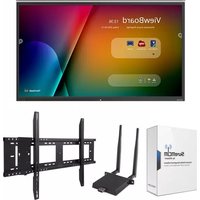
IFP8650-M1 - Interactive whiteboard VIEWSONIC - Free user manual and instructions
Find the device manual for free IFP8650-M1 VIEWSONIC in PDF.


Pick your language and provide your email: we'll send you a specifically translated version.
| Product Type | Interactive Whiteboard |
| Display Size | 86 inches (diagonal) |
| Display Resolution | 3840 x 2160 (4K UHD) |
| Touch Technology | Infrared (IR) touch, 20-point touch |
| Processor | Quad-core ARM Cortex-A72 + A53 |
| Operating System | Android 9.0 (or later) |
| Internal Storage | 3 GB RAM, 32 GB ROM |
| Connectivity | HDMI (x2), VGA, USB (x3), RS232, LAN, Wi-Fi, Bluetooth |
| Built-in Speakers | 15 W x 2 stereo speakers |
| Input Voltage | AC 100-240 V, 50/60 Hz |
| Power Consumption (Typical) | 450 W |
| Standby Power | <0.5 W |
| Product Dimensions (W x H x D) | 1957 x 1142 x 90 mm (without stand) |
| Product Weight | Approximately 58 kg (without stand) |
| VESA Mounting | 800 x 400 mm |
| Touch Input | Finger, stylus, or other opaque objects |
| Writing Surface | Anti-glare, tempered glass |
| Accessories Included | Power cord, remote control, USB cable, stylus (x2), quick start guide |
| Warranty | 3 years limited warranty (varies by region) |
| Recommended Cleaning | Use a soft, dry cloth; mild cleaner for stubborn marks |
| Safety Certifications | UL, FCC, CE, RoHS compliant |
| Repairability | Modular design; replaceable touch panel, main board, and speakers |
Frequently Asked Questions - IFP8650-M1 VIEWSONIC
How do I calibrate the touch screen?
Access the settings menu, select 'Touch' and choose 'Calibration'. Follow the on-screen instructions to touch the indicated points.
What is the maximum resolution supported via HDMI?
The display supports up to 3840 x 2160 at 60 Hz via HDMI 2.0 ports.
How to connect to Wi-Fi?
Go to Settings > Network & Internet > Wi-Fi, enable Wi-Fi, select your network, and enter the password.
Can I use the interactive whiteboard without a PC?
Yes, the built-in Android system allows you to use apps, browse the web, and display content directly without a PC.
What type of pen works with the screen?
Any passive stylus or your finger works. Included pens are dual-sided (fine and thick tips). For best results, use the provided stylus.
How do I update the firmware?
Go to Settings > System > System Update. The device will check for updates online; follow the prompts to install.
Screen is unresponsive to touch, what should I do?
Clean the screen with a soft cloth, restart the device, and check for firmware updates if issue persists.
Can I mount the display on a wall?
Yes, the display supports VESA 800 x 400 mm mounting. Use appropriate wall mount hardware rated for the weight.
How to cast from a mobile device?
Use the built-in screen mirroring feature (Miracast or AirPlay). Enable Wi-Fi and select the display from your device's cast menu.
What is the power consumption in standby mode?
Standby power consumption is less than 0.5 W.
User questions about IFP8650-M1 VIEWSONIC
0 question about this device. Answer the ones you know or ask your own.
Ask a new question about this device
No questions yet. Be the first to ask one.
Download the instructions for your Interactive whiteboard in PDF format for free! Find your manual IFP8650-M1 - VIEWSONIC and take your electronic device back in hand. On this page are published all the documents necessary for the use of your device. IFP8650-M1 by VIEWSONIC.
USER MANUAL IFP8650-M1 VIEWSONIC



Manual assistant
Powered by Anthropic
Waiting for your message
Product information
Brand : VIEWSONIC
Model : IFP8650-M1
Category : Interactive whiteboard