X009-GM2 - Gps ALPINE - Free user manual and instructions
Find the device manual for free X009-GM2 ALPINE in PDF.


Pick your language and provide your email: we'll send you a specifically translated version.
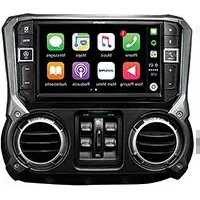
| Brand | Alpine |
| Model | X009-GM2 |
| Product Type | GPS Navigation System |
| Display Size | 7.0 inches |
| Dimensions (W x H x D) | 178 x 100 x 20 mm |
| Weight | Approx. 300 g |
| Power Supply | 12 V DC (vehicle battery) |
| Navigation Features | Turn-by-turn directions, voice guidance, points of interest, 2D/3D maps |
| Connectivity | Bluetooth, USB, microSD slot |
| Audio | Built-in speaker, 3.5mm audio jack |
| Map Updates | Free lifetime map updates via USB |
| Languages | Multiple languages including English, French, German, Spanish |
| Mounting | Suction cup windshield mount or dashboard disc |
| Battery | Built-in rechargeable lithium-ion battery (approx. 2 hours backup) |
| Operating Temperature | -10°C to 60°C |
| Maintenance | Clean with soft, dry cloth; avoid liquids |
| Safety | Do not disassemble; use only approved accessories |
| Spare Parts & Repairability | Contact Alpine customer service for spare parts and repairs |
Frequently Asked Questions - X009-GM2 ALPINE
How do I perform a map update on my Alpine X009-GM2?
Connect the device to your computer via USB, download the Alpine MapUpdater software from the official website, and follow the on-screen instructions to update maps.
Can I use the GPS without a power cord?
The device has a built-in battery that provides approximately 2 hours of operation. For extended use, connect to vehicle power using the included 12V adapter.
How do I pair my phone via Bluetooth?
Enable Bluetooth on your phone, select 'X009-GM2' from the list of devices, and confirm the pairing code shown on the GPS screen.
What should I do if the screen is unresponsive?
Perform a soft reset by pressing and holding the reset button (small hole near the SD card slot) with a paperclip for 10 seconds. If the issue persists, contact Alpine support.
How do I mount the GPS on my windshield?
Clean the windshield, attach the suction cup mount, press firmly to create a seal, and secure the device onto the mount. Adjust the position for optimal viewing.
Does the Alpine X009-GM2 support voice commands?
Yes, it supports basic voice commands for navigation, such as 'Navigate to [address]' or 'Find nearby gas stations.' Activate by pressing the voice command button on the screen.
What types of SD cards are compatible?
Use microSD (HC) cards up to 32 GB formatted in FAT32. Higher capacity cards may not be recognized.
How can I change the language of the interface?
Go to Settings > Language, select your desired language from the list, and confirm. The interface will update immediately.
Why is my device not acquiring a GPS signal?
Ensure the device has a clear view of the sky, away from tall buildings or tunnels. Move to an open area and wait a few minutes. If the issue continues, perform a GPS reset in the settings.
How do I set a home address?
Go to Navigation > Favorites > Set Home Address, enter your address, and save. You can then navigate home with a single tap.
User questions about X009-GM2 ALPINE
0 question about this device. Answer the ones you know or ask your own.
Ask a new question about this device
No questions yet. Be the first to ask one.
Download the instructions for your Gps in PDF format for free! Find your manual X009-GM2 - ALPINE and take your electronic device back in hand. On this page are published all the documents necessary for the use of your device. X009-GM2 by ALPINE.
USER MANUAL X009-GM2 ALPINE

Manual assistant
Powered by Anthropic
Waiting for your message
Product information
Brand : ALPINE
Model : X009-GM2
Category : Gps